
Navigation
Install the app
How to install the app on iOS
Follow along with the video below to see how to install our site as a web app on your home screen.
Note: This feature may not be available in some browsers.
More options
You are using an out of date browser. It may not display this or other websites correctly.
You should upgrade or use an alternative browser.
You should upgrade or use an alternative browser.
F23: Possible minor fixed pattern noise?
- Thread starter Mike Krumlauf
- Start date


Mike Krumlauf
Award Winning Filmmaker
Great. will have a look later in july when i can afford something a bit better for the weight. Note on the F23 noise.. its coming from my HDSDI breakout cables for the Kona 3 or its my Kona 3 card.. its for sure not the camera doing it as the noise is in no way showing up on my monitor and i tested that SDI plug with the mac and the lines showed via my mac so i am 99% sure that its my video card or cable.
G
Guest
Guest
I may have meant Secced tripods. Not sure if that is the brand name here.
E-image might be closer to Manfrotto level quality.
E-image might be closer to Manfrotto level quality.
Mike Krumlauf
Award Winning Filmmaker
Change of topic: Does anyone have any thoughts on AJA vs Blackmagic in terms of the Kona 3 and Decklink HD Pro DL cards? I'm really trying to get to the bottom of this minor noise issue before my work starts asking me to bring it in for work.. given what i said about the monitor vs mac thing with the noise, i do believe its within my workflow and not the sensor or a camera problem but i need to for sure get to the bottom of it. BMD DL cards are under $100 on ebay and unlike AJA they are full size BNC connectors (i hate mini bnc). The only thing thats throwing a semi knot in my chain of thought is helweg just emailed me saying he sees the noise in his camera now in shadow areas when running at 60p...
G
Guest
Guest
I use the Aja kipro mini on my f35 without any issues.
Wish i had more experience pertaining to your use case.
Wish i had more experience pertaining to your use case.

rbirnbaum
Well-known member
Mike,
I discussed FPN with Yachacha in the past. I have seen it in low light shots, and so has he... but was never able to replicate it. I've had it with different recorders. I will post some examples if I can find some. Some ASC Dp's commented in the past that the sensors in these cameras could be more sensitive to moire. That could be the source of the issue. Honestly, I would start with a simple signal. 422HQ to a basic recorder. Test the response in lo light., then change codecs. Also... did you reset your camera to factory defaults... could be the previous owner messed around with something in the settings, and it is enhancing the FPN. For example, maybe sharpening, or detail or one of those... unless you are already shooting in CINE EI which disables all of these. If you are in custom, that could be the issue. I assume you also Black Balanced the camera, right? Anyway... I would perhaps present a more step by step process here so that we can crack it in between all of us. The hpurs on your camera are fine. That shouldnt be the problem. Good luck man.
I discussed FPN with Yachacha in the past. I have seen it in low light shots, and so has he... but was never able to replicate it. I've had it with different recorders. I will post some examples if I can find some. Some ASC Dp's commented in the past that the sensors in these cameras could be more sensitive to moire. That could be the source of the issue. Honestly, I would start with a simple signal. 422HQ to a basic recorder. Test the response in lo light., then change codecs. Also... did you reset your camera to factory defaults... could be the previous owner messed around with something in the settings, and it is enhancing the FPN. For example, maybe sharpening, or detail or one of those... unless you are already shooting in CINE EI which disables all of these. If you are in custom, that could be the issue. I assume you also Black Balanced the camera, right? Anyway... I would perhaps present a more step by step process here so that we can crack it in between all of us. The hpurs on your camera are fine. That shouldnt be the problem. Good luck man.
Last edited:
Mike Krumlauf
Award Winning Filmmaker
Mike,
I discussed FPN with Yachacha in the past. I have seen it in low light shots, but was never able to replicate it. I've had it with different recorders. I will post some examples. Some ASC Dp's commented in the past that the sensors in these cameras could be more sensitive to moire. That could be the source of the issue. Honestly, I would start with a simple signal. 422HQ to a basic recorder. Test the response in lo light. Also... did you reset your camera to factory defaults... could be the previous owner messed around with something in the settings, and it is enhancing the FPN. For example, maybe sharpening, or detail or one of those... unless you are already shooting in CINE EI which disables all of these. If you are in custom, that could be the issue. I assume you also Black Balanced the camera, right? Anyway... I would perhaps present a more step by step process here so that we can crack it in between all of us. Good luck man.
Totally. When I have time I will really dig into it.. maybe this saturday when I am off. My job is letting me bring home a HD SDI to HDMI DA for a few days so i can hook the camera into my TV and see if the noise pops up there. I do really believe its a video card or cable issue.. the monitor i use is an Astro DM3005 which is very nice. When i use the MAG tool to zoom into the image, there is nothing, yet, on my mac pro screen both in Adobe Premiere Capture and AJA's own capture program the lines are there..
As for camera settings. yes, i already did a fresh reset of the menus and black balanced, white balanced, and white shaded/black shaded more than a dozen times so all up to speed on that (i know the drill lol).
Mike Krumlauf
Award Winning Filmmaker
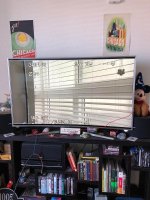
UPDATE: So before work today I was able to hook the F23 into my 4K tv and do various tests and guess what.. no FPN, no banding, just regular noise you would get from CCDs!!! AHHHHH! So its def the Cable or AJA Board. I bought a Blackmagic Decklink HD DL card on ebay this morning so once that arrives I will test again and report back, but my mind as of now is made up that nothing is wrong with the camera. its how the image is getting into my mac. I also thought that maybe it was ground noise because i was powering via XLR from that IF box but that would show on the TV when i have it hooked from the IF box and it didnt. I got a Dtap to Lemo 8pin cable coming next week so we will see.. but this made me very happy. 
G
Guest
Guest
That banding looks pretty intense. I looks like blinds going across the window!
Mike Krumlauf
Award Winning Filmmaker
That banding looks pretty intense. I looks like blinds going across the window!
You think you're sooooooo funny don't cha?! :grin:
Mike Krumlauf
Award Winning Filmmaker
Mike... I always know it’s something else and not the cameras... these things are built to the highest standards. Let us know if you manage to capture a clean image. Great news indeed.
Will do!
all bets are on next week
Mike Krumlauf
Award Winning Filmmaker
According to this webpage and i quote "Due to the Sony F23 CineAlta’s design it will not develop a fixed pattern noise." Is this actually true? is the 23's prism incapable of generating FPN?
http://amvwebcast.com/_includes/rentals/I_F23_FAQ.htm
http://amvwebcast.com/_includes/rentals/I_F23_FAQ.htm
Mike Krumlauf
Award Winning Filmmaker
UPDATE: So the blackmagic decklink card arrived and for some reason i cant get it to see 24psf or 23.98psf or even a single dual link input (even though its the DL version).. im wondering if i need a legacy driver installed or something? Either way at 29.97 the lines were showing up via the IF box so im just going to return the BMD card and keep my KONA 3.. seems to be a little easier to use with the F23. I'll finally get to get recording with the SRW1 this next weekend as the final bits and pieces arrive thursday this week. Lucky for me I have saturday and sunday off this next weekend so i'll have a bit of time to dive into more tests. My current guess is its noise causes by the power coming from the XLR input.. i was told by a few people that powering these cameras via XLR is not the best way and to power LEMO if possible.. wondering if the power current is interfearing with the BNC signals on the IF box? I tested the SDI on the camera and the lines were still there a bit. Im still not in belief anything is wrong with the CCD or camera and its simply user error or a workflow problem i need to figure out. Will keep you guys posted
Mike Krumlauf
Award Winning Filmmaker
Here is a frame of the noise. this is zoomed in a bit and i added sharpening for you guys to make out the lines a bit better.

rbirnbaum
Well-known member
That’s definitely FPN... have you tried a simple recorder?that will tell you if it’s the line your capturing card, right?
I never heard of any image problems powering via XLR. I know Mac Gregor powered his camera via XLR on his Mauritania doco and thee is no FPN there. Anyway, if I’m doubt, replace the wiring and soldering and try again. If you are also getting FON out of the monitor out, I would discard the IF Box as the culprit.
I never heard of any image problems powering via XLR. I know Mac Gregor powered his camera via XLR on his Mauritania doco and thee is no FPN there. Anyway, if I’m doubt, replace the wiring and soldering and try again. If you are also getting FON out of the monitor out, I would discard the IF Box as the culprit.
Mike Krumlauf
Award Winning Filmmaker
Well before I do that, i've made a bit of a revelation. Firstly to your question about if the noise is showing on my HD SDI monitor, no it never has, even when i plug the monitor into the IF box when the cam is set to a 4:2:2 signal. But, I went and dug out my final cut studio 3 software and did a fresh install of the kona drivers so everything would line up with FCP 7.. i captured a 4:4:4 24psf from the IF box via FCP 7 using its RGB 10bit LOG codec and what do you know... FPN is gone... So it had something to do with how Adobe Premiere CC was talking to the Kona then as thats what i had been using to capture with? But it was also showing in AJA's capture program.. either way, i will take this victory as i use FCP 7 anyway, just never thought of trying to capture with it lol (had a moment). Check the unlisted video example which is just a quick shot of my desk below and let me know what you think. and yes, i was not paying attention to the WB so everything is a bit too blue.
Edit: just as another note, i uploaded the Apple Prores 4444 file i exported out of FCP to YouTube.
Also, I wonder if Premiere and AJA itself was looking at psf in an unusual way and that noise was due to some strange interlacing that was going on because the card and my computer were not talking to each other correctly.. i know psf (progressive segmented frame) gets shown at something stupid like 48i on monitors a lot back in the day. granted the F23 (like the 35) have Progressive scan chips in them... idk.. i just know the way different P formats like PA (DVX with 2:3:3:2 pulldown), native P (the norm today) and Psf all get processed differently to become the same thing. Maybe FCP 7 just had the smarts to understand how to properly deal with it. I mean between the 3 capture softwares i have, it was the only one showing me an option for "RGB 10bit LOG Uncompressed DL" so who knows.
Edit: just as another note, i uploaded the Apple Prores 4444 file i exported out of FCP to YouTube.
Also, I wonder if Premiere and AJA itself was looking at psf in an unusual way and that noise was due to some strange interlacing that was going on because the card and my computer were not talking to each other correctly.. i know psf (progressive segmented frame) gets shown at something stupid like 48i on monitors a lot back in the day. granted the F23 (like the 35) have Progressive scan chips in them... idk.. i just know the way different P formats like PA (DVX with 2:3:3:2 pulldown), native P (the norm today) and Psf all get processed differently to become the same thing. Maybe FCP 7 just had the smarts to understand how to properly deal with it. I mean between the 3 capture softwares i have, it was the only one showing me an option for "RGB 10bit LOG Uncompressed DL" so who knows.
Last edited:
Hey Mike,
To update you on this, I seem to get this kind of pattern noise on my camera when I'm in 50 or 60p mode.
24/25p is totally devoid of it (that I can see).
It's not overly noticable in 50/60, but in cases where gain is ramped up or there's particularly dark images on screen I can see it pretty clearly (like in that image I sent you personally the other day).
I thought that maybe it might have something to do with my AJA Lut Box but I notice that even with the SR-R1 as the recorder (and the LUT box out of the picture) the FPN is present in the 50/60p content!
I had some weird grey line stuff going on in the bottom of the image and if I remember correctly that was also showing in some SR-R1 stuff but would go away if I disconnected one of the dual links momentarily and reconnected.
But also maybe it wasn't present in the actual recordings, I can't remember and haven't done enough tests yet.
The results are difficult to see and describe, especially over the internet, and I've found that viewing in 1:1 and scaled can present the noise differently.
I see it prominently at 1:1 on my non sharpened 2K Dell monitor but the Sony 24 inch LMD monitor doesn't seem to show it that much if it all...
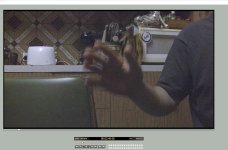
Anyway, here's a gained up image that probably won't acurately show the FPN, but maybe it'll be visible to you.
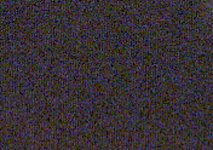
And a closer piece of the image (my hand) to illustrate those vertical line patterns I see.
Interesting stuff!
I wonder whether it's something that can be tuned out or mitigated by some kind of instruction from the service manual, or if it's enhanced by having a slight bit of sharpening on (-80 at the moment).
Either way it's not the end of the world for me.
To update you on this, I seem to get this kind of pattern noise on my camera when I'm in 50 or 60p mode.
24/25p is totally devoid of it (that I can see).
It's not overly noticable in 50/60, but in cases where gain is ramped up or there's particularly dark images on screen I can see it pretty clearly (like in that image I sent you personally the other day).
I thought that maybe it might have something to do with my AJA Lut Box but I notice that even with the SR-R1 as the recorder (and the LUT box out of the picture) the FPN is present in the 50/60p content!
I had some weird grey line stuff going on in the bottom of the image and if I remember correctly that was also showing in some SR-R1 stuff but would go away if I disconnected one of the dual links momentarily and reconnected.
But also maybe it wasn't present in the actual recordings, I can't remember and haven't done enough tests yet.
The results are difficult to see and describe, especially over the internet, and I've found that viewing in 1:1 and scaled can present the noise differently.
I see it prominently at 1:1 on my non sharpened 2K Dell monitor but the Sony 24 inch LMD monitor doesn't seem to show it that much if it all...
Anyway, here's a gained up image that probably won't acurately show the FPN, but maybe it'll be visible to you.
And a closer piece of the image (my hand) to illustrate those vertical line patterns I see.
Interesting stuff!
I wonder whether it's something that can be tuned out or mitigated by some kind of instruction from the service manual, or if it's enhanced by having a slight bit of sharpening on (-80 at the moment).
Either way it's not the end of the world for me.