External Recorders

Yeah, that was a confusing scenario, and it took some effort to figure out what was going on.

The book went through several drafts as I learned more and more about the camera. Now I can say more clearly what's going on: the output of the HDMI port is always 4:2:2, unless you're set to UHD/60p or 50p. In those cases, it's 8-bit 4:2:0, period. It cannot output 10-bit 4:2:2 in UHD 60p or 50p, it can only output 8-bit 4:2:0 when in UHD 60p/50p. And, of course, that's only when live monitoring; when you go to record internally the HDMI drops to 1080p during the recording.

As for whether the output is 8-bit or 10-bit: if you've set it to 10-bit output, then it's always 10-bit output (except in the aforementioned UHD 50p/59.94p scenario, in which case it's always 8-bit 4:2:0). Other than that one exception, it's always 10-bit 4:2:2.

So -- you can always have 10-bit 4:2:2 output except for when the camera is in UHD 59.94p or 50p. You cannot record when the 10-bit setting is set.

Or, you can always have 8-bit 4:2:2 in all scenarios, except when the camera is set to UHD 59.94p or 50p. When set to 8-bit 4:2:2 in UHD 59.94/50p, the output is 8-bit 4:2:0 during standby, and the output becomes 1080p 8-bit 4:2:2 when you tell the camera to internally record UHD 59.94 or 50p.

The more I think about it, the more I wonder if that clarification makes much sense, but -- that's the state of things, so hopefully it makes sense.

Thanks, LOL, So, When I'm recording UHD-59.94 Internal, (Which I do a lot) It's 8bit 4.2.2, or 8bit 4.2.0? Whats standby?, I just Checked a UHD-59.94 file I shot and it's 8bit 4.2.0, I think I just answered my own question, LOL!
 
to make it simple, 50p and 60p in 4K are always 8bit 4:2:0, no matter if you record it internally or externally.

the only thing that you gain recording 60p in 4k externally on a compatible recorder (such as the Odissey 7Q) is a higher bitrate with a intraframe codec.

hope this helps
 
The spec for HDMI2.0 allows DCI 4K or UHD at 10-bit 4:2:2 up to 30p. For 50/60p (or 59.94p) the signal spec drops to 8-bit 4:2:0. This is the limitation of the data transfer bandwidth.

Please note that the Odyssey7Q+ uses an HDMI1.4a input. This is limited to DCI 4K 10-bit 4:2:2 up to 24p or UHD 10-bit 4:2:2 up to 30p. While the Odyssey7Q+ can record DCI 4K/UHD in 10-bit 4:2:2 up to 60p in Apple ProRes, to do so the signal must be sent via SDI.
 
The spec for HDMI2.0 allows DCI 4K or UHD at 10-bit 4:2:2 up to 30p. For 50/60p (or 59.94p) the signal spec drops to 8-bit 4:2:0. This is the limitation of the data transfer bandwidth.

Please note that the Odyssey7Q+ uses an HDMI1.4a input. This is limited to DCI 4K 10-bit 4:2:2 up to 24p or UHD 10-bit 4:2:2 up to 30p. While the Odyssey7Q+ can record DCI 4K/UHD in 10-bit 4:2:2 up to 60p in Apple ProRes, to do so the signal must be sent via SDI.

Mitch, I believe the DVX200 Only allows any 4K external using the HDMI 2.0 port that is backward compatible to HDMI 1.4
 
7DDude, Yes I was able to use the cameras record button to trigger the Ninja Flame. I believe in the DVX200 setting I set the HDMI TC out to ON and then in the Ninja Flame I set it to trigger to HDMI and TC. As far as SSD drives I am using PNY 480GB CS1311 SSD's and have had no issues. This was not a hard drive on their list but it has a read/write of about 525mbs each way so I figured it should be fine and so far so good. They were on sale a while back for $99 each so I bought three, not sure what they cost now.
 
7DDude, Yes I was able to use the cameras record button to trigger the Ninja Flame. I believe in the DVX200 setting I set the HDMI TC out to ON and then in the Ninja Flame I set it to trigger to HDMI and TC. As far as SSD drives I am using PNY 480GB CS1311 SSD's and have had no issues. This was not a hard drive on their list but it has a read/write of about 525mbs each way so I figured it should be fine and so far so good. They were on sale a while back for $99 each so I bought three, not sure what they cost now.

Hey JPVid, Thanks that's good info! I wish that these recorders could record UHD@60p. I feel like I'm going to get one and in a couple of months, they will be recording UHD@60p, Oh well got to jump in some where. Thanks for the post mate!
 
The DVX200 HDMI output works great with the Odyssey7Q+ up to UHD 30p in 10-bit 4:2:2.

Mitch, I was speaking about being able to output 4k/UHD 60P 10 Bit-4.2.2, from the DVX200 (Only thru HDMI 2.0), and that the Odyssey7Q+ Only records 4K/UHD 60P 10Bit-4.2.2 using SDI Input.
 
7DDude if you need 4K @60p 10bit 4:2:2 look at the Atomos Shogun Inferno, it does what you want but it costs $1995.
 
Barry wrote in #40:
"It cannot output 10-bit 4:2:2 in UHD 60p or 50p, it can only output 8-bit 4:2:0 when in UHD 60p/50p."

The same you can read in the technical date about the DVX 200:

External Output Video Signal:
8 bit 4:2:2/10 bit 4:2:2 (switchable menu)
*HDMI output of UHD/59.94p/50.00p becomes 8 bit 4:2:0.
Also, when 10 bit 4:2:2 is selected, recording is not possible with the main unit

SDI OUT: BNC ×1, 0.8 V [p-p], 75 Ω, 3 G/1.5 G HD-SDI, SD-SDI supported
Output format: 1080/59.94p LEVEL-A/50.00p LEVEL-A,
1080/29.97PsF/25.00PsF/24.00PsF/23.98PsF, 1080/59.94i/50.00i, 720/59.94p/50.00p, 480/59.94i, 576/50.00i

HDMI OUT:
HDMI × 1
(HDMI type A terminal, not compatible with VIERA Link)
Output format:
2160/59.94p/50.00p/29.97p/25.00p/24.00p/23.98p,
1080/59.94p/50.00p/29.97p/25.00p/24.00p/23.98p/59.94i/50.00i,
720/59.94p/50.00p, 480/59.94p, 576/50.00p

Therefore it is not possible to record a signal which the DVX does not/can't deliver !
 
Barry wrote in #40:
"It cannot output 10-bit 4:2:2 in UHD 60p or 50p, it can only output 8-bit 4:2:0 when in UHD 60p/50p."

The same you can read in the technical date about the DVX 200:

External Output Video Signal:
8 bit 4:2:2/10 bit 4:2:2 (switchable menu)
*HDMI output of UHD/59.94p/50.00p becomes 8 bit 4:2:0.
Also, when 10 bit 4:2:2 is selected, recording is not possible with the main unit

SDI OUT: BNC ×1, 0.8 V [p-p], 75 Ω, 3 G/1.5 G HD-SDI, SD-SDI supported
Output format: 1080/59.94p LEVEL-A/50.00p LEVEL-A,
1080/29.97PsF/25.00PsF/24.00PsF/23.98PsF, 1080/59.94i/50.00i, 720/59.94p/50.00p, 480/59.94i, 576/50.00i

HDMI OUT:
HDMI × 1
(HDMI type A terminal, not compatible with VIERA Link)
Output format:
2160/59.94p/50.00p/29.97p/25.00p/24.00p/23.98p,
1080/59.94p/50.00p/29.97p/25.00p/24.00p/23.98p/59.94i/50.00i,
720/59.94p/50.00p, 480/59.94p, 576/50.00p

Therefore it is not possible to record a signal which the DVX does not/can't deliver !

I just re-read what Barry posted on page 5, I get it now.
 
Last edited:
Just found out that Video Devices has posted a firmware fix for the Pix e5 recorder that fixes the start/stop record flags over HDMI;

Last update - (v3.03) October 3, 2016
Video Devices PIX-E Series firmware - (v3.03) is an update for all previously released versions. It includes various bug fixes and performance enhancements.
Fixed
  • PIX-E does not receive 4K over HDMI from Sony a7S, a7R, a7Sii, a7Rii.
  • PIX-E starts and stops recording prematurely when receiving record triggers from Panasonic AG-DVX200.
 
I've been using the Atomos Shogun with the DVX200 with no problems apart from a start/stop issue when I initially set the timecode to be the trigger. I would get random stop/starts, but setting up (as recommended RTFM!) correctly:
DVX200 /
Output Sel: HDMI
SDI Remote: On
Remote REC Link: On
SDI EDH: On
HDMI UHD Output Limit: 25.00p
HDMI TC Output: On

And enabling Trigger HDMI, and Enable Trigger: on
on the Shogun works perfectly.

I have to say though that the internal codec on the DVX is amazingly good. Whilst I use the 10bit 422 for chromakey - when shooting scenes particularly with a lot of detail (meadows with tall flowers etc, or tree leaves), unless you shoot with Prores HQ or the top DnxHR codec, you seem to get a lot more artifacts. Colour accuracy/separation seems better, but the lower bitrate Dnx codecs can render fine details as small cubes - at first I thought I had a faulty camera!
 
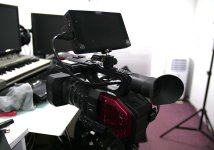
I purchased the Atomos as well recently and love it. I have loaded the DVX200 LUT and starting to use others as well. I am getting ready to do some comparisons of scenes both indoors and outdoors with 10 bit vs 8 bit. I expect to use it 80% of the time depending on my testing and situations. The screen is very bright up to 1500 nit as mentioned for outdoors. I was doing a time lapse test and to save battery just turned down the brightness all the way when outside. The red LED on the left is great showing you that it is still recording since the monitor was turned down. I typically will use the DNX Avid codecs as Premier plays nicely with that as well as ProRes. I purchased the Shogun Inferno as there may be a need to use the SDI I/O's in what I do. I am trying to decide where to mount it. I initially bought a swing arm that clips on the front and I can position it anywhere but it seems to be a little flimsy. I have a smaller tripod than my Vinten 3 I may use to set it off to the side a little more. However next I will mount it directly to the handle when I shoot next to see how that goes with a swivel attached so I can angle it up/down/left/right depending on the height of the tripod. I need to set it up as well when I use my wireless receivers.

I am loving the DVX200 at this point. I typically shoot all manual. I am still learning as I go at this point on the camera.
 
It is a great match - to mount the Shogun I just used a double ended tripod bolt, and then fixed a ball head thing on top of the DVX handle. not ideal for run and gun! but for studio stuff it works great.P1540047.jpg
 
Thanks for the info. I was leaning toward that as well. I initially was looking to get it off to the side and adjustable. I felt it was putting too much pressure on the shoe mount.
 
Did a quick test between the codecs on the Shogun vs the internal. Seemed to me that you need to shoot HQ to really beat the internal - and things like DNxHR LB are absolutely to be avoided even though they work out at a similar bit rate to the internal codec.

No grading was done other than applying the Varicam DVX LUT, lowering the blacks, and increasing saturation to match the actual colour of the coat.

This was all at 8 bit 422 rather than 10bit as I was simultaneously recording.

My impression was you get better colour definition, and more separation with the Shogun, but detail wise the internal copes incredibly well for 100mb/s.
 
Thank you Jason - not sure I learned a lot apart from a) how good the internal is, and b) never ever to use DNxHR LB!
 
Back
Top