exporting on a DVD for TV projection from PremierpRO6

induz

Member
I want to make a montage of scanned photos [2550x3507, 24 bit, 300 dpi, depth 24 bit ] on Premiere Pro CS6[Pre Pro] with some audio.


I have scaled, positioned and trimmed those photos on the Timeline of PPro. My final edit has few dissolves, other video effects and text titles too. PPro is running on a 24 bit win 7 Machine. The Sequence setting for now is set to -

DV NTSC,D1/DV NTSC(0.9091), 29.97,720x480, 4:3, 30fps DropFrame Time code for now.

Now I want to export the media/project to a DVD disk, so that I could run the final project on a LCD, 720p TV with the help of a Sony dvd player. The TV and DVD are NTSC tested systems, I guess.

I don’t have Adobe Ecore on my window PC. but I have access to FinalCPro5 on my friend's Apple Macbook. On my window PC I don’t have a DVD burner, but that Macbook has DVD inbuilt burner. The Macbook has iDVD too.

How should I go about this project?

If I export the media from PPro6, what should be my export settings for this project.


Exporting .XML/EDL from PPro6 to import on FCP5 wont help as the project has lots of key-frames and dissolves.

Please help. Some definitive web-links would be appreciated.Thanks
-Induz
 
Last edited:
Thanks for replying. I just want to double check before buring a DVD. Should i export a DV file from PPro with the same settings as--- DV NTSC,D1/DV NTSC(0.9091), 29.97,720x480, 4:3, 30fps DropFrame Time code???? Or should I change it to mpeg DVD ???

My firend is saying that I dont need to burn a DVD. I could play the project through the a USB stick to the TV?
The TV has a USB slot on its side panel. What codec/format the TV wouldplay from the USB?
 
Last edited:
There's no way I can tell you what formats the TV can play. You'd have to check the TV's manual for that info.
 
There's no way I can tell you what formats the TV can play. You'd have to check the TV's manual for that info.

My Q is about DVD player. What format/settings should I export from PrePro CS6 to run on a DVD player[northAmerica\USA] to be projected on a TV.
 
Thanks for replying. I just want to double check before buring a DVD. Should i export a DV file from PPro with the same settings as--- DV NTSC,D1/DV NTSC(0.9091), 29.97,720x480, 4:3, 30fps DropFrame Time code???? Or should I change it to mpeg DVD ???

My firend is saying that I dont need to burn a DVD. I could play the project through the a USB stick to the TV?
The TV has a USB slot on its side panel. What codec/format the TV wouldplay from the USB?

These days many DVD players do have a USB interface, and will play MOV 'directly'. You'd have to know what the 'viewer' has available, and whether a particular DVD player has a reasonable set of codecs it can 'understand'.

If you want to go with the sure fire 'guaranteed' playability, make a standard DVD. That said...

If your original media is still photos, you may want to export differently. Do you have a 'full' Premiere Pro CS6 installation that includes Adobe Media Encoder? If so, output the media from Premiere as a Quicktime file (MOV), and select a codec that does the least compression, such as the Animation codec, with does no compression. As a Quicktime filem iDVD should be able to 'import that' and chew it up for output onto the DVD.

The animation codec generates huge files... but it does not compress, and so you don't have compression, decompression/recompression issues. If you output as DV, then iDVD will have to transcode that to Mpeg2 which is the codec for DVD. I don't know if there's an option for iDVD to 'not recompress' a file, if there is then perhaps using the Adobe Media Encoder to generate the MPeg-2 directly would be better.

Were it me, I'd make my sequences 720x480, square pixels. The output to Animation, then let iDVD figure out the NTSC stupidity...

If I were going the USB route, I'd generate 720x480 square pixels, and use H.264 as my codec, with a max bit rate of around 7 Mbs/s for video. Many players if they are 'USB capable' will also have the H.264 codec decoder.
 
Last edited:
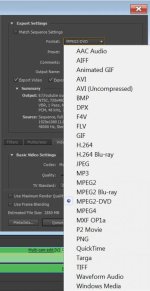
when I export the Media [sequence] from PrePro as DV NTSC format, it gives me a .avi file with 720wx480h Frames @29FPS
I dont see MPEG2 options for DVD, just MPEG4 DVD options.
I dont have a Full PrePro. I dont have Encore in it. I have these options;
http://imgur.com/pkAoe
 
I notice the difference but PPro on this PC is not full version i guess. Since I have already edited and finalized my sequence in PrePro 6, I have few options.

I could export as:-
H.264 -- 720X480 (NTSC) 4X3 or there is a better export setting for my situation?

Please suggest me what suitable format, for the max. quality, I should export the Media from PrePro to finally burn a DVD via iDVD on a different PC. I dont have Encore or DVD burner on this PC. I have to take the final exported file from PrePro to a Mackbook with iDVD Burner. I need to know, what format and preset, I should export the sequence [Medi]a to take the final file- .avi/.mov/.mpeg4 format to burn a DVD.

Thanks
 
I notice the difference but PPro on this PC is not full version i guess. Since I have already edited and finalized my sequence in PrePro 6, I have few options.

I could export as:-
H.264 -- 720X480 (NTSC) 4X3 or there is a better export setting for my situation?

Please suggest me what suitable format, for the max. quality, I should export the Media from PrePro to finally burn a DVD via iDVD on a different PC. I dont have Encore or DVD burner on this PC. I have to take the final exported file from PrePro to a Mackbook with iDVD Burner. I need to know, what format and preset, I should export the sequence [Medi]a to take the final file- .avi/.mov/.mpeg4 format to burn a DVD.

Thanks

I don't know how you are getting your CS6, there was a problem supposedly with the cloud based CS6 such that the Adobe Media Encoder did not include the MPeg-2 options. There has been an update, the Adobe site mentions version 6.01 of the Media Encoder.

I currently am still debating about 'cloud' vs. 'physical media'... so I don't have experience with that aspect of things. I also recall that the Mpeg-2 packages were not part of the 'trail' version. And if you went from 'trial' -> "licensed" perhaps that package was not properly updated/installed.
 
Back
Top