500lb Productions
Well-known member
Sorry if this has been asked before, I tried searching and came up empty.
I have a 23.97 ntsc project in Avid Express Pro HD (5.2).
When I export the sequence to WMV, I get horrid interlaced jaggies (purely horizontal on contrasty edges) between frames, even though in the composer window it shows clean frames.
Anyone have any ideas how to do this? My details are below:
Camera: Sony A1U, recording HDV 1080 in Cineframe 24 mode.
Exporting in DV to Avid 23.97 NTSC project. It captures to bins and allows me to create sequences and edit.
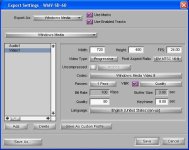
Now, Exporting my edited sequence.... I'm attaching a grab of my export screen.
I have a 23.97 ntsc project in Avid Express Pro HD (5.2).
When I export the sequence to WMV, I get horrid interlaced jaggies (purely horizontal on contrasty edges) between frames, even though in the composer window it shows clean frames.
Anyone have any ideas how to do this? My details are below:
Camera: Sony A1U, recording HDV 1080 in Cineframe 24 mode.
Exporting in DV to Avid 23.97 NTSC project. It captures to bins and allows me to create sequences and edit.
Now, Exporting my edited sequence.... I'm attaching a grab of my export screen.