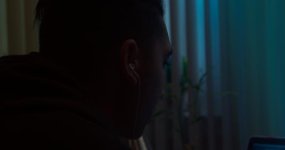
F65: Experimenting with dark day exteriors.

abreu-canedo

Well-known member
Just starting to lens a scripted drama shooting in NYC and have been given a lot of room to experiment. I'm trying to experiment with dark day exteriors. Not crushing shadows, but keeping a lot of textures in the low end. Just the beginning of the experimentation into a dingy NYC look that hides a lot of info in the shadows, just barely piercing the epidermis of visibility. Also using the Skypanel for some tertiary colors in the background.

Sure, it's not a "correct" exposure, but maybe it can lead to some interesting points of view for the story. Some of the approach is inspired by Sieranevada, and Three Times.
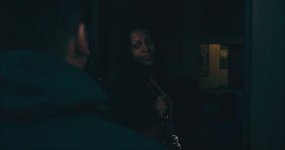
image.jpg

I'll post more as I go along.

Edit: sorry for the poor quality upload. You'd never know it was shot 4K ;)
 
I love it, however it seems it's one of those projects that internet compression is going to make muddy where it looks great before you compress.
 
Hey, thanks for the kind words, as well as the constructive feedback, yachacha!

Yeah, you might be right. Those subtle shadow textures might just get macro-blocked. Now I have some homework to do! Compression tests, here I come!
 
https://vimeo.com/95573517

This looked so much better fullscreen from prores files before i put it on vimeo. It seems to squash the dark areas all together. The F35 is capable of seeing the subtle differences in the dark areas but how do we preserve them in delivery format? I think overshooting into 4k helps a lot.
 
Compression is awful.

I wish we had 4k monitors and 1080/720 high data rate material.

4K-8K is great for displays, as it helps take off the jagged edges on text and details, and it is really nice for GUI's, but not always needed for all material. I wish vimeo or netflix and other sites had the option of higher data/bit rates over higher resolutions.


1. The things you can do to fight compression, is to grade for the delivery format. Do a lot of testing to see what the image looks like uploaded, and across several devices. Grading to be subtle in the shadows is difficult, because there is huge variation in display settings. but if you grade your shadow contrast for a highly compressed delivery format, than you can improve the final look. This is a long process the first time, but gets easier as you go along and develop a style.

2. You can "lift" the black point. This gets the shadow details into a safer range, but can be too milky for certain looks.

No matter what you do, it will never be as good as you want it. Hope those two tips help.
 
Yeah, it is tricky. My laptop clips blacks much earlier than my iphone. And my iphone clips whites much earlier than my laptop...and my grading monitor is only good for assessing how my DCP will turn out, since none of the several screens in my life really match.

For this project it will be exported to DCP for a potential festival run, and will most likely have a quicktime file for screeners and online viewing....so P3 and SRGB.

Thanks for the tips. Yeah, will try compression tests. But good point about variation in black levels rendering the subtle shadow details null. I'll be remissed if I don't give it a go, but yeah, I just may learn the hard way. Yikes!
 
Still going for the dark look. Haven't done compression tests yet, but also thinking of doing two different grades. One for DCP, one for SRGB. Will post links when I upload some clips of compression tests, but may not be able to do it for a while. I have to check with the director first.

IMG_5026.jpg
 
I would say the only issue I have is the darkness of the highlights. It feels like the image was made dark, rather than the subjects being in the bark. if that makes sense.
 
I would say the only issue I have is the darkness of the highlights. It feels like the image was made dark, rather than the subjects being in the bark. if that makes sense.

You're absolutely right. Indeed these images have been brought down in post. Thanks for the feedback! I'll keep this in mind moving forward.
 
I love detailed shadows, all too often everything is crushed for many reasons, not least that most cameras can't see shadows nicely.

But it's nigh impossible to display like this unless you can guarantee proper calibration across the board which unless you're heading for theatrical you can't.

Compression is utterly evil in this regard. I find it highly amusing that netflix's £100m crown series in the titles alone band like crazy on playback, such a shame as that's one show where the shadows are very detailed.

But the most important thing is we're all using calibrated displays, right? Or know what our displays can do and have made viewing LUTs for them?

FWIW the MacBook Pro display is nearly bang on sRGB/709 primaries and the iPad pro is on the nail P3. Of course you would need to output for either sRGB, 709 or P3 for each of those devices accordingly.

cheers
Paul
 
I love detailed shadows, all too often everything is crushed for many reasons, not least that most cameras can't see shadows nicely.

But it's nigh impossible to display like this unless you can guarantee proper calibration across the board which unless you're heading for theatrical you can't.

Compression is utterly evil in this regard. I find it highly amusing that netflix's £100m crown series in the titles alone band like crazy on playback, such a shame as that's one show where the shadows are very detailed.

But the most important thing is we're all using calibrated displays, right? Or know what our displays can do and have made viewing LUTs for them?

FWIW the MacBook Pro display is nearly bang on sRGB/709 primaries and the iPad pro is on the nail P3. Of course you would need to output for either sRGB, 709 or P3 for each of those devices accordingly.

cheers
Paul

Yes, all good points. With this particular project, the main goal is a theatrical premier at festivals. So the main grade will be for the DCP in P3. However, we will be outputting an SRGB grade for streaming as well. This later scenario is gonna be the tricky scenario.

I grade on a calibrated monitor, which really just gets me security for the DCP. As far as streaming, I am slowly accepting that I have little control of how people viewing it. The last short I made had a similar approach to keeping some textures in the shadows, but the problem wasn't as much with compression as it was with different monitors just crushing the shadows into blacks while other displays showing more of the shadows.

I wish Vime could recognize display settings and load the appropriate version of the video...so I could upload a P3, a SRGB and a Rec709 file, and it would display each file according to the display settings of the viewer.
 
...aaaand, another one.

Screen Shot 2016-11-22 at 11.37.30 PM.jpg

I just can't help it. I'm just in my dark period, right now. Using hue and value contrast to create depth and emotion. Shooting for the grade, and grading for the story...hopefuly!! =Z

Compression tests coming soon, I hope.
 
I wish Vime could recognize display settings and load the appropriate version of the video...so I could upload a P3, a SRGB and a Rec709 file, and it would display each file according to the display settings of the viewer.

It's like the wild west out there with colour support. I wish this too.

Although even if detection between colour displays was possible, each particular display - especially computer monitors - can vary wildly in it's capabilities. I have a 30" HP main display which is near damn P3. But of course if i show a full saturated green then i am seeing a P3 green, which is far removed from a sRGB saturated green.

At the moment it's a case of profiling a particular device, creating a LUT and then including that LUT as part of a viewing transform. What i would love to be able to do is to have that LUT active at a system level on windows. In the same way you can apply an ICC profile. I don't believe this is possible.

cheers
Paul
 
Back
Top