EXHAUSTED! Capture Settings: Premiere, Squeeze?

qerplonk

New member
Hello everyone,


I am shooting in 24p, using squeeze mode, and have not yet been able to get a good quality video with Adobe Premiere Pro CS4. I don't know what I'm doing wrong with the capture, but I feel like it's a small tweak that I'm missing.

I need to know:

1. Which type of timeline to use in Premiere
2. Your capture settings (compression, interlacing, framerate, etc.)


That's it! Any help would be much appreciated.

Sincerely,

Andrew


How I usually capture:

- Compression: DV/DVCPRO NTSC
- Framerate: 29.97
- Quality: Best
- Scan Mode: Progressive
- Aspect Ratio: 16:9

Timeline: NTSC Widescreen 48kb timeline, 29.97 fps


Computer:

Mac OS X 10.5.8
2.66 GHz Intel
4GB RAM

Thanks! :Drogar-BigGrin(DBG)
 
1) Use the DV-24p Widescreen 48 Khz preset

2) Capture with standard DV settings.

Don't change anything.
 
David,

Thank you for your very quick response. I came into the office today and captured using your suggestions.

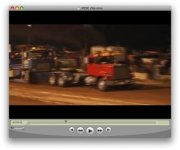
The capture of the file worked well, but when I placed the file in the 24p sequence, I get a lot of jagged edges whenever there is motion. I have tried several export settings, to no avail. There is a picture attached.

1. Which export settings do you recommend?
2. Do I need to Remove the 24p Pulldown?

Any insights are appreciated.

Andrew
 

Attachments

  • Picture 7.jpg
    Picture 7.jpg
    12.8 KB · Views: 0
Well I'm not sure why the picture is so small, but you sound like a guy who knows what jagged edges in a video look like!

- Andrew
 
What version of Premiere is this? CS4? Do you have at least version 4.1, or later?

If you have version 4.0 or any version before 4.1, you'll see this.
 
David,

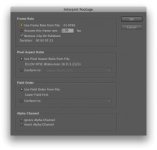
Here are the captured file's settings (a screenshot is attached).

Clip Settings

Frame rate: 23.9760
Remove 24p DV Pulldown: Checked
Aspect Ratio: D1/DV NTSC Widescreen 16:9 (1.2121)
Field Order: Lower Field First

Capture Settings for the clip

Compression type: DV/DVCPRO - NTSC
Frames per second: 29.97
Compressor: Best
Scan Mode: Interlaced
Aspect Ratio: 4:3


Thanks,

Andrew
 

Attachments

  • Picture 7.jpg
    Picture 7.jpg
    9.1 KB · Views: 0
That's not the clip properties; that's the Interpret Footage box. You're causing the interlacing by having it interpreted as Lower Field First.

You shouldn't have to Interpret the footage at all. It should all be taken care of for you automatically.
 
Oh, I may need to clarify -- when I said "standard DV settings" in post #2 above, I didn't mean 4:3. :) I just meant don't monkey with the settings.
 
If your shooting 24FPS set your timeline to 23.976 not 29.

and assuming your using 24PA (advanced) make sure you set the the conversion to 2:3:3:2 (not ABBCD)
 
and assuming your using 24PA (advanced) make sure you set the the conversion to 2:3:3:2 (not ABBCD)

That's only a playback setting for previewing on a 60 Hz screen, though, not a pulldown removal setting -- and it's 2:3:3:2 by default. It doesn't matter if you're using 24p standard or 24pA footage.
 
- I am shooting 24P not 24PA (scene file F5), and using the 24p 48khz Widescreen preset for the timeline
- David you alluded that capturing in 16:9 would be fine
- You also mentioned that the field order was "Lower Field First" and that was a problem

Here are the clip properties you asked for.

Clip properties

File Path: /xxx/NTSC-30i-letterbox.mov
Type: QuickTime Movie
File Size: 38.8 MB
Image Size: 720 x 480
Pixel Depth: 24
Frame Rate: 29.97 (24p)
Source Audio Format: 48000 Hz - 16 bit - Stereo
Project Audio Format: 48000 Hz - 32 bit floating point - Stereo
Total Duration: 00:00:05:23
Average Data Rate: 6.5 MB / second
Pixel Aspect Ratio: 1.2121

QuickTime Details:
Movie contains 1 video track(s), 1 audio track(s) and 1 timecode track(s).

Video:
There are 179 frames with a duration of 1/29.97th.

Video track 1:
Duration is 0:00:05:23
Average frame rate is 29.98 fps

Video track 1 contains 1 type(s) of video data:

Video data block #1:
Frame Size = 720 x 480
Compressor = DV/DVCPRO - NTSC
Quality = Most (5.00)

Audio:
Audio track 1 contains 1 type(s) of audio data:

Audio data block #1:
Format = 16 bit - Stereo
Rate = 48000.0000 Hz
Compressor = 16-bit Little Endian (uncompressed)

Timecode:
Timecode track 1 contains 1 type(s) of data:

Timecode data block #1:
Start Time = 02:07:44:24
Reel name =
 
OK, then it's recognizing the footage properly.

You should be able to drop it into a DV-24p widescreen sequence, and then the pulldown should be removed automatically.

But you can't have it as Lower Field First in Interpret Footage.

That said, you should shoot 24pA if you're planning to edit as 23.976. You can still do it here, but get into that practice.
 
- "Remove 24P DV Pulldown" is checked, so that must be working okay. I was under the same impression that I should be able to drop it in and all would be well.
- No Lower Field First in Interpret Footage: Are you saying it should be Progressive (no fields), or Upper Field First?
- Since I am shooting in Squeeze Mode, should I be capturing 16:9 aspect ratio, Progressive? Perhaps that could be at the root of my problems.

When I first started shooting my buddy told me to shoot in 24P, saying "24PA is for people who really know what they're doing."

Are there any special considerations that need to be made for working with 24PA video?


Thanks,

Andrew
 
- "Remove 24P DV Pulldown" is checked, so that must be working okay. I was under the same impression that I should be able to drop it in and all would be well.
- No Lower Field First in Interpret Footage: Are you saying it should be Progressive (no fields), or Upper Field First?
- Since I am shooting in Squeeze Mode, should I be capturing 16:9 aspect ratio, Progressive? Perhaps that could be at the root of my problems.

You should never have to go into Interpret Footage at all. But as it is, the clip needs to be set back to "Progressive (no fields)." In the future, don't go into Interpret Footage.

When I first started shooting my buddy told me to shoot in 24P, saying "24PA is for people who really know what they're doing."
There's so much bad info out there about 24p standard vs. 24pA.

For the record, the only difference between them is how the pulldown cadence is arranged when the footage is recorded to tape. It's exactly the same otherwise. There is absolutely no difference between them when you're shooting. None whatsoever. And on tape, they're both 29.97, only with a different arrangement of interlaced fields. Contrary to what some say, 24pA is not recorded as 23.976.

The difference comes in post, and ONLY in post. 24pA pulldown is easier to remove than 24p standard (2:3) pulldown, so it's the better way to go if you're planning to edit as 23.976.

However, the 24pA pulldown can make playback of the raw footage strobe more, so it's not ideal for delivery. It's really for editing in 23.976 only. And it's especially important to do so if you're going to edit in FCP, because FCP can only remove 24pA pulldown automatically, and 24p standard pulldown removal is a lot of extra work. So save yourself having to worry about THAT and just shoot 24pA.

With Premiere Pro (2.0 and later), as well as Vegas or Edius, though, 24p standard footage is just as easy to edit as 24pA, because both pulldown cadences are removed automatically; you'll never perceive the slightest difference between it and 24pA anywhere along the way when you're editing as 23.976. (With the exception of PP 4.0, but just upgrade to the latest version.)

Are there any special considerations that need to be made for working with 24PA video?
No. The only question to ask -- the ONLY question to ask -- is "will I edit as 23.976 or as 29.97?"

If 23.976, shoot 24pA.

If 29.97, shoot 24p standard.

That's it. For this question, you are NOT worried about going to film, about going to DVD, about going to the web, or anything. You are worried about how you are going to edit, and nothing else. Shooting with them, as I said above, is 100% exactly the same.

And as far as choosing the sequence when editing, the only time you should edit as 29.97 is if your NLE doesn't give you any other option, or if you're planning to mix with 60i or 30p and leave those frame rates the way they are. You'd want 23.976 if you're going to use 60i or 30p for slo-mo, and and you'd want 29.97 (interlaced) if you're planning to keep your 60i footage looking like 60i, or if you're planning to keep your 30p at normal speed. (If you convert 60i to 24p, it'll look like 24p and won't look "live" anymore, and 30p doesn't make a good conversion to 24p, or vice-versa, but both do fine on a 29.97 interlaced timeline.)

And to head off another persistent Internet trope, you have ALL output options still available if you edit as 23.976. Everything. You can still deliver as 29.97.

However, if you edit as 29.97, you give up making 24p DVDs or general 24p export of any kind, or even 24 fps film-out.
 
David,

Thank you for all of your help with this, it is much appreciated. I'll head over to Ken Stone's website to brush up on how the pulldown differs with 24PA - I remember reading something about it there.

I'll start shooting in 24PA, but is there anything you see that will fix the issue with the footage I've already shot?

ChapelGrove,

I will check the tape on a TV screen when I get a chance -- the camera is at my office.
 
Ken Stone will be worried about how it differs when using it in FCP. The concerns in FCP are not concerns in other NLEs, and not in Premiere Pro. This is why you will see posts from people familiar with FCP and only FCP telling users of OTHER NLEs to "make sure to capture with advanced pulldown removal, " assuming that things work in every other NLE just like they do in FCP, and that other NLEs need to capture footage in a special way, like FCP -- whereas in reality, FCP is the only one with the concerns. As I said, Premiere Pro, Vegas, and Edius don't have any of those worries. Don't fall into the trap of thinking that what's true for FCP is true for you -- especially where 24p/DVX footage is concerned.

You shouldn't be having a problem as long as you don't mess with Interpret Footage.
 
ChapelGrove,

I will check the tape on a TV screen when I get a chance -- the camera is at my office.

I only ask because it might not be a capture or NLE issue at all. If the jagged edges appear when simply playing the tape through a TV, then the problem is in the camera settings -- maybe the shutter speed?
 
Back
Top