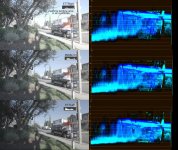
Example of BAD Noise in 4K2HD ISO 2500

Sony locks S-Log2 at 2000ISO as it allows the most dynamic range from the sensor, sticking middle grey right in the middle. But that also means a lot of noise comes up off the floor.

We are going to add a "virtual ISO" set of LUTs to the Odyssey7Q which will allow you to take the S-Log2 material and see it transformed to a different ISO level in REC709. This will allow you to set exposure properly for pulling levels in post, which will bury the noise floor.

I personally don't like ETTR, as I find it erratic and poorly matching shot-to-shot. Instead I like to choose a standard exposure level offset and stick to it, usually by judging with the waveform or false color modes. I like the FS700 at around 800 ISO, or 1.3 stops overexposed.
 
In any case 4k2hd looks great but you do need to be sure to expose up as much as possible to minimize it. I'd always aim for at least 1-2 stops over and as much as 3.

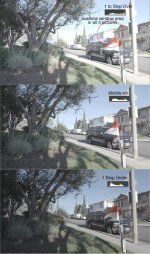
Sorry to disagree guys, but the ETTR thing with 4K2HD leads to blown out images. Take a look at these bracket tests, especially the white, window area. Even a little over 1 stop on a bright sunny day causes massive LOSS of detail that cannot be recovered. 4K2HD is not RAW and cannot recover highlights like RAW. The best looking one out of these three is the 1 stop under IMO. The one that's exposed to the middle is decent, but still quite a good bit of detail loss in the highlights. If you go 3 stops over on this day, the highlights would be destroyed.

In Taynos' case, he could have ETTR because it was in the shadows, but on a bright sunny day, NO WAY.

I'd like to add in video, the 1 stop under take, the noise is not bad at all probably because it's daylight. I'd certainly rather have a little extra noise than un-recoverable, white highlights. Exposing S-Log is definitely a case by case things. By just going ETTR for everything, you're going to have S#!T images often.

Click here to see this image full size

http://www.builtbyugene.com/misc/exposure.jpg

exposure.jpg
 
Sorry to disagree guys, but the ETTR thing with 4K2HD leads to blown out images. Take a look at these bracket tests, especially the white, window area. Even a little over 1 stop on a bright sunny day causes massive LOSS of detail that cannot be recovered. 4K2HD is not RAW and cannot recover highlights like RAW. The best looking one out of these three is the 1 stop under IMO. The one that's exposed to the middle is decent, but still quite a good bit of detail loss in the highlights. If you go 3 stops over on this day, the highlights would be destroyed.

In Taynos' case, he could have ETTR because it was in the shadows, but on a bright sunny day, NO WAY.

I'd like to add in video, the 1 stop under take, the noise is not bad at all probably because it's daylight. I'd certainly rather have a little extra noise than un-recoverable, white highlights. Exposing S-Log is definitely a case by case things. By just going ETTR for everything, you're going to have S#!T images often.

Click here to see this image full size

http://www.builtbyugene.com/misc/exposure.jpg

View attachment 92034

First off how are you judging 'normal' exposure? And it looks like you are clipping superwhites, did you recover then? To me those all look a few stops over. Slog2 at 'normal' exposure generally looks quite dark, darker than any of those. And of course it all depends how you're metering and will be very scene and even frame dependent... also ettr just means don't waste any highlight room since that's where the cleanest detail is, any very high contrast scene will always be a judgement call of whether you trade clupped highlights for noisy shadows. Usually ettr just under clipping will give you the most room and will look the best except for situations where scene contrast is way beyond the camera's DR or especially where a subject needed to be brightly exposed falls in dark shadow with a bright background. Fortunately those situations are usually avoidable if you know what you're doing, and exposure will be a judgement call and dependent on style preference.

Perhaps I'm misunderstanding but ETTR is just an idea and doesn't necessarily mean changing exposure shot to shot or clipping highlights. You can ETTR for a scene as a way of choosing an exposure, and ETTR only means expose toward high as long as nothing is clipping, so you could be ETTR an still end up underexposing...
 
Last edited:
First off how are you judging 'normal' exposure? And it looks like you are clipping superwhites, did you recover then? To me those all look a few stops over. Slog2 at 'normal' exposure generally looks quite dark, darker than any of those. And of course it all depends how you're metering and will be very scene and even frane dependent... also ettr just means don't waste any highlight room since that's where the cleanest detail is, any very high contrast scene will always be a judgement call of whether you trade clupped highlights for noisy shadows. Usually ettr just under clipping will give you the most room and will look the best except for situations where scene contrast is way beyond the camera's DR or especially where a subject needed to be brightly exposed falls in dark shadow with a bright background. Fortunately those situations are usually avoidable if you know what you're doing, and exposure will be a judgement call and dependent on style preference.

i put the histogram below, so interpret how you will. For me, going ETTR all the time just does not work, especially in bright day. But each to his own. I personally don't have much of an exposure problem with S-Log because I've really learned how to use it. Practice I guess.
 
I'm no pro, but i'd much rather pull out Neat Video to fix some noise in the shadows than expose to the right and risk losing some DR. I do agree with going a little to the right if you're not going to lose any information in the background whites, i don't think anyone is suggesting that though. Still, i find it's harder to keep the background from blowing out than to fix some noise in the shadows.
 
I personally don't like ETTR, as I find it erratic and poorly matching shot-to-shot. Instead I like to choose a standard exposure level offset and stick to it, usually by judging with the waveform or false color modes. I like the FS700 at around 800 ISO, or 1.3 stops overexposed.

I think ETTR is misrepresented. Stills photographers who have been doing it for years do not change the exposure for every shot/setup - which creates a nightmare in post (even for sets of stills for a mag or brochure) but more typically expose a 400 camera at 200 or 125 etc - exactly as you outline :)

Convincing some DPs of the value of ETTR I have had to rename this method as ETTRLite to clarify the difference between how it is actually done and how it is perceived to be done
 
Last edited:
i put the histogram below, so interpret how you will. For me, going ETTR all the time just does not work, especially in bright day. But each to his own. I personally don't have much of an exposure problem with S-Log because I've really learned how to use it. Practice I guess.

If you've learned how to use sLog2 you are probably ETTR, you juat don't know it. From your framegrabs it looks to me like you do ETTR. All ETTR means is don't leave highlight DR unused because it is the cleanest part of the range and represented by the most values in the ADC and RAW in most forms of digital capture.

If you didn't ETTR and exposed SLOG2 'normally' you'd be wasting a lot of DR in most scenes as most scenes don't need 6-7stops of highlight range. You might as well put as much of your scene range aa possible in clean highlight stops rather than noisy shadow stops.
 
If you've learned how to use sLog2 you are probably ETTR, you juat don't know it. From your framegrabs it looks to me like you do ETTR. All ETTR means is don't leave highlight DR unused because it is the cleanest part of the range and represented by the most values in the ADC and RAW in most forms of digital capture.

If you didn't ETTR and exposed SLOG2 'normally' you'd be wasting a lot of DR in most scenes as most scenes don't need 6-7stops of highlight range. You might as well put as much of your scene range aa possible in clean highlight stops rather than noisy shadow stops.

That's definitely a more advanced way of looking at ETTR and thanks for the explanation. I've been just going by the more dated way of looking at the histogram and if falls to the right it's ETTR and if it falls to the left it's ETTL. I usually just set my Zebras to 100 and use the histogram on the onboard LCD and I've become very good at getting correct S-Log exposure by doing that after lots of shooting as well as a bunch of bracket / pixel peeping tests.

So I guess the way I've been going about it, I interpret it as more exposed to the middle or even under.
 
Last edited:
There's some ambigous-ness(is that a word?) to the ETTR methodology, which is, perhaps the disagreement, here. Looking at the WFM, both in Gene's example and on my own FS7Q, the highlights generally taper off until they appear to be gone. So, exactly WHERE is the proper ETTR limit? If one isn't careful, it's quite easy to blow out the hi-lites while the on-camera WFM looks OK. But, on closer inspection, I can always see a very slight bit of hi-lite over the 109%. So, the question becomes one of judgment, and a choice about how much of some extreme hi-lite bit of the image one wants to preserve, perhaps all of it, perhaps blowing out a small piece is OK. With the motivation being to roll back exposure in post.

For exposure in RAW, I've been playing with the enhanced colors, setting my GREEN range to be very narrow for Slog2, at 59% for 90%white, without the LUT, per Dennis Hingsberg's (starcentral) excellent write-up on exposing Slog2/3 on the F55. This seems to be giving consistent results for me, the same as my own ETTR method with the LUT on.

For exposure in 4k2HD, I tend to rely on the WFM with the LUT on. Exposures are running, typically, 2/3-1 stop more exposure than RAW. I haven't backed out where to set 90% white, yet, but, that's a trivial exercise.

edit: I like 90% white as most scenes tend to have a white point. Defining 18% gray, without a gray card, is pretty impossible.
 
Last edited:
We are going to add a "virtual ISO" set of LUTs to the Odyssey7Q which will allow you to take the S-Log2 material and see it transformed to a different ISO level in REC709. This will allow you to set exposure properly for pulling levels in post, which will bury the noise floor.

Did everyone miss this? That's a really cool feature.

I'd like this to apply to RAW recording as well, so i can monitor everything +/- various stops so we can rate the sensor differently but monitor correctly

thanks
Paul
 
If you've learned how to use sLog2 you are probably ETTR, you juat don't know it. From your framegrabs it looks to me like you do ETTR. All ETTR means is don't leave highlight DR unused because it is the cleanest part of the range and represented by the most values in the ADC and RAW in most forms of digital capture.

Hi Guys, I believe I understand Noah's explanation of ETTR, but I just want to clarify.

The things that's confusing is, I'm wondering how you guys apply this definition of ETTR to a graph and actual shooting workflow? In the image I attached, I included the waveform and the histogram and on both, ETTR is producing an image with clipped highlights. Middle and ETTLeft still look better.

So if we are looking at graphs like the Histo and the waveform, should we expose it to the middle on bright days? Because according to the graphs, if we ETTR in this situation we will get clipped highlights.

Thanks for any clarification as I'm trying to understand ETTR better.

graph02.jpg
 
Last edited:
I'm no expert but as far as i can see, what you're calling ETTL in Slog according to the waveform above is still approx. a stop over.
 
I'm no expert but as far as i can see, what you're calling ETTL in Slog according to the waveform above is still approx. a stop over.

I agree.

My analysis if that your ETTR is silly overexposed, your middleish is about right if a little hot, and your ETTL is only slightly low for ETTR. Keep in mind SLOG2 places middle grey at 32% and you have barely anything at 32%. I would guess your ETTL is still at least +1 EV over for SLOG2's designed EI. Your "ETTR" sample looks like it may be as much as +3-4 EV, and your middle seem to me somewhere around +2, so I would think ideal is somewhere in the +1.5 range.

Also, from the look of it, your waveform shows superwhites but the screenshot and histogram are probably clipping them. Notice there is data clipped in the histogram in the ETTL but there really isn't anything clipping in the waveform.

Obviously ETTR is just a concept and a guideline, and many people use it differently. It's not necessarily a hard and fast exposure methodology, and different people may take different things from it. To me it just means use your full DR but still don't clip whites, so if you are shooting something very low contrast, don't expose for ISO2000, overexpose and get super clean images. Some cameras like RED/F5/F55/Alexa allow you to do this and still monitor with normalized exposure by adjusting ISO/CineEI which adjusts the curve in camera. It's just a little more scary in SLOG2 since you have to assume it'll be brought back down in post. It's like how if you were shooting on an overcast, low contrast day with a RED/Alexa, you wouldn't shoot at ISO1600, you'd shoot at ISO200-400 and get super clean images and still not clip anything even though it's just bringing down the exposure in software and not changing gain amplifiers. ETTR is just based on the idea that especially with LOG or RAW, the exposure curve can easily be adjusted in camera/post software so you might as well just use the whole bit bucket.
 
Last edited:
I'm no expert but as far as i can see, what you're calling ETTL in Slog according to the waveform above is still approx. a stop over.

OK, so this is where I'm confused. Please help me with this.

Maybe I'm just interpreting the graphs wrong, but from what I understand (or thought I understood) about histograms it's fairly straight forward. If the data is to the left it's underexposed and if the data is to the right it's over-exposed. Is that just a too simplistic way of looking at Histograms?

But with the Waveform, it's a little more complex. Since middle grey is set to 32%, so that means I have 32 (the IRE numbers on the left) as the base and I look at what's over and under 32 to determine if it's over or under?

On a normal grey card, the middle grey is set to 50%. But since S-Log middle grey is set to 32%, that means that a middle exposed value, there would be an equal-ish amount of info above and below 32%?

Thanks for helping me understand better.
 
Yes, if you follow sony, 'correct' exposure puts your grey card at 32% on the waveform. Grey card at 50% would mean you are a few stops overexposed.
 
So help me out a bit more on the Histogram side.

So the standard Histogram assumes that middle grey is 50% and that's why data that falls the left is under-exposed and to the right it's over-exposed on many cameras.

But S-Log 2 middle grey is 32%, so I have to mentally shift middle point to the left where 32 would be, instead of 50. What I have been doing is reading middle grey as 50% on S-Log, which is why I thought ETTR was leading to blown out images.

Is that correct?

Also, that's why S-Log 2 is rated ISO 2000 is because the middle grey has been shifted quite a bit further down. So in reality, ISO 2000 at 32% would be like a camera who's middle grey is at 50% which is rated at ISO 500 or something like that. Which is why ISO 2000 on S-Log looks like ISO 640 or so on Cinegamma 4. Is this correct?

Note: This is starting to make more sense because when people have been saying ETTR, I've been interpreting middle grey for S-Log at 50%, so I've been thinking ETTR is just leading to blown out images.
 
Last edited:
As someone getting an FS7 and going to be using Slog 3 for the first time all this slog talk is very helpful thanks all involved. I learned a lot here.
 
So help me out a bit more on the Histogram side.

So the standard Histogram assumes that middle grey is 50% and that's why data that falls the left is under-exposed and to the right it's over-exposed on many cameras.

But S-Log 2 middle grey is 32%, so I have to mentally shift middle point to the left where 32 would be, instead of 50. What I have been doing is reading middle grey as 50% on S-Log, which is why I thought ETTR was leading to blown out images.

Is that correct?

Also, that's why S-Log 2 is rated ISO 2000 is because the middle grey has been shifted quite a bit further down. So in reality, ISO 2000 at 32% would be like a camera who's middle grey is at 50% which is rated at ISO 500 or something like that. Which is why ISO 2000 on S-Log looks like ISO 640 or so on Cinegamma 4. Is this correct?

Note: This is starting to make more sense because when people have been saying ETTR, I've been interpreting middle grey for S-Log at 50%, so I've been thinking ETTR is just leading to blown out images.

Yeah basically except a histogram doesn't really have a middle grey, it just collects pixel values from 0-100. And most gamma curves set middle grey around 42-45%. Yes you have it right about Slog's ISO and why we were misunderstanding eachother before. Where manufacturer's set a gamma's middle grey is somewhat arbitrary, and it really it only affects the rated ISO which only really matters if you are exposing/lighting with a meter or trying to use it to match exposure to another camera which you probably shouldn't do. It can really screw up comparing different cameras and different gamma curves though.
 
The third one IS ETTR, not left, first and second are called over exposed. Exposing to the right means exposing to the right as much as possible without clipping the highlights, it doesn't mean that you histogram should neccessairly be stacked to the right, just the hottest highlights in the sceme, they should be closest to the right edge as possible without crossing it.

Sometimes in scenes with very high dynamic range with a camera that has limited DR, in a scene with very hot highlights and deep shadows, you have to intentionally blow out these highlights and expose the deep shadows to right to get clean shadows. That's a bad situation and you can only decide which is most important, the highlight retention or clean shadows. Cameras with higher DR address this.
 
Back
Top