EX3 & Working Sold State Drive (SSD)

Barry J. Anwender

Active member
I received several e-mails and comments that "at the end of the day" the Western Digital Passport was still a "harddrive" prone to shock and eventual failure. Therefore it would be unreliable for shooters requiring the same endurance as the SXS. So I moved on with the goal of implementing a solid state drive (SSD) that does not have any moving parts and is completely shock proof as Sony's SXS storage.

There were a lot of technical considerations to make given that the SSD technology that is now emerging cleans up many of the first and second generation issues. So this implementation is a pretty good balance of cost-performance tailored to the EX1/3 camera.

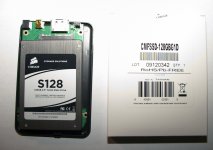
The Corsair SSD is $289 US
The RocketFish USB/SATA Case is $30 US
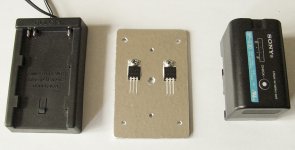
The Dolgin BP-30/90 Power Unit modified with 5 volt regulators is $40 US
The hacked ExpressCard fitted with USB cable comes from spare parts.
Not bad for 5 hours of EX1/3 recording!

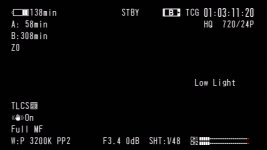
Interestingly the performance tests reveal that this USB-SSD configuration is equal to and better that Sony's SXS. I have not yet taken the time to fill up the SSD with 308 minutes of video and then measure how much time it will take to off-load on a computer via SATA-2. However as you can see the SSD SATA-2 read performance is more than respectable.

I'm waiting for Jeff DeMaagd to ship my EX3 upgrade from plate to a shoulder mount. This will the platform to mount the modified Dolgin BP-30 battery power and the SSD/Case.
 

Attachments
Last edited:
Performance Comparison Tests

Performance Comparison Tests

I've had to split my attachments so here are the performance comparison tests:
 

Attachments

So does that chassis connect to the camera without having to inject the 5v into the USB cable or is that part hidden from view. I know my chassis wouldn't connect to the camera unless I put 5v on the USB cable, even though it was a fully AC powered enclosure.

To be honest I only considered hard disc drives only a proof of concept. For any real implementation where data integrity is important SSDs are the only option.
 
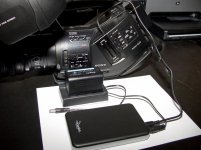
Guy, the SATA drive/case has a seperate 5 volt input and this can be verified by the RocketFish case manual. So the modified Dolgin BP-30/90 power adapter provides this 5 volts to the SATA/case with a standard 1.3 mm power adaptor that plugs into the SATA case.

The USB cable to the camera is just a simple USB cable with one end cut off and connected the ExpressCard as outlined in the previous thread. The USB 5 volt red wire inside the ExpressCard is not connected to anything.

Here is a shot of the bottom aluminum plate fabricated for the 5 volt regulators to accommodate two SSD's. Cheers!
 

Attachments

  • Dolgin 5volt Regulators.jpg
    Dolgin 5volt Regulators.jpg
    109.9 KB · Views: 0
Last edited:
That is interesting then. As I said, my devices wouldn't connect to the camera unless there was 5v on the power line of the USB cable. THis included a USB powered 2.5" HDD (as you would expect), but also a external HDD chassis with its own DC power supply.
 
SSD Off-load time & BP-U30 Life

SSD Off-load time & BP-U30 Life

I've just completed filling up the SSD so that I could measure off-load time to computer as well as measure the actual battery life.

SSD off-loading via SATA2 to computer for 308 minutes (5.13 hrs) of video is 20 minutes.
SSD off-loading via SATA2 to Raid-0 array for 308 min (5.13 hrs) of video is 14 minutes !!!
SSD off-loading via USB to either desktop/Raid-0 for 5.13 hrs of video is 40 minutes.

Actual BP-U30 life with the 128GB Corsair SSD & Rocketfish case is 7 hours 20 minutes of continuous use.

The SSD drive case under continuous writing or reading for over 5 hrs remains cool to the touch.

The modified Dolgin power pack with the 1/8 inch aluminum bottom gets very slightly warm to the touch during continuous usage.

This is about all the formal testing I plan on doing. I feel very satisfied with the end result and especially pleased with the off-load time. It will be a great time saver compared to SDHC card off-loading which are painfully slow. My 16GB Sandisk Extreme III's takes 15 minutes to off-load 1 hr of video. SSD off-loading for 5 hrs of video takes 14 minutes. Cheers!
 
Last edited:
So does that chassis connect to the camera without having to inject the 5v into the USB cable or is that part hidden from view. I know my chassis wouldn't connect to the camera unless I put 5v on the USB cable, even though it was a fully AC powered enclosure.

To be honest I only considered hard disc drives only a proof of concept. For any real implementation where data integrity is important SSDs are the only option.

Guy, I found the same thing with USB power when I initially tested using the 2.5 in harddrive with the Newer Tech USB 2.0 Universal Drive Adapter. I was disappointed but then realized that this drive adapter most likely has a very basic controller chip with limited firmware/dialogue capabilities over the USB bus to the camera. So I went to the next step with the Western Digital Passport drive USB powered and voila it worked as one would expect.

So, it was no surprise to also discover that the Corsair SSD SATA drive and Rockfish case/USB/SATA2 controller also work properly with the EX3 camera. All combinations of powering the SSD on or off and/or EX3 camera on or off, automatically recognize the SSD when the power comes on. Cheers!
 
Since ssd is much quicker than sxs. will you be able to do full overcrank on that? Or it is limited to usb speed.
 
If anybody could wire a reliable USB to ExpressCard adapter, I'd gladly pay you! My one attempt to solder those connections failed and I haven't destroyed adapter yet to try again!

Ned
 
Since ssd is much quicker than sxs. will you be able to do full overcrank on that? Or it is limited to usb speed.

It overcranks to 48fps and so ls limited ot the Sony USB speed cap. I recorded the full 308 min at 720/24p @ 48fps and it didn't skip a beat (ie. NO media errors/restore).
 
Guy, I found the same thing with USB power when I initially tested using the 2.5 in harddrive with the Newer Tech USB 2.0 Universal Drive Adapter. I was disappointed but then realized that this drive adapter most likely has a very basic controller chip with limited firmware/dialogue capabilities over the USB bus to the camera. So I went to the next step with the Western Digital Passport drive USB powered and voila it worked as one would expect.

So, it was no surprise to also discover that the Corsair SSD SATA drive and Rockfish case/USB/SATA2 controller also work properly with the EX3 camera. All combinations of powering the SSD on or off and/or EX3 camera on or off, automatically recognize the SSD when the power comes on. Cheers!

I decided to try it again today with a 80GB 2.5" HDD in a chassis, and Bob's your uncle it worked like yours did. I'm not sure what I did wrong before but I'm doing it right now. The chassis is actually just a cheap Taiwanese generic by Welland.

I've also found a 12v to 5v DC power adaptor (to suite a card cigarette lighter) that has the right plug for my HDD. Ironically it is the adaptor for the NextoDi Video Storage unit I still have to finish the review off. Powering this of my Dolgin EX-V battery plate works a treat.

I've got to update my web page with this info. Change to a SSD and I have a completely mobile solution.
 
I've got to update my web page with this info. Change to a SSD and I have a completely mobile solution.

Glad to hear that all working as expected.

Guy feel free to use any or all of my information, pictures and documents in this thread to update your web page. For my part it is all public domain so that it can benefit the widest possible group of folks. I have not yet got around learning how to put up web pages. Cheers!
 
I wouldn't be too worried about that, the bottle neck is going to be the writing speed of the drive you are copying it too :-)

[Addition: Thinking more about this, as far as I know eSATA does not have a specific controller in the chassis for eSATA, it is more of a case of just connecting the internal SATA connector to the SATA drive outside the computer. Therefore it seems like there is not really a specific need to support eSATA 1 or 2, if the drive and controller are SATA2 compliant then they will work as SATA2 independant of the design of the chassis.]

Tested my 2.5" drive today in the field. I recorded straight for 2.5 hours (start to end of the job), the U30 battery powered the HDD for 3 hr straight via a 12v to 5v cigarette lighter adaptor. At the end of the 3 hours, it had droped one of the 4 level indicators and when connected via the Dolgin EX-V to the DC input the camera reported the voltage of the battery as 15.8v.

My cabling is very messy at the moment, as is the mounting. On an EX1, for a moving solution I think XxS is still the best option, but for tripod mounted work this is not a problem. On the EX3, if you could mount the SSD & Battery together on the rear cold shoe it would work fine as a mobile solution.
 
Last edited:
I am sure it is the firmware. It will be interesting if Sony ever plan on releasing a 128GB SxS card then they will need to update the firmware to support this capacity as well. Even if that happens, it probably some time off though and they will have probably superceeded the EX1/3 and never update them to support that capacity anyway...
 
If anybody could wire a reliable USB to ExpressCard adapter, I'd gladly pay you! My one attempt to solder those connections failed and I haven't destroyed adapter yet to try again!

Ned

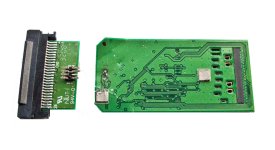
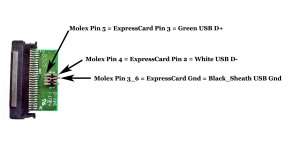
To Ned and others. My first prototype connector took me several hours with a magnifying glass and soldering iron to get proper connections. However, on my second go for the final SSD cable I left the molex connector on the ExpressCard daughterboard so that the USB wires are more easily attached to the molex pins. To accomplish this, I used my larger soldering gun to apply heat to the back off the motherboard, enough so that with a little pressure the duaghterboard molex connector lifted away. So no heat was applied to the daughterboard or its molex connector, thus it comes away without any damage whatsoever. This makes the task much easier. See the attached pictures.

I have also included the pinout details so that the USB cable can more easily be soldered to the molex pins without having to fiddle under a magnifying glass. You may also find it easier to solder the Black USB wire and its Sheath to the otherside of the daughterboard where its ground plane has lots of space and an exposed ground point to solder to. Make sure to use an Ohm Meter to check for continuity and no shorts - do keep your shorts on though:-) This may still be a bit of a challenge for people with big fingers and few thumbs ;-)

P.S. The Sonnet, Sandisk and Delkin ExpressCard adaptors have this daughterboard arrangement. Cheers!
 

Attachments

  • Accessing Daughterboard.jpg
    Accessing Daughterboard.jpg
    107 KB · Views: 0
  • Exposed Molex Pin Wiring Detail.jpg
    Exposed Molex Pin Wiring Detail.jpg
    56.5 KB · Views: 0
Last edited:
I had tried those connectors origonally but when I couldn't get it to work I just went back to the harder connections on the other side. I never did work out why it didn't work on those connectors for me, it should have...
 
Back
Top