EVA1 SD Card Errors & Issues - HELP!

I'm DP'ing a feature western right now and 2 of my 4 Lexar 128GB SDXC v60II memory cards are done. One physically broke, but the second gave errors, lost a take, got initialized, worked, then on another day it froze my EVA1, got initialized after a reboot by pulling the battery (because camera wouldn't power down or cut), and after initialization was working, did some test shots, and kept filming the movie... BUUUUUUT....

....now it won't mount on any computer (windows, mac, direct or card reader). Hoping tomorrow to put it back into the EVA1 and at least see that the thumbnails and data are still there... maybe it'll prompt another initialize media and we can get it to mount. Is there a way to get to "initialize media" in the Panasonic menu (like you do on an FS7?)

I'm at a loss. This is 1/4th of our shoot day and obviously we're on a tight indie budget and time schedule where re-shooting would be really tough, but 100% necessary. Any insights are welcome.

Also, note that slot1 wouldn't work with the card, but it worked in slot2 and that's where we initialized it. I'm not sure if this is a Lexar card issue or an issue with my EVA1's Slot1. Thoughts? Advice?
 
Sounds to me like the cards are too slow, or may have simply gone bad.
Are you recording at 150 long-gop or 400 intra?
And are you at least recording to dual slots so you have a second card as a backup?
 
I am shooting 400mbs All-I. Today we loaded the SD card back into the EVA and the thumbnails are all there and playback. We cannot get the SD card to mount on any computer or laptop, directly or with a reader. Any ideas??? Thanks!
 
Yes use a Atomos recorder to capture the HDMI output.

I am shooting 400mbs All-I. Today we loaded the SD card back into the EVA and the thumbnails are all there and playback. We cannot get the SD card to mount on any computer or laptop, directly or with a reader. Any ideas??? Thanks!
 
Good suggestion from MM. None of my Lexars can be read by my computer but my Sony A7R3 works perfectly as a card reader.
 
Yes use a Atomos recorder to capture the HDMI output.

Totally agree. Saving whatever you can ASAP should be your #1 priority! (Different camera/card/system, but had a similar thing happen to me with an FS7/XQD card a while back. We were able to play back and capture some - but not all - of our takes playing back from the original camera. Efforts to retrieve other takes didn't work - and the entire card failed shortly thereafter. We sent the card in and Sony was unable to retrieve any of the data.) So if you can play it back out of the camera, don't wait -- save it to a recorder!

And if you have ANY problems with a card, take it out of your use rotation immediately. You might also want to stick with v90 cards for 400-I recording from now on.
 
I was going to suggest the same as Sam to see if you can use the camera as a reader.

And I also second OnSet, that if a card starts giving you issues, it’s best to pull it from the lineup. It sucks having to replace the card, but it’s cheaper than losing the footage.
 
EVA1 cannot be used as a card reader that outputs file data to a computer. You could always play each clip out to another recorder over video but that's a real pain. I suggest doing that as a safety backup and then contacting Panasonic Support to see if there is a way to rescue the files directly. But first play them out before that card gets further damaged.
 
I'm DP'ing a feature western right now and 2 of my 4 Lexar 128GB SDXC v60II memory cards are done. One physically broke...

I didn't want to ask earlier because I didn't want to sidetrack your path to a solution, but... how the heck did this happen?

Did it get jammed up in the slot, or simply come apart (due to shoddy manufacturing)? Might it have been a heat related issue because it's a V60 instead of a V90 (if that's even possible)?

I mean, hey it's an SD card, so sure, it's susceptible to many different possibilities for failure (dual record everybody!),... but "physically breaking" on you? My curiosity is piqued (as well as my concern).

Also, I hope you were able to recover your work somehow!
 
If you use cards enough (in & out of cameras/readers consistently for months/years), the front and back whole pieces just break apart perfectly sometimes. Only saw it a few times in my life.
 
I didn't want to ask earlier because I didn't want to sidetrack your path to a solution, but... how the heck did this happen? !

That easily happens on the harsh edges of the built in SD card slots of Apple computers. Especially on the iMac when you search the slot without seein it you scratch the card over the harsh alloy edges. I had several broken cards over the years and since I added a plastic card reader I haven’t had any. In general SD cards are fragile and need to be treated carefully

edit:
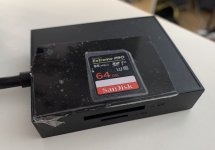
I taped an image of the card on top of the reader so I know which side up/down.
IMG_0243 copy.jpg
 
Last edited:
It must be a function of my own paranoia about SD cards that has allowed me to exist this long without experiencing (or even hearing) of this. Their small size and bare contacts freak me out. I operate strictly case-to-device-to-case, and reflexively ground myself whenever I look in an SD card's direction. My kookiness must have been paying off all this time.

...and now that I wrote that, I fully expect all of my SD cards to suddenly explode without warning. damn.
 
I've had similar problems with two Lexar V60 cards. Using an iMac and FCPX, sometimes there were no problems seeing and importing clips and on other times an outline box existed for each clip in the import window , but no image. Sometimes it would be possible to retrieve the image having pulled out the card (not ejecting) then re inserting. However I subsequently bought a Lexar USB3 Professional Card Reader and have used this rather than the iMac. So far I have had 100% success iinporting files from CX350 and FS5 sources. Similarly I have not experienced problems using a BM mini Ultra 4k.
 
Back
Top