EVA1 Scene Files/Gamma Types

Seanik

Well-known member
I'm only on my 2nd real project using the EVA1, and already, I've had to dive into the world of preset gamma types. Long story short, I really could not possibly even begin to explain v-log to this client, so I just rolled the dice and shot with "scene 2" using the V-504580L1 mode... untested, lol! At least I am editing this piece, so I have some control over it (it's for f*ing Instagram and FB for f* sake), but I am curious about others' experiences with these other gammas. I was hoping I could stick with v-log and not ever worry... wrong!

There really isn't much in the manual on this (from the Operations Manual) :

[GAMMA SELECT]
Selects the gamma mode.


[V-255570L1]

A gamma curve for EVA-LOOK.

[V-504580L1]

A gamma curve for EVA-LOOK.

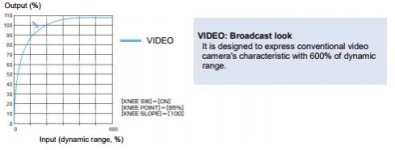
[VIDEO]

A gamma curve for BroadCast-LOOK.

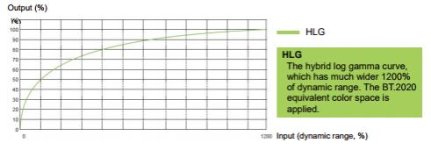
[HLG]

A hybrid log gamma (HLG) curve.


Not much explanation there. Then there is this bit from News Shooter (which is part of a comprehensive video review of EVA1)... not much explanation there, either.

Then, by complete random chance (?) I happened upon the "EVA1 Handbook" from Panasonic (.PDF), which actually gives some insight as to what these different gammas actually do, but still, it's a bit wanting in terms of description for practical use:
Screen Shot 2018-02-06 at 3.39.27 PM.jpg

Screen Shot 2018-02-06 at 3.39.56 PM.jpg

Screen Shot 2018-02-06 at 3.40.12 PM.jpg


OK, so I get the "Video" gamma (basic REC 709 response... maybe similar to one of Sony's milder cine/hypergammas), and I get the idea of HLG (in principle anyway, it's a REC 2020 standard from BBC/NHK... I think both YouTube and Vimeo support it, and I know of at least one BBC show that has experimented with it), but what's with the other two gammas, exotically referred to as V-255570L1 and V-504580L1 respectively? Has anyone used these? The only guidance I have found is that one attaches "importance to contrast" while the other attaches "importance to softer image." Huh?
 
Just curious, if you're doing the editing, why didn't you shoot v-log? You can monitor with a lut, correct?
 
You are right, when I shoot with V-Log, I just use the V709 output to the LCD (and could do the same via SDI/HDMI to an external monitor if I was using one). This client, as many of my clients, isn't really concerned about the "look" during the shoot itself, but when they sift through the raw footage looking for "selects" (their term, not mine), I know they would have a panic attack if I gave them the v-log version. In this case, I had to dump the clips off of my cards at the end of the shoot because of the quick turnaround. Else, I would have normally put low-res/proxy versions with the rec709 lut on Vimeo or Google Drive for them to review, "write," etc. These are marketing people who have limited understanding of editing/grading processes. Let me put it this way, they told me that the final should only be about :45 long, so "it shouldn't take that long to edit." Lolz.
 
Gotcha.

Your last line kind of reminds me of some of my network clients some time. "We only need five scenics. That will only take you like 10 minutes, right?"
 
[V-Log]
This is a gamma curve that can achieve gradation and wide latitude (exposure range). A grading process after recording is required.
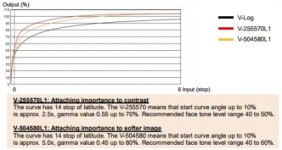
[V-255570L1]
This is the EVA-LOOK gamma curve with 14Stop latitude equivalent to [V-Log].
The rise is equivalent to approximately 2.5 times, and the gamma factor is 0.55, which means up to 70%.
This is a setting focused on contrast. The color is not easily saturated up to upper limit of the latitude.
It is recommended to shoot at 40% to 55% for face tone.
[V-504580L1]
This is the EVA-LOOK gamma curve with 14Stop latitude equivalent to [V-Log].
The rise is equivalent to approximately 5.0 times, and the gamma factor is 0.45, which means up to 80%.
This is a setting focused on soft texture. The color is not easily saturated up to upper limit of the latitude.
It is recommended to shoot at 40% to 60% for face tone.
[VIDEO]
This is the BroadCast-LOOK gamma curve with 600% dynamic range equivalent to the generally used video camera.
[HLG]
this is the hybrid log gamma curve with wide dynamic range of 1200%.
The color range equivalent to BT.2020 is automatically s
 
I shot my first (fast turnaround corporate) using Scene 1, was the best choice for the content produced, only needed some minor CC'ing, currently trying to figure out best Scene file for matching with GH4 if anyone has pointers

**also raised the master ped a bit when i used this scene
 
Last edited:
I' but what's with the other two gammas, exotically referred to as V-255570L1 and V-504580L1 respectively? Has anyone used these? The only guidance I have found is that one attaches "importance to contrast" while the other attaches "importance to softer image." Huh?

The "exotic" names are descriptions of the mathematical properties of the gammas. In V-255570L1, it breaks down like this:
V = "V-log-like" (or so I say; I don't know what it really stands for)
25 = 2.5x rise
55 = it has a gamma value of .55
70 = the limit is 70%.

For V-504580L1 it's
V- (same)
50 = 5.0x rise
45 = .45 gamma value
80 = 80% limit

So if you know what those things mean, you can know how the gamma curve is going to respond.

For everyone who doesn't know what those things mean, the simplest summation is that these are curves that are intending to retain the 14 stops of V-Log, but in a more monitor-friendly environment. As such, I think it would be fair to basically think of V-255570L1 as basically similar to "CINE-V" on prior generation Panasonics, and V-504580L1 is basically the same concept as "CINE-D." V-Log = ultra-flat, V-504580L1 = very flat, V-255570L1 = kinda flat.
 
From my testing today, I like V-LOG with the panasonic rec 709 Lut added in post the best (plus some other color correction). Scene 1 crushed the blacks for some reason for me. I think scene 2 will be what I go with if a client wants a baked in look.

I think all of the scene files require some color correction, including more chroma and lowered blacks to look their best. I could modify the scenes to add more color, but I think I like the flatter look for grading. Perhaps my footage looks a little washed out because I tend to expose to the right, but so far, that technique also seems to be working (the image is very clean). I can get back the highlights in post if I haven't gone way overboard.
 
Thank you Barry, that's very helpful. And thank you, TFA for your tests. All very good info to consider.

To follow up on the shoot where I used "Scene 2" (V-504580L1), I shot for skin tones to max out at 60% (in reality, I probably hit 65% or more at at times). Because it was a quick turnaround (and destined for social media), I opted to just use Lumetri in Premiere for quick and dirty grading. It turns out that mostly all I needed to do was boost the Exposure levels 1.5-2.0 and everything more or less fell into place. For the "look," I just added a little Vibrance for a little extra contrast and chroma. That's it.

This was shot in a small studio with daylight colored overheads and two 4' Kinos (one at all 4 banks, the second at 1 bank) more or less washing a group of 5-6 people moving about in front of a 10x10' step-and-repeat (off-white background with thin green floral designs and a logo). So while it is hardly a good test of the 14 stop range that one should supposedly get from this gamma, I was very impressed with the small amount of effort it took to dial it all in. When I did obviously overexpose (i.e. when the subjects wandered too close to the lights), I was able to easily bring back the detail by decreasing the Highlights levels. FYI, I opted for the V-504580L1 (softer texture emphasis) because it was for beauty/skin products. It really worked out well, and the clients didn't freak out because I gave them v-log footage to review, lol.

Now I am really intrigued, and I think I might try some tests of my own vs. V-log/709 lut, V-log/ACES, and the "Scene 1" gamma.
 
Back
Top