Navigation
Install the app
How to install the app on iOS
Follow along with the video below to see how to install our site as a web app on your home screen.
Note: This feature may not be available in some browsers.
More options
You are using an out of date browser. It may not display this or other websites correctly.
You should upgrade or use an alternative browser.
You should upgrade or use an alternative browser.
EVA 1- Focus Assist Green Squares over SDI output
- Thread starter JohnT
- Start date


NorBro
Major Contributor
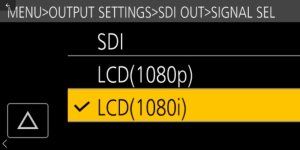
Good News!!! I was mistaken as I'm still learning the menus. The SDI output can be set to mirror that of the LCD. It can be set to either 1080i or 1080p to do this. Then the Home menu, the Focus Assist (peaking or green squares), and anything else shown on the LCD are replicated on the SDI feed. Great for adding a viewfinder. I still suggest keeping the LCD on the camera. It's handy as an Assistant's monitor and is also convenient for navigating the menus via touchscreen.
http://www.dvxuser.com/V6/showthrea...ions/page28&highlight=panasonic+green+squares
#272

soarprod
Veteran
I cant seem to find in the menu how to send the focus squares over the SDI/HDMI outputs. I would like to send them to my Gradical Eye VF. Any help is appreciated.
Set the SDI out to the LCD output. That clones the camera info to the SDI.

I cant seem to find in the menu how to send the focus squares over the SDI/HDMI outputs. I would like to send them to my Gradical Eye VF. Any help is appreciated.
1080i or 1080p, whichever works better for your setup.