Edius P2 Spanned Clip Problem

I'm shooting with a Panasonic HVX200, using two 4GB P2 cards. The camera will shoot a continuous shot from one P2 card to the second without losing time code, etc. In P2 Viewer, this split shot appears as one
continuous clip, as it should. However, I can't import it that way into Edius Broadcast. The P2 Select function sees the cards as two separate drives. It will not select both drives at once, so it will import the part of the clip on the first card, but then refuse to import the second half (on the second card), saying that a clip with that user name already exists. It also won't play more than a few seconds of the imported "half clip", saying that it's "imperfect". It should really just import as one clip. The same thing happens if I've downloaded the card contents to my hard drive in two separate folders. What's missing? I have the upgraded Edius Pro 3.61 with the HotFix and Broadcast 2.02.

And I've discovered another P2 function that should be available to me but also seems not to be, and maybe that is the key to what's wrong. I've tried to export my timeline back to a P2 card in the camera - as described by Barry - the "P2 Export Module" - and outlined in the Broadcast Upgrade User Guide. I connect the camera to my computer - I know it's mounted because it's seen by P2 Select - I click Export, I select Print to File, but then I don't see "HD P2 Clip Exporter" as an option. I've tried reinstalling ProCoder just in case, but it's made no difference. My current timeline does use a Canopus HD Preset as specified in the user guide (in this case, 720/24p over 60). Feels like some crucial P2 element is missing.

Any comments much appreciated.
 
Edius Broadcast is smart (had me fooled at first too) . . . it imports and combines both halves of your clip the first time (even though you and I think it is only importing the part from the first card).

You don't use Procoder to record back to the card. You select print to file, then HD P2 Clip from the list when the box appears (not ProCoder).
Although I may have misunderstood your post . . . if you have Broadcast you should be able to edit and record back to the cards . . . if you only have Edius Pro (without Broadcast) I don't think you have that option.

Hope this helps.
 
Last edited:
My problem, I've just discovered, stemmed from the options I chose in P2 Select. Either of the "copy" options resulted in the "you already have imported this clip" message when I tried to copy the second half of the spanned clip. Only the "direct import" option worked - but it did work. Too bad the exact nature of the copy options is not explained anywhere.

Regarding the HD P2 Clip Exporter option that's supposed to be on the Export drop-down list - I've never seen it! It might have to do with the way I've connected the camera to the computer. I've tried both USB (it's a PC) and Firewire, but I'm never offered that option, though the computer recognizes the camera. I'd love it if you could walk me through your steps when you decide to export your timeline to a P2 card. I'm obviously missing something. I do have Broadcast, by the way, and my timeline is a Canopus HD preset codec, as is required.

Thanks for your response.
 
Hey Saul,

i am working with hvx and broadcast too, unfortunatly i cant tell you step by step, as i am not at home for the next 9 days, but i did export it as p2 already, but not directly to the cards, but to my hdd and i just copied it in the end, worked great, maybe this could be the way.

If you cant find the option to export it as p2 at all, it might have 2 do with edius and the broadcast thing...maybe it has to be broadcast, starting from 3.6 i think, but ask bhiga in the canopus part, hell help ya for sure..!
 
Saul Tenser said:
My problem, I've just discovered, stemmed from the options I chose in P2 Select. Either of the "copy" options resulted in the "you already have imported this clip" message when I tried to copy the second half of the spanned clip. Only the "direct import" option worked - but it did work. Too bad the exact nature of the copy options is not explained anywhere.

Regarding the HD P2 Clip Exporter option that's supposed to be on the Export drop-down list - I've never seen it! It might have to do with the way I've connected the camera to the computer. I've tried both USB (it's a PC) and Firewire, but I'm never offered that option, though the computer recognizes the camera. I'd love it if you could walk me through your steps when you decide to export your timeline to a P2 card. I'm obviously missing something. I do have Broadcast, by the way, and my timeline is a Canopus HD preset codec, as is required.

Thanks for your response.

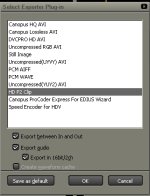
This is how the HD P2 Clip Exporter looks like.
You don't need to connect the camera to have this option available. I assume that your dongle is pluged in.
 

Attachments

  • Exporter Plugin.jpg
    Exporter Plugin.jpg
    53.6 KB · Views: 0
jjb,

Yes, dongle plugged in, latest Broadcast, everything else works. I don't see an image in your post, but the Broadcast Upgrade User Manual shows the drop-down list that shows that option. For some reason, I see all the others but not that one.
 
That's weird. Did you ever connect the HVX via USB to you PC? Perhaps you should check the installation status of the P2 driver (page10 P2 SW installation manual). What does latest Broadcast means? 4.02? Apparently there are some bugs in this release.
 
There was a small Broadcast upgrade to 2.02. I have connected the camera, but no difference. I now see your image - and I can't find a way to get that option on the export list. Maddening.
 
I never heard about a version 2.02!!!
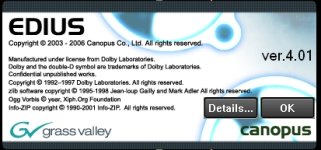
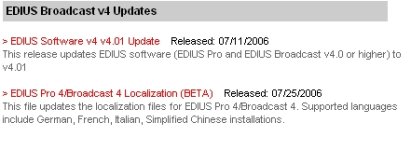
Onby you'll find my version popup. On the Canopus website there is only the Broadcast V 4.01 available (they did apparently delete the 4.02 update?!) -> see attached picture.
 

Attachments

  • EDIUS version.jpg
    EDIUS version.jpg
    71.4 KB · Views: 0
  • EDIUS broadcast Updates.jpg
    EDIUS broadcast Updates.jpg
    40 KB · Views: 0
The localization update is in fact Edius V4.02, though it seems to have broken a few things. If you don't have an urgent need for the V4.02 update, don't install it -- there is another update coming this week, possibly as early as tomorrow.

The update adds support for the Canopus NX boards, but will also contain bug fixes and enhancements.

Going back to the original problem, both P2 Import and Export should be available with both V4.01 and V4.02, unless the P2 module was not installed during Setup -- I would pop in the installation CD and rerun it.
 
I think I've confused you. If you go to the Canopus website, Support/Downloads, you'll see, under Edius Broadcast V3 Updates: "Edius Broadcast Option update v2.02", Released: 04/14/2006". This apparently only fixes a flaw in XDSelect, which doesn't affect me, but I thought it might refresh my version of Broadcast. Originally, there was Edius Pro, and Edius Broadcast, two separated entities. They seem to be merging them now. Anyway, I have Edius Pro 3.62, and Broadcast 2.02 as a result.
 
THoff,

I'll try that. I have import - P2 Select - but not export. I don't yet have V 4, but 3.62 with Broadcast technically gives you all P2 functions. Thanks.
 
Sorry for this misunderstanding. If I remember well it works as well with EDIUS Pro (Broadcast) 3.62. Something must be wrong with your installation. I think THoff's hint is more than valid.
 
...and the reinstall included P2 Select Tool, Edius P2 Plugin and Edius MXF Plugin (all were installed originally as well). You'd think that would cover the P2 Export tool, though that is not specifically listed.
 
I've discovered what the problem was: an incorrect setting, as I thought, but a weird one you'd think might be documented. My project settings have all been 720/24p over 60p. That's the only Canopus HD setting that won't give you the P2 Clip Exporter option. Anything else, 720/23.97 etc. will.

Now I need to find a way to give my project a new setting so that I can access the P2 Exporter. I get no other options when I use the Save Project drop-down list. Anybody know how I can do this? Do I save the project in a different way?
 
That's weird, I'm surprised that problem is specific to the project settings.

Anyway, go to Settings -> Project Settings and select something different.
 
As I say, the list of presets there only reads "HD Canopus 720/24p over 60p". It doesn't give me anything different to select.
 
Sorry, I just went back to the beginning of the thread and see that you are in fact still on V3.6x -- in V4, it is trivial to change the setting at any time, and all of the HVX200 recording modes are supported.
 
Back
Top