Editing Help!

wooMARVIN

Member
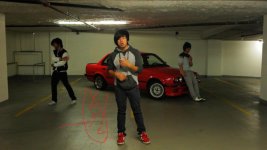
Okay so my client wants a shot with 3 of him in the scene and i've managed to garbage matte the 3 of them in. But now my problem is you can notice a difference in lighting on the ground on the left side... if that made no sense...just look at the picture too fully understand what i'm talking about.
dog.jpg

Is there any way in premiere pro cs5 too fix this problem ? It's kinda annoying and really noticeable.
 
I can see it. I agree with the feathering option. I a FCP editor, so I can't tell you how to get the feather (might be a part of basic options, or it might be in your Matte folder), but that seems like the best best. Just don't overdo it so that the client will stay unfeathered throughout.
 
There is not a feathering option in Premiere. You need to use the track matte effect.

Open the title designer and create an all white mask over the area you want to crop out. In the timeline, duplicate the clip onto track 2. Place the title matte you just created on the third track, above the duplicated clips and adjust to the same length. Apply the track matte effect to track two, referencing the matte in track 3. You will see the area where there is white disappear. Add Gaussian blur to the title matte and adjust to blur the line.
 
If the matte needs to be animated use a white color matte and drop the garbage matte and a blur on it. Use this as an track matte.
 
Last edited:
Back
Top