Editing AVCHD .mov files

Orpheus

Active member
My Current Setup:
I have Adobe Production Premium CS4 (Premiere, After Effects, Encore etc.) and an old Core 2 Duo E6600 Processor and 2.7 gigs of RAM, running 32 bit Windows XP. I am planning on buying a DSLR in the future, but I am upgrading my computer first.

I have pretty much narrowed a new system down to 64 bit windows Professional, 16 gigs of RAM and an i7 2600k processor with a 560TI graphics card (I already have the graphics card by the way). Of course I would love to get CS 5.5 or even CS6 when it comes out, but I think I will be using an intermediate codec intitally (e.g. Cineform) with CS4 to get by for the time being.

Ideally I want to be able to edit AVCHD .mov files natively and SMOOTHLY on my new computer. (I don't want glitchly, stuttery scrubbing in the preview monitor). Granted I don't think I will be able to do that with Premiere Pro CS4, but will I be able to with CS 5.5 with the Mercury Playback Engine? Of course I will be adding some graphics once in awhile, and probably a couple layers of video from time to time. I will also be doing some work in After Effects.
What I don't want:

I don't want to buy all these new computer components and not see the performance I want.

1.) Can the components I have picked meet my needs?

2.) Is getting a more updated version of Premiere, After Effects etc. necessary?

3.) Is current hardware even ready for AVCHD yet? (Or should I just be using an intermediate codec anyways?)

Thank you everyone for your time!
 
I don't want to buy all these new computer components and not see the performance I want.

But that is exactly what you will experience, if you only upgrade your OS and hardware, but then fail to update your application ( Premiere ).

You need the new 64 bit Premiere 5.x in order to take proper advantage of the new 64 bit OS and CPU with Hyper-threading that you are planning to buy, as well as all of the GPU power in your Nvidia 560 Ti card. Your current version of Premiere is simply not programmed to take advantage of all of this new technology.


1.) Can the components I have picked meet my needs?

You will have a decent system with this CPU and graphics combo. The 560Ti is probably the best bang for the money on the market now for a graphics card in terms of price/performance. Sure, a Nvidia 580 would be better, but it costs more, and has more power and cooling requirements. Same goes for getting a higher powered CPU. There are much more expensive 6 core i7 CPUs, and the new 6 core Sandy Bridge E i7's will be coming onto the market very soon, but again at a higher price with increased demands for power and cooling.

What you have selected sounds good. Make sure, though, that your motherboard has the newer and faster SATA 3.0 6 Gb/s hard disk interface, and not the older and slower SATA 2.0 3 Gb/s interface. A lot of cheaper motherboard are still being sold with the older and slower HD interface. And then naturally make sure that your hard drive(s) are the newer SATA 3.0 spec too. Again, you cannot get the increased performance unless both are upgraded with the new interface.

Also definitely be sure that you get a motherboard that supports the newer and faster USB 3.0, so you can backup and transfer files more quickly from your computer. The new USB 3.0 is significantly faster than the old 2.0

If you really want to enhance your disk performance without the higher cost of going to a RAID HD setup, I would highly recommend getting a motherboard that uses the new Intel Z68 chipset. That chipset has Intel's new Smart Response Technology in it, which allows a person to use up to a 64 GB SSD drive to supercharge the performance of their hard drives by providing a large fast cache for reading and writing data to your hard drive(s). You can get these solid state memory drives for less than $150. But one has to get a motherboard with the Intel Z68 chipset on it, in order to have this new Intel hardware feature available.

Finally, make sure that you get a good and powerful power supply for the computer, one that more than meets the power requirements of your hardware. And your case should have multiple fans in it too.


2.) Is getting a more updated version of Premiere, After Effects etc. necessary?

The difference will be like night and day. Without upgrading, you get no benefit from Intel's Hyper-threading, nor from all the GPU's on your Nvidia card.


3.) Is current hardware even ready for AVCHD yet? (Or should I just be using an intermediate codec anyways?)

I would argue yes. You just need to pay more attention to current specs, and make sure that you are not buying older technology. A lot of off-the-shelf computers are not really state of the art technology. Especially the more inexpensive ones.

So you really need to check the specs of a PC very closely when buying. Or build one yourself if you feel up to it, or buy from a vendor that allows you specify such precise details when ordering. One vendor that does that which I have used and had good results with is IBUYPOWER.COM
.
 
I should also add that if one wants Premier 5.5 to be able to use more Nvidia cards like the GTX560 Ti, it is necessary to edit a file so that Premiere will recognize and use it.

A number of websites have tips on how to do this. Here is a link to one of them:

http://blog.krama.tv/2010/05/hacking-adobe-premiere-cs5-to-enable-more-nvidia-cuda-cards/


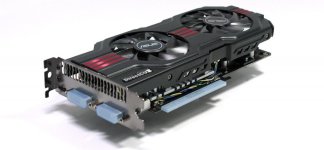
I've been using an Asus GTX560 Ti DirectCU II card with my Core i7 system and Premier 5.5 with very good results. In fact, I highly recommend this card, due to its quality workmanship, and dual cooling fans. It is a great value. Only $245 at NewEgg.com


overview.jpg
 
Last edited:
I spoke too soon about the new generation Sandy Bridge E processors from Intel. I see that vendors are saying that they will start shipping motherboards and computers using them and the Intel X79 chipset before the end of February. So we are going to be getting new affordable i7 CPU's from Intel with 6 cores and the ability to run 12 threads very soon. The Core i7-3930K will definitely be popular, as it is not going to be that much more expensive than the i7-2600K. It has a monster L3 cache in it too.
 
You make a good point about the software. There's just no way around it--I have to spend the money for it. If I'm going to spend the money on the hardware I might as well get the software that fully utilizes it.

Also, I will be getting an SSD as a main drive. Probably a 120 gig one.

And it is true, I was considering the 3930k, but I wasn't quite sure I wanted to spend double the price of a 2600k on a processor and also have to get a more expensive motherboard. But, if I do, I hope the system will last me a good 4 years.

** I just don't know whether I should get the 3930k, or if the 2600k will be enough. I'd rather not spend the money, but I don't know if the performance increase will be worth it. I am not so much worried about my render times--I just want a processor that will playback native AVCHD smoothly**
 
Last edited:
I am editing on CS5 and will be buying the Panasonic AC160 camera. Are there any workflow issues I should be aware of when transfering the video files off the cards and using them in edit?
Thanks for your experience and expertise. Captain Video (Bill)
 
Just make sure that you copy the entire PRIVATE folder off the card, and into the destination folder that you have created on your hard drive. Doing that will insure that you get all of the necessary files.
 
1. Yes.

2. Yeah, it really is. CS4 wasn't coded to deal very well with DSLR footage. CS5.5 was, and handles it much better.

3. Many people use it native with hardware less capable than what you plan to buy.

On a side note, AVCHD is a very specific format, with a defined file structure. MOV is not a recording option for AVCHD, so if it's one, it can't be the other.
 
Back
Top