
Navigation
Install the app
How to install the app on iOS
Follow along with the video below to see how to install our site as a web app on your home screen.
Note: This feature may not be available in some browsers.
More options
You are using an out of date browser. It may not display this or other websites correctly.
You should upgrade or use an alternative browser.
You should upgrade or use an alternative browser.
DVX200 Autofocus Speed and Sensitivity
- Thread starter 7DDude
- Start date
Larry Chapman
Well-known member
I played with it a bit and eventually set it back to default. I only use AF in true run-and-gun situations.

Jason R. Johnston
Well-known member
I only ever used AF once for a self-shot of myself and, of course, I needed to be in perfect focus. AF handled fine...I was in focus the whole time...but it was a sit-down studio situation. I haven't used DVX200 at, say, a friday night high school football game...but I wouldn't use AF for that, either. I'm not exactly sure what I would trust AF for...even the selfie I was hesitant and had an external monitor. I simply couldn't reach the focus ring from where I was seated and had no crew. Had to use AF. It worked, but I'm not sure when I would decide to use it again.
Barry_Green
Moderator
AF Speed is simple -- it's how fast the autofocus system focuses. Experiment with it, you'll see -- the fastest speed will snap things into focus, the slowest speed causes the focus motors to respond very gradually. On the fastest speed, it can be a bit "twitchy" if anything changes in the frame. On the slowest speed it might be more graceful in its transitions, but -- if your object is moving fast, the slowest speed might not be able to catch up to it adequately, where a faster speed would do better.
AF Sensitivity is basically a delay before the autofocus thinks it needs to refocus. The more sensitive you set it, the quicker it will be to respond. Two examples: if you're videoing a kid on a swing, swinging towards you and away from you, you'd want the sensitivity at its highest so the autofocus can track the kid accurately. On the other hand, if you're filming a stand-up interview and someone walks between the camera and the subject, you'd want the sensitivity to be on its lowest, so the autofocus wouldn't hop immediately to the interloper and then leap back to the interview subject; instead you'd want the autofocus to "stick" on your subject. So if you set the sensitivity low, it'll be "stickier" and less resistant to start hunting for a new focus point. It works sort of like a delay; the autofocus system may think "ooh, we're out of focus now" but the delay says "eh, don't worry about it, don't go hopping over like a rabbit on adderall, stay put. If we're still out of focus a second from now, then you should refocus."
So -- high sensitivity means excellent tracking on a moving object. Low sensitivity means stable focus without it snapping around or getting distracted.
AF Sensitivity is basically a delay before the autofocus thinks it needs to refocus. The more sensitive you set it, the quicker it will be to respond. Two examples: if you're videoing a kid on a swing, swinging towards you and away from you, you'd want the sensitivity at its highest so the autofocus can track the kid accurately. On the other hand, if you're filming a stand-up interview and someone walks between the camera and the subject, you'd want the sensitivity to be on its lowest, so the autofocus wouldn't hop immediately to the interloper and then leap back to the interview subject; instead you'd want the autofocus to "stick" on your subject. So if you set the sensitivity low, it'll be "stickier" and less resistant to start hunting for a new focus point. It works sort of like a delay; the autofocus system may think "ooh, we're out of focus now" but the delay says "eh, don't worry about it, don't go hopping over like a rabbit on adderall, stay put. If we're still out of focus a second from now, then you should refocus."
So -- high sensitivity means excellent tracking on a moving object. Low sensitivity means stable focus without it snapping around or getting distracted.

Design Media Consultants
Well-known member
Hey Guy's, Has anyone played around or tested the Auto-Focus speeds and sensitivity on the DVX200, what are the trade offs, and how it works with certain subjects? :-Happy(DBG):
This is a good question. Like Larry mentioned, I also use the auto focus for run and gun. Larry went back to default.
I have not had time to mess with it and am curious as to what you give up if your were to increase the speed. This sounds like a question for Barry Green. Would not be surprised if the answer is in his book. Just do not have the time to test or research. But a good question. Hopefully someone here has experimented with it. From my experience, it works as good as or possible better than most auto focus systems. I just plan and compensate for the focus to catch up with any movement. If that focus could happen faster without giving up something that would be great. But I would not hold my breath.
Design Media Consultants
Well-known member
AF Speed is simple -- it's how fast the autofocus system focuses. Experiment with it, you'll see -- the fastest speed will snap things into focus, the slowest speed causes the focus motors to respond very gradually. On the fastest speed, it can be a bit "twitchy" if anything changes in the frame. On the slowest speed it might be more graceful in its transitions, but -- if your object is moving fast, the slowest speed might not be able to catch up to it adequately, where a faster speed would do better.
AF Sensitivity is basically a delay before the autofocus thinks it needs to refocus. The more sensitive you set it, the quicker it will be to respond. Two examples: if you're videoing a kid on a swing, swinging towards you and away from you, you'd want the sensitivity at its highest so the autofocus can track the kid accurately. On the other hand, if you're filming a stand-up interview and someone walks between the camera and the subject, you'd want the sensitivity to be on its lowest, so the autofocus wouldn't hop immediately to the interloper and then leap back to the interview subject; instead you'd want the autofocus to "stick" on your subject. So if you set the sensitivity low, it'll be "stickier" and less resistant to start hunting for a new focus point. It works sort of like a delay; the autofocus system may think "ooh, we're out of focus now" but the delay says "eh, don't worry about it, don't go hopping over like a rabbit on adderall, stay put. If we're still out of focus a second from now, then you should refocus."
So -- high sensitivity means excellent tracking on a moving object. Low sensitivity means stable focus without it snapping around or getting distracted.
LOL this posted just as I was typing. I said this sounds like a question for Barry Green, and like magic it appeared. Excellent explanation. I think this makes the auto-focus an more relevant and powerful tool. Thanks Barry
I had the opportunity to test it yesterday when filming a carpenter at work. It was a mixture of medium telephoto shots (when there was lots of dust or potential damage to the lens) and quite bit of macro.
Initially I had it on default, and to be honest it did a pretty good job - however what suited me best once I had decided on the framing for different shots was to assign a button to trigger Area mode. I then kept a fairly narrow focus field using the cross hairs to make sure it was aligned to the part I wanted in focus, and this let me do some really off-set framing. I could of course use the touch screen to move the focus point around whilst filming. I found I needed to hold the screen pretty firmly so not to introduce shake, but the results were fantastic, and absolutely pin sharp.
I also used manual focus, but occasionally used the Push Auto button which worked well too.
Initially I had it on default, and to be honest it did a pretty good job - however what suited me best once I had decided on the framing for different shots was to assign a button to trigger Area mode. I then kept a fairly narrow focus field using the cross hairs to make sure it was aligned to the part I wanted in focus, and this let me do some really off-set framing. I could of course use the touch screen to move the focus point around whilst filming. I found I needed to hold the screen pretty firmly so not to introduce shake, but the results were fantastic, and absolutely pin sharp.
I also used manual focus, but occasionally used the Push Auto button which worked well too.

7DDude
Well-known member
AF Speed is simple -- it's how fast the autofocus system focuses. Experiment with it, you'll see -- the fastest speed will snap things into focus, the slowest speed causes the focus motors to respond very gradually. On the fastest speed, it can be a bit "twitchy" if anything changes in the frame. On the slowest speed it might be more graceful in its transitions, but -- if your object is moving fast, the slowest speed might not be able to catch up to it adequately, where a faster speed would do better.
AF Sensitivity is basically a delay before the autofocus thinks it needs to refocus. The more sensitive you set it, the quicker it will be to respond. Two examples: if you're videoing a kid on a swing, swinging towards you and away from you, you'd want the sensitivity at its highest so the autofocus can track the kid accurately. On the other hand, if you're filming a stand-up interview and someone walks between the camera and the subject, you'd want the sensitivity to be on its lowest, so the autofocus wouldn't hop immediately to the interloper and then leap back to the interview subject; instead you'd want the autofocus to "stick" on your subject. So if you set the sensitivity low, it'll be "stickier" and less resistant to start hunting for a new focus point. It works sort of like a delay; the autofocus system may think "ooh, we're out of focus now" but the delay says "eh, don't worry about it, don't go hopping over like a rabbit on adderall, stay put. If we're still out of focus a second from now, then you should refocus."
So -- high sensitivity means excellent tracking on a moving object. Low sensitivity means stable focus without it snapping around or getting distracted.
What can I say, this camera is way more sophisticated than I ever thought, especially for me as I'm not as experienced as many of you here on this forum, but I'm learning, and seeing Barry Green's reply's here and your great detail of features makes me glad I got the DVX200.
Excellent explanation Barry, and thank you!
Last edited:
I just shot some clips yesterday with the AF. I was impressed as I wasn't expecting it to be as smooth as it was on the default setting. I was in a tight shot in a corner and couldn't see to focus so I tried it out. I was on the right side of the camera and wanted a rack focus. I made it completely out of focus and then just let it go. I got the shot I was looking for and couldn't get it any other way in a pile of bushes in the corner of a building outside.

BONLEV
Active member
filming theatre shows with lots of light on stage and the autofocus goes regulary out of focus. So when it's in focus it just starts hunting for a very short time and goes back in focus. Even when there is no action on stage. And sometimes it goes fully out of focus so I have to zoom out and zoom in otherwise it stays out of focus I think. I had this problem with the default settings for speed and sensivity and with these setting at highest. I have firmware 1.83
I have the luck a have a second fixed camera that covers this problem. So I can noramlly use this wide shot when this happens. Is this a normal behaviour with this camcorder?
I have the luck a have a second fixed camera that covers this problem. So I can noramlly use this wide shot when this happens. Is this a normal behaviour with this camcorder?
Larry Chapman
Well-known member
filming theatre shows with lots of light on stage and the autofocus goes regulary out of focus. So when it's in focus it just starts hunting for a very short time and goes back in focus. Even when there is no action on stage. And sometimes it goes fully out of focus so I have to zoom out and zoom in otherwise it stays out of focus I think. I had this problem with the default settings for speed and sensivity and with these setting at highest. I have firmware 1.83
I have the luck a have a second fixed camera that covers this problem. So I can noramlly use this wide shot when this happens. Is this a normal behaviour with this camcorder?
I've never seen it hunt with a truly static scene, that seems broken. That said, I almost never use autofocus (or auto-anything)...especially with a well lit scene (more DOF, straightforward manual focusing). That's how I shoot unless it's a true run-and-gun no matter what camera I'm using.
You might try leaving it in manual focus and just pressing the "PUSH AUTO" button if the subject leaves the in-focus area, or use AREA FOCUS.
BONLEV
Active member
I made a short compilation about the issues I had with last theatre show (I muted the audio)
https://www.youtube.com/watch?v=NtgqB8m-0Uk
https://www.youtube.com/watch?v=NtgqB8m-0Uk
Larry Chapman
Well-known member
I made a short compilation about the issues I had with last theatre show (I muted the audio)
https://www.youtube.com/watch?v=NtgqB8m-0Uk
My advice remains....don't use auto-focus. I shoot theater scenes like that all the time. With that much light you'll have a decent DOF.
Preferably do these steps before the actual show, maybe during a dress rehearsal or some practice right before the show:
Set camera to manual focus.
Zoom in tight on a "typical subject"
Press "PUSH AUTO"
Verify it did focus appropriately then write down the focal distance for future reference.
Zoom out to desired wide shot.
With that much light on a typically sized stage performance you may never have to adjust focus manually.....but watch it and do what you need to do!
regarding: "I don't understand what you are saying. You shoot in manual focus and sometimes you push auto?"
Even though you are in manual, the button called "focus assist" overrides manual and gives you a momentary autofocus on the subject. The camera remains in manual mode. The focus assist button is a momentary focus button that does not change your focus mode to auto. As far as seeing it in the dark, maybe a penlight or a clamp-on gooseneck led light for your controls.
Even though you are in manual, the button called "focus assist" overrides manual and gives you a momentary autofocus on the subject. The camera remains in manual mode. The focus assist button is a momentary focus button that does not change your focus mode to auto. As far as seeing it in the dark, maybe a penlight or a clamp-on gooseneck led light for your controls.
Larry Chapman
Well-known member
thx Larry for your advice. I don't understand what you are saying. You shoot in manual focus and sometimes you push auto? Write down but I'm always in the dark (like you I guess) when filming.
It's already difficult to find the buttons when standing in the dark for filming.
I grab the focus before the show starts while zoomed in and that's when I write down the distance for future reference. From your example, the stage is very well lit. That means you'll have a relatively large DOF and may never have to change the focus throughout the show (especially if you grab focus at full zoom but shoot mostly medium and wide shots). If the show has darker/theatrical lighting then you have less DOF and may have to adjust focus during the event (by adjusting manually, or pressing "PUSH AUTO").
Larry Chapman
Well-known member
regarding: "I don't understand what you are saying. You shoot in manual focus and sometimes you push auto?"
Even though you are in manual, the button called "focus assist" overrides manual and gives you a momentary autofocus on the subject. The camera remains in manual mode. The focus assist button is a momentary focus button that does not change your focus mode to auto. As far as seeing it in the dark, maybe a penlight or a clamp-on gooseneck led light for your controls.
For the record....the button described is labeled "PUSH AUTO", not "focus assist".
BONLEV
Active member
Larry and Sneakle,
I have read messages before I did my next theatre this weekend. So switch to manual focus and focus assist and "push auto". this works great! It's easier to see with peaking to see if it's in focus or not. Because I wear glasses it's very difficult to use the viewfinder.
But this theatre show was with 30 actors and the lightning was not bright (the autofocus was better this time, not so much hunting). Mostly I did used autofocus but sometimes there were scenes with only 2-3 persons talking so I had time to switch to manual and push auto.
That was a great tip you gave me here! I also assigned the push auto to another button.
Are you using an external monitor also?
I have read messages before I did my next theatre this weekend. So switch to manual focus and focus assist and "push auto". this works great! It's easier to see with peaking to see if it's in focus or not. Because I wear glasses it's very difficult to use the viewfinder.
But this theatre show was with 30 actors and the lightning was not bright (the autofocus was better this time, not so much hunting). Mostly I did used autofocus but sometimes there were scenes with only 2-3 persons talking so I had time to switch to manual and push auto.
That was a great tip you gave me here! I also assigned the push auto to another button.
Are you using an external monitor also?
Larry Chapman
Well-known member
Larry and Sneakle,
I have read messages before I did my next theatre this weekend. So switch to manual focus and focus assist and "push auto". this works great! It's easier to see with peaking to see if it's in focus or not. Because I wear glasses it's very difficult to use the viewfinder.
But this theatre show was with 30 actors and the lightning was not bright (the autofocus was better this time, not so much hunting). Mostly I did used autofocus but sometimes there were scenes with only 2-3 persons talking so I had time to switch to manual and push auto.
That was a great tip you gave me here! I also assigned the push auto to another button.
Are you using an external monitor also?
Good to hear you had better results. Another tip....since the DVX200 is not great in low light, I almost always shoot in HIGH SENS mode to gain an additional f-stop. I very rarely need to add any gain.
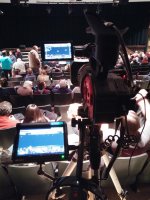
Yes......I use a 7" external monitor quite a bit to help with assessing focus and to help shooting comfort since I can often place in a better spot for viewing than the builit-in LCD.
BONLEV
Active member
Larry, I use auto gain and limited it to 2000 iso. Even with a dark stage fully zoomed in the noise is really good to me. (low noise)
I had today another theatre and shoot all the time in manual and the push auto worked great. It's easy to see with the peaking color (I use blue)
I saw your picture with the external monitor attached but after the great results with the push auto I don't think I need an external monitor. thx again for your help :2vrolijk_08:
I had today another theatre and shoot all the time in manual and the push auto worked great. It's easy to see with the peaking color (I use blue)
I saw your picture with the external monitor attached but after the great results with the push auto I don't think I need an external monitor. thx again for your help :2vrolijk_08: