DVX100b newbie questions

Ruby Gold

Member
I just got a 100b and did my first shoot with it yesterday--an interview. LOVE the camera, but have some questions I couldn't find answers to in the manual or Green's DVX Book, so I thought I'd try here. All input appreciated. First, the set-up:

The interview was with an African-American woman with medium dark skin. I did a basic 4-point lighting set-up using an Omni for my key, a small Rifa for the fill, a Pro light for my hairlight and a Tota to throw light on the background. There was some cloudy daylight coming through frosted windows very high up in the wall. I manually white balanced with a white card, set the zebras at 85% and used them as my guide for the iris setting, which was around 6.8. I used manual focus. I used an external lav mic connected to input 2. Mic Gain level at -50dB, Mic ALC off.

Questions:
1. After looking at the footage, it seems that the tighter I went with the zoom, the more "rich" the color appears. When I was wider, it looked a little tiny bit washed out/overexposed compared to the tighter shots. Am I imagining this?

2. Also, looking at the footage, it seems that when I went wider, I lost the sharpness of the focus ever so slightly. To set focus--I went in to Z99, focused and then pulled back out to however I wanted to frame the shot--does the focus not hold if you pull too far out? How does this work?

3. No zebras, i.e. overexposure was registering, yet a couple of times the "ND filter 1/8" message popped on screen. What would cause this? Particularly if no overexposed areas are registering with the manual iris setting I chose based on zebras? Seemed very strange.

4. The woman looks good, but she has hot (shiny-looking) spots in places on her face that didn't show up as zebras when I was shooting, or just very, very minimally. I used face powder when I saw her looking shiny, but since the zebras weren't registering, I figured I was okay. Yet, in this footage, these spots look really shiny--a little blown out. If they were--why didn't the zebras show it? Could another issue be causing this problem? Any help here is greatly appreciated so I can correct for it in the next interview to be shot next week.

5. I set audio levels to hover around -12dB, occasionally going into one or two red squares. When I captured the footage, the audio seems very low. Of course, better too low than blown out, but I'd prefer a a stronger level. Suggestions?

6. Last but not least--should you set the Black Balance along with White Balance for each shoot?

Thanks so much for any and all help.
Ruby
 
Ruby Gold said:
1. After looking at the footage, it seems that the tighter I went with the zoom, the more "rich" the color appears. When I was wider, it looked a little tiny bit washed out/overexposed compared to the tighter shots. Am I imagining this?
Maybe, maybe not, you'd have to post stills for us to know, but I can offer a couple of reasons why this might have happened:
1) if you were getting hit with lens flare in the wide-angle shot, but not in the telephoto, then the flare could be washing out the contrast in the wide shot.

2) this wouldn't apply to you if you were shooting at f/6.8, but for those in the future who may read this: the maximum-open iris stops down as you zoom in, so at full wide-angle you can be at f/1.6, at full tele the most-open you can get is f/2.8. A very mild bit of underexposure can lead to richer, more saturated color, so that could maybe explain it.

But I'm betting on flare.


2. Also, looking at the footage, it seems that when I went wider, I lost the sharpness of the focus ever so slightly. To set focus--I went in to Z99, focused and then pulled back out to however I wanted to frame the shot--does the focus not hold if you pull too far out? How does this work?
It should definitely hold. If it's demonstratably not holding, the service department should adjust it for you.


4. The woman looks good, but she has hot (shiny-looking) spots in places on her face that didn't show up as zebras when I was shooting, or just very, very minimally. I used face powder when I saw her looking shiny, but since the zebras weren't registering, I figured I was okay. Yet, in this footage, these spots look really shiny--a little blown out. If they were--why didn't the zebras show it? Could another issue be causing this problem?
Could it be a mis-calibrated monitor you're viewing it on? If something was overexposing the zebras should be showing it.

5. I set audio levels to hover around -12dB, occasionally going into one or two red squares. When I captured the footage, the audio seems very low. Of course, better too low than blown out, but I'd prefer a a stronger level. Suggestions?
Yes, record a stronger level. -12 is really low. You should be up around -6 or so for a good strong level, leaving plenty of headroom to avoid clipping. Go about three dots into the red.
6. Last but not least--should you set the Black Balance along with White Balance for each shoot?
In the manual they specify when you should perform a black balance. It wouldn't hurt to do it, but in general we don't do it all that often.
 
Barry--thanks so much for your responses and I hope you don't mind a few more questions.

I don't really understand why there'd be lens flare or what that means exactly, Could you explain a bit how that occurs in the setting I described, and if you have any suggestions re: what I should do to correct for it?

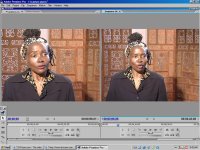
Also--I've attached a screen shot so you can see the problem I described about exposure/weird color in shots that are tighter versus wider shots. The image on the left and right have all the same settings, yet when I went wider in the shot on the right, you can see the yucky yellowish color the woman's face becomes. This happened in another setting as well with a different woman. I'm very perplexed by it.

I have another interview coming up next week and wd love to know what's causing this and how to correct for it so it doesn't happen again. Any light you can shed on this wd be appreciated.
Ruby
 
My bet for the screen shot is that no amount of powder will make the bright spots go away. I'd suggest the next time you shoot, not to have the key so hot on the face, it might have been good to bounce the key on a bounce card to get a less intense even glow.

Does the dvx have zebra options? if so adjust it, it might be set for a high amount over exposuer.
 
Hey Ruby,
Looking at your shot, i can tell your key is a bit hot, too much light is lingering around, including backlight... That spot on the forehead would definitely show zebra lines... With dark skin tones, softer and equal lighting on the face is utmost important...
 
Thanks to all for the feedback. Did either of you see what I mean about the slightly overexposed/yellowish color of her face in the wider shot, or am I just imagining it?

Yes, the DVX does have zebra options--I was using it at 85%, and, as I said, no zebras were showing up on her face, including the spot on her forehead. I thought it was strange too, because I could see the spot, and yet the zebras were not registering, so I figured it was okay and just used powder to tone the shine down. Why do you think the zebras weren't showing up?

Thanks for the tips about the lighting--I'll use a more diffuse key next time (don't have a bounce card).

Any thoughts about the other questions--like the ND filter message?

thanks a lot-
Ruby
 
btw great bounce card, foam core at your local walmart. what ever size you feel you need will work.

i think the yellowness is just your imagination.

as for what a lens flare is, the easiest way to see one, is to open a photo in photo shop, go to filters->render->lens flare.

"When a bright light source is shining on the lens but not in its field of view, lens flare appears as a haze that washes out the image and reduces contrast. This can be avoided by shading the lens."
- lens flare on wikipedia http://en.wikipedia.org/wiki/Lens_flareb
it always says it better than i can.
thats why some people have matte boxes as it sheilds out extra light.
 
Thanks a lot! Both for the feedback about my yellowish imagination and the lens flare explanation. Still not entirely clear how to shade the lens from the flare, but will work on that.

As for your bounce card suggestion, I actually have a big white card that I cut up to use for white balancing. I could bring it for bounce--always thought a bounce card needed more of a special reflective surface. Thanks again for the help.
Ruby
 
slightly overexposed/yellowish color of her face in the wider shot, or am I just imagining it
I think you are ;)
Why do you think the zebras weren't showing up?
You can switch to 2nd zebra (%100) if you are not sure and switch back to % 85. Also as Barry mentioned, how were you monitoring? Did you have a monitor? If you didnt have a field monitor, did you check your shot with the viewfinder?
Any thoughts about the other questions--like the ND filter message?
Your overall lighting is bright, and if you were on manual iris and open the aperture to around 9.6 momentarily camera may suggest to put ND 1/8. I bet message didnt last than a few seconds...
 
Thanks Volcano. I didn't have a field monitor--was just using the LCD screen. Didn't use the EVF--is it more accurate than the screen? And thanks for the suggestions re: zebras and ND filter message.
Ruby
 
Thanks for the link--it doesn't really look to me like the shot is suffering from lens flare--does it to you guys?
Ruby
 
Didn't use the EVF--is it moret accurate than the screen?
Yes it is...Always check & adjust exposure from the viewfinder, than switch to lcd for a more comfortable use...
 
Oh, okay, didn't realize that--thanks for the heads-up. One other question--where is the button that makes all the info on the display disappear?
thanks-
 
where is the button that makes all the info on the display disappear?
I dont think such a button exist...You can choose how much detailed info on the screen from your display set up(partial, on or off)
 
Right--you can set partial, on or off in the display menu, but, additionally, in Barry Green's book, he lists it as one of the improvements to the 100b and calls it the "Display Off Button." I just can't figure out where it's located.
 
Back
Top