
Navigation
Install the app
How to install the app on iOS
Follow along with the video below to see how to install our site as a web app on your home screen.
Note: This feature may not be available in some browsers.
More options
You are using an out of date browser. It may not display this or other websites correctly.
You should upgrade or use an alternative browser.
You should upgrade or use an alternative browser.
dvx100b FCP export dimensions?
- Thread starter odarden
- Start date

Jarek Zabczynski
Veteran
To keep the widescreen ratio you can use any size as long as it's 16:9
Common fame sizes are 854x480, 640x360.
You might read about the correct size being 853x480, but even numbers seem to work best with other applications and websites.
Common fame sizes are 854x480, 640x360.
You might read about the correct size being 853x480, but even numbers seem to work best with other applications and websites.

If you use 854x480 or 640x360, or any other dimension which works out to 16x9, you must use square pixels (pixel aspect ratio 1.000). Anything else and the picture will be distorted.
If you use 854x480 or 640x360, or any other dimension which works out to 16x9, you must use square pixels (pixel aspect ratio 1.000). Anything else and the picture will be distorted.
Thanks David, so you mean in FCP under Sequence Settings the PAR should be "Square" and not "NTSC - CCIR 601 / DV (720 x 480)"?
Last edited:
In your render properties, where you set the dimension, frame rate, etc., you want to render to. Standard NTSC Widescreen properties are 720x480 with a pixel aspect ratio of 1.21. If you're doing 854x480 instead (or 640x360 or anything else which comes out to 16x9), you need to set it to 1.000 or you will get a picture that's stretched too wide.
I don't know what settings would have a pixel aspect ratio of 0; that's mathematically impossible.
I don't know what settings would have a pixel aspect ratio of 0; that's mathematically impossible.
Hey David, sorry, I was editing my post while you were replying =/. Check out my edited post above and see if that is correct.
Also in the export settings (export > QuickTime conversion) there is no option to set the PAR. Only an option for 720 x 480 16:9 which makes the dimensions 853 x 480
Also in the export settings (export > QuickTime conversion) there is no option to set the PAR. Only an option for 720 x 480 16:9 which makes the dimensions 853 x 480
Last edited:
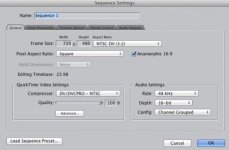
Jarek Zabczynski
Veteran
Sequence settings and export settings are two different things. Leave sequence settings alone. Change your Pixel ratio back to where it was was for DV.
What exact steps do you take?
What exact steps do you take?
After shooting 24pA squeeze footage I capture at 29.97 using DV NTSC 48 kHz Advanced (2:3:3:2) Pulldown Removal. Then I edit the footage in a 23.98 timeline with my settings mirroring the link below:
https://discussions.apple.com/message/11667538#11667538
For exporting I use: EXPORT > Using QuickTime Conversion > Options > Size > under Dimensions I choose NTSC 720 x 480 16:9 > Preserve Aspect Ratio is UNCHECKED
Last edited:
I don't have it in front of me, but can't you go into Size>Custom and set it there?
If it's 720x480, then you don't want square pixels. You want 1.21. I'd pretty much make sure that Preserve Aspect Ratio is checked.
Why not just export it the way you have it and see if it's what you want? You're probably overcomplicating it.
If it's 720x480, then you don't want square pixels. You want 1.21. I'd pretty much make sure that Preserve Aspect Ratio is checked.
Why not just export it the way you have it and see if it's what you want? You're probably overcomplicating it.
Hey David, yes, I can set a custom size, and my original question was "what should that size be?".
Exporting using 720 x 480 16:9 looks correct and creates a file that is 853 x 480. If Preserve Aspect Ratio is checked then it puts black bars on the sides and it is not widescreen.
Where I get confused is when you talk about 1.000 and 1.21 as I have no idea where to change that.
Exporting using 720 x 480 16:9 looks correct and creates a file that is 853 x 480. If Preserve Aspect Ratio is checked then it puts black bars on the sides and it is not widescreen.
Where I get confused is when you talk about 1.000 and 1.21 as I have no idea where to change that.
Exporting using 720 x 480 16:9 looks correct and creates a file that is 853 x 480.
Then that's all you have to worry about. It did everything automatically.
genrerolla610
Member
if you're shooting 24p when importing you want to use advanced pulldown removal, if you haven't already