DVCPROHD Archiving

Hard drives have a failure rate of around 2% per year. I don't know that I'd call that "notoriously fragile and unreliable";


Just 2%? Over a period of 12 years I had 18 drives fail out of 40+. Including half a RAID setup where 4 drives died within a year, killing the whole RAID.

Recently had a LaCie D2-500GB die, this time it turned out to be the controller, also had a couple of Seagates die within a day.

Controller are unreliable as well, had a RAID controller die on me and replacing it with a identical controller only gave me a nice fresh empty RAID. Because only my personal photo archive was not fully backed up on external drives / DVD I only lost a month of photos. Imagine this to be your running production close to a deadline... :Drogar-Dum(DBG):

It is one of the reasons I don't like P2 or any flash memory based work flow (yet). The new HDV tape + Compact Flash Z7 handycam from Sony is a cool idea. To bad its only HDV.

Tapes you can splice like film I had Beta tapes break in the past but with a bit of gaffer (it was an emergency! lol) we got it to work. Recently captures a bunch of 23 year old BVU/U-matic tapes to see some of the old stuff I made. They still look good, even Video8 tapes from 18 years ago had zero dropouts and looked OK. So yes tape for the shooting and backups and perhaps in the future Blu-Ray or XDCam discs? Sony EX workflow looks pretty solid if you backup to XDCam discs.

Important stuff like projects should be kept on the internal drives, at least they have some sort of monitoring system.

Believe me, you feel really stupid when you take out your backup drive, neatly packed and kept safe for a year only to find out it dies the second you turn it on.

Used or unused, electronics degrade over time and this is the main reason why the two drives back idea will never work: two drives four drives, whatever number of the same age / model / make will die around the same time.


Backup the shots to tape, backup the projects to CD and DVD or to a DAT tapestreamer or don't produce anything you need to keep for years :Drogar-Thinking(DBG
(doh) And this is without getting into the whole single location backup discussion ....


:bath:
 
Since 2002 I've never had a drive fail. I've got six sitting on the shelf as backups and four others I use regularly. Some are partitioned and formatted exclusively for Mac, a couple are exclusively PC, and some are dual. They are all external.

I don't use any fancy controllers or anything, RAID or otherwise. I guess like anything, the more elements you introduce into any process, the likelihood of errors/failures increases.

Sure it means taking a little more time whenever I need to use/access one of them. But there's something to be said for keeping things simple.
 
Well like I said 4 failed in a RAID, the other 14 just died in daily use without any RAID or other complicated stuff involved. Most of the drives that failed where Maxtors by the way, some of them Seagates and two Western Digital.

So far no Hitachi have failed me but I do know people who had IBM drives die a miserable death. LaCie seems to have put a lot of Maxtor drives in the older 250GB models, both of those died on me just by doing nothing. (do harddrives die from boredom?... and is that a unicorn i see?)

Anyway, for me it has become more a question of beating the odds then a "harddiscs are safe if you treat the right" because they are not. All the drives that died on me where in high end casing / specially cooled servers hardware housings. None of them where used in transport, in fact those drives all still work. Including the WD one I dropped 6ft. And the worst part is they all died without any warning.

It is not a question of who is the lucky one, it is just a question of: a dead drive will loose ALL the data on it. So unless you want a nice big $2K bill to recover your projects take this into account, especially with what I call the "virtual" workflow becoming more common.

Already had to reshoot a P2 production because an entire RAID blew up and the editor had not made a backup of any running projects.

I have to admit I dropped all RAID type configurations years ago and just stick to SATA or FW800.

The only practical tip I can give: always have 2 or 3 copies of your current project s until it is absolutely finished. There really is no excuse you can give if you do loose a running project.
 
I think there is something to keep in mind also when using hard drive, if you are in a constant usage of hard drive, the chance of it to fail increases compared to using a hard drive to back up the file and store it away...

I have backed up files on numerous hard drives, and store them carefully away on a shelf. When I do need to go back and grab the data, I'll install the hard driver, carefully, to an external enclosure and retreat the info and then file the drive away...

This mean my drives were never being part of a constant usage format, which will, of course, prompt for failure greater a drive that is sitting on shelf waitin for data access only.

I do have drives that dies on me, but they were drives that has been in constant usage, and knowing that my house's electric current isn't the greatest, I am forgiven to the drives I use. And for archieve (without banging the drive around or contantly using the drive like a normal drive)... THIS archieved drive can last for a very long time. (aka over 10 years). Compared to DVD-R that I've used, I have more luck accessing archieved data with the IDE 250meg hard drive from 15 years ago than with the DVD-R that was burnt 4 years ago.
 
I think we can all agree that everyone has had differing experiences with HDs. Some of us hae been repeatedly left high and dry and some of us have had good experiences with little to no failures.

But the bottom line is that relying on hard drives is not a proven and effective long term storage strategy. Having multiple copies of your material IS a long term proven strategy.

Dan
 
You should have multiple copies regardless of what you store it on, yes.

(And the "2%" quote is not me declaring it, that's me interpreting the results of the Google study.)
 
I feel compelled to interject some facts into the conversation.

It's simple to see that those of us archiving relatively small amounts of data (<10 TB in the span of a few years) will tend toward HDD while those of us with larger amounts of data will tend toward LTO.

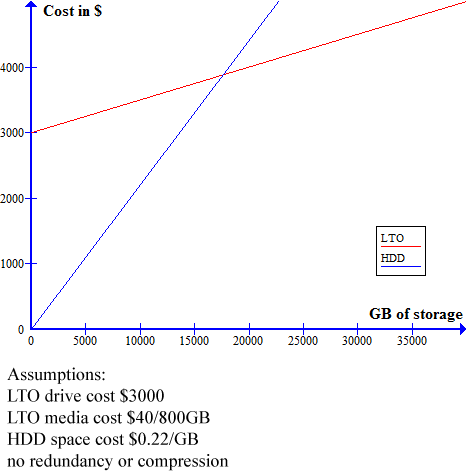
storage-cost-graph.png


Third-generation LTO (800GB) drives vary widely in price, external HDD vary from .22 to .30 or so per GB. I gave each product the lowest price I could find. This assumes you own the controller for the tape drive already, that could add a few hundred dollars more.

If the comparison was apples-to-apples, the cost is the same for roughly 17 TB of storage. Or, for duplicate data, the costs intersect around 9 TB (200 hours of DVCPro100).

In support of the apples-to-apples comparison, random access times should not be important for backup, and transfer rates are remarkably close.
The only other worthwhile consideration is failure rate, which, with duplicate data offsite, is reasonable for most of us.

Failure rates beyond five years should be thrown out. At historic rates, in five years a 1TB drive will cost $50 or less. Moore's law only applies to transistors. HDDs double in density roughly every 12 months.

Here's an excellent whitepaper on this subject.
 
18 drives fail out of 40+
jeezlouise! what are you doing to these things?!?!? i think the primary common denominator in that situation is the operator! what the heck did you do? kill a nun in a prior life or something? hahahahaha! just kidding man ; )

i obviously dont know specifics of the systems of the folks here but over time on this and various other forums i see a few common denominators for those who experience higher than average drive failure:

1. many of the folks are "self-styled drive engineers" and cobble together their own home made RAIDS. though ive seen many excellent home-built units and its not rocket science. there are easy ways to poorly construct a home made RAID that is sure to fail sooner than later

2. the words "LaCie" and "western digital" come up a lot. in three different forums these two manufacturers lead the list of failed products. there is logic to defend that they are also the highest volume manufacturers so a higher occurance of failure would only be mathematically logical. maybe, but i doubt it. ive owned two lacies and both failed on me in a single use and i only used them to move data from one computer to another. twice bitten, thrice shy in my book.

nearly every drive ive ever used has been from the following 3 dealer/manufacturers:
- promax
- owc
- caldigit.

and NONE of those has ever given me even a hiccup.

from what ive seen, its a very dicey practice to buy a production drive from a big-box, home entertainment, "joe average consumer" computer or office supply store.

3. handling and placement. ive been watching over the years. people do some fundamentally dumb-**** things with their drives.
- ive seen a few folks who when they move a portable drive just unplug it from the wall and the computer and wrap all the cables around the drive with power and usb/firewire/sata/ect still plugged into the unit. doing this torques the plugs which could obviously compromise the connectors and im certain a hot power supply still emits some degree of EMF or some such thing that cant be good next to a drive mechanism.
- CELLPHONES! ever see someone lay their phone next to their laptop, drive, cpu?
ever hear that buzzing in your stereo or tv just before a call comes in? obviously so does your electronic equipment. for the love of God, keep your cellphone in your pocket or across the room. there are numerous documented issues of cellphones wreaking havoc on computer gear

4. karma/aura/voodoo. in reference to my initial comment to the 18 failures in 40+ fella. there ARE people who just break computers. i have a buddy from college who screwed up every machine he ever used. and i watched him. he didnt do anything weird. but every machine he ever touched would go to some degree haywire. people do emit electrical energy and its very possible that some folks just "interfere" somehow with hard drives? heck. my dad kills every watch he wears just by wearing it a few weeks...

ok, i'll get off my soapbox now ; )
 
Last edited:
OMG that must be it: I just do not know how to turn on computers without breaking hard drives!! :badputer:

...... and you found all this out without facts or even asking what happened, you are my hero eeh fella guy.. :violin::engel017:

All those years I thought it was a batch of 8 bad Maxtor drives (factory recalled 1 month after they died on me) replaced by 4 double size Maxtor drives equally bad, they took longer to die because they where never used them in the NLE setup.

But nope all wrong, it was kaarma, voodoo and bad walnuts and must have killed a non, ran over an old lady or insulted mother Theresa instead.

So despite the two batches of bad Maxtors that leaves 6 drives in 12 years, I doubt you have to kill nuns to get this number but your free to try.

Anyway, still does not change the moral of the story:

Even a batch of 8 drives can all be bad, can as in its possible, multiple backups are GOOD single drive backups might be taking more risks then you should. :Drogar-Shock(DBG):
 
What factors can destroy data on HDD when you just use it for store in a shelf for archiving - let's say a clean place with not too much changing temperature and humidity?


If you don't spin up your drive on a regular basis, one of the things that can happen is the grease on the spindle will dry out. The next time you try to spin it up, you will hear a very disturbing chattering sound, then the drive WILL fail.

If you are using drives placed on a shelf, set aside time every 3 months or so to write a 1gb+ file to it. This will spin the drive up for a period of time, and will also (hopefully) alert you to early problems.
 
Last edited:
Lots of wonderful information in this thread. Thanks for everyone for contributing; I've been looking for a good discussion about data storage for video, and this is it. A couple conclusions I've drawn so far from reading:

1) A hard drive is a decent, cheap way to store small amounts (<10 TB) of data. With a 2% failure rate, they're not perfect, but they're certainly good enough.

2) A good way to make them better is data redundancy: multiple copies on multiple hard drives, or multiple storage methods.

3) An even better way is to monitor the drives for errors and immediately migrate to another drive when an error occurs.

An ideal solution for <10 TB seems to be a system where data is kept stored on multiple drives -- such as a RAID-1 array -- without getting much access, but is periodically checked for errors. When an error occurs, it alerts the user, who would swap out the drive and rebuild the data. The chance of failure would be the same as two drives failing (or more for different systems), and since the array isn't accessed constantly, this chance would be made small enough to be virtually impossible. Combine it with off-site backups, and you have a pretty decent data backup system.

Although more expensive (money + the occasional power consumption), I think this system would be better than storing hard drives on a shelf because it checks for errors either weekly or monthly and migrates data if it finds any.

Now, to find a product that actually does this.
 
Can I ask exactly how people are storing their drives when they refer to 'putting them on the shelf' ? Are they in enclosures, anti-static bags etc.
 
External enclosures sounds like the way to do it, but it also sounds like some people are just sticking internal hard drives naked on a shelf somewhere, especially if they're just using a USB to SATA/IDE cord to connect to their computers.
 
I am doing both. I checked some bare drives (which were stored in the anti-static bags in a cool, dark environment) from 2002-2004. Out of ten drives I tried to boot up to "exercise" and to look at some old media I had on them, two of the drives crashed and burned. I am telling you, storing your media on drives is a crapshoot.

I had an ex-client's stuff on one, fortunately he left that company for another one so no big deal but one of the drives had some really valuable footage on it. My own fault for not archiving to a better format. Fortunately I have tape for all of the material on these drives but these drives also had FCP projects, graphics, music and all of the digitized media.

If you think hard drives only have a 2% failure rate, you are deluding yourself, it is much higher.

Tape looks like a better and better long term media storage format, whether camera masters, edited masters or LTO tape. Drives crash and burn all of the time.

So far, all of my P2 media is living on regular hard drives, not bare drives. So far, no failures but I anticipate that there will be some soon. I really need to buy an LTO drive and really archive this stuff. I have two copies of most of it, one copy on my working RAID and one on these external drives.

Dan
 
I have the opposite experience.

I have drives going back to 1999, and they all work (searched for archived footage last month). However my DV tapes (Panasonic Master) from just 5 years ago have dropouts.

I used to collect and restore old computers (minicomputers), and rarely (never, actually) would I have a problem with an old drive unless that was the original problem. And these were massive Winchesters (5 megs!) -- some from the '70's.
 
Regardless of what you save to I think the old saying, "If it's only saved in one place it's not saved at all" applies.

-A
 
I'm interested in LTO3/4 as a backup medium vs hard drives.

Since LTO is tape based, I do not think it has random access? I might be wrong. What if I want to grab a file from a specific area of the drive? Does it spin up and find it for me?

Also about LTO, is there a eSATA/FireWire/USB2.0 version instead of SCSI or SAS?
 
The LTO3a has a GIG-E ethernet port on it, which means ANY computer on your network can reach out and touch it. MUCH better than direct attachment.
 
Back
Top