DVCPro50 - wrong Aspect Ratio outside of FCP

MaxThomas

Well-known member
I shot a project yesterday on a Panasonic HPX300, DVCPro50 anamorphic. Imported everything today through Log and Transfer in FCP 6.0.5. Footage plays and looks great in FCP.

If I open one of the captured clips in QuickTime, however, it seems to be reading the pixel aspect ratio incorrectly and displays them as 1026x480 (a frame aspect ratio of 2.14:1) rather than the correct 853x480 for 16:9. If I bring them into After Effects, they have the same problem, except I can use Interpret Footage to correct it manually from the 1.46 it reads to the 1.21 AR it should be.

In the FCP browser, the clips are listed as NTSC - CCIR 601 pixel AR with Anamorphic checked. After Effects reads the files as D1/DV PAL Widescreen (1.46). I've never cut PAL footage in FCP, and no settings appear to be set to PAL.

This happened on a previous project, but I was doing the post so I could fix it myself. This time, I have to hand the raw QuickTime footage to the client and I'm afraid of dealing with the complaints that everything is stretched. Has anyone encountered this problem before, and if so, is there a way I can batch process (or recapture) the footage to apply the correct pixel aspect ratio (without re-encoding/losing a generation)?

Thanks,
Max
 
Can you provide some screen shots- that sounds all weird.

Noah

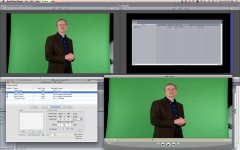
Not sure what specifically you want to see, but here's one of FCP and QuickTime showing the difference.

Top left is how FCP displays it. Straight from the bin, not conformed to sequence settings or anything. Top right is the bin with the AR properties. Bottom right is how QuickTime displays the same file, no settings changed. Movie properties displayed to the left showing what it thinks is the native video size.
 

Attachments

  • QT_FCP_AR.jpg
    QT_FCP_AR.jpg
    118.7 KB · Views: 0
Try Apple-J - Presentation - Conform Aperture

That does change the aspect ratio, but none of the options correct it.

The "Clean" setting is the default, looks like the screenshot above.
"Production" actually increases the pixel AR slightly to a frame size of 1049x480.
"Encoded Pixels," "Classic," and unchecking Conform Aperture entirely are all just square pixels (720x480 display size).
 
QT is horrible at properly displaying non-square pixels. In QT you could try manually changing the settings for "scaled size" to 853x480 but I don't know if that will mess up how FCP reads the footage though.


-A
 
QT is horrible at properly displaying non-square pixels. In QT you could try manually changing the settings for "scaled size" to 853x480 but I don't know if that will mess up how FCP reads the footage though.


-A

That does make QuickTime display it correctly, but the Movie Properties still list the "Normal Size" as 1025.5x480, while Finder and After Effects read it as 599x480 with the same PAL 1.46 pixel aspect ratio. FCP, with the same file, also displays it as 599x480 but with square pixels and the anamorphic box checked (stretching out to something just shy of the original 16:9 files).

I'm not sure what else to do... I can go through and uncheck the Conform Aperture setting in each file, which makes QuickTime display it as 720x480 with square pixels, while FCP still reads it properly as NTSC-CCIR601/Anamorphic. I can deal with that, except After Effects still reads the PAL 1.46 pixel AR, stretching it out to 1050x480. Since I don't know what the client will be editing with, this isn't really ideal.

Is this some kind of metadata issue with this camera? I can't be the first person to capture DVCPro anamorphic from a P2 card and open the files in QuickTime (or send them to After Effects).
 
No clue- should not be anything like that frame size. Show your export settings. Probably something wrong there.

Noah
 
No clue- should not be anything like that frame size. Show your export settings. Probably something wrong there.

Noah

Which export settings? These are the original capture files, as created by FCP from the P2 card contents.

If I do export a clip from the FCP bin, (either with Current Settings or DV50 NTSC Anamorphic) the exported file has the same issues.
 
Ok well I've never seen a clip at that frame size so somewhere you have a setting wrong. How about your sequence settings then.

Noah
 
Ok well I've never seen a clip at that frame size so somewhere you have a setting wrong. How about your sequence settings then.

Noah

The files were never on a sequence, they're just the original raw footage files, pulled from the Capture directory. In FCP, they display and handle exactly as they should, stretched to 16:9, no sign of any issues. When I open one of those same footage files in QuickTime or After Effects (or Finder QuickLook), they display at either 1026x480 or 1050x480, with the issues described above.
 
Ok what happens when you drop them into a 720x480 16:9 Anamorphic sequence and reset the motion tabs.

Noah
 
Ok what happens when you drop them into a 720x480 16:9 Anamorphic sequence and reset the motion tabs.

Noah

They still look fine, no issues at all with the files within FCP. It's only when trying to use them outside of FCP that they're distorted.
 
Well then wash them through the sequence in FCP at 720x480. But again this should not be happening if you're doing everything correct...

Noah
 
But again this should not be happening if you're doing everything correct...

Of course, that's why I'm here ;)

Well then wash them through the sequence in FCP at 720x480.

I can export the clips from the Sequence (or from the Bin) but it only fixes the problem if I Recompress All Frames and lose a generation, which I'd like to avoid (although I may not have a choice since I have to deliver this tomorrow).

Here's the history of each footage file; there's not much room for error:
- Shot on Panasonic HPX300 in DVCPro50 30p anamorphic
- Connect camera to computer via USB, mount P2 cards
- Open FCP, create a new project, set the capture scratch.
- Open Log and Transfer, go through footage and rename clips
- Select all, Add to Queue. Transfer settings are derived from the source footage.
- Open a captured file in the FCP Viewer, looks fine. Displays at the proper 16:9 aspect ratio.
- Switch to finder, navigate to that same clip in the capture scratch, open it in QuickTime
- QuickTime displays the file stretched as seen in the previous screenshot

Since the only capture settings when using Log and Transfer are pulled automatically from the P2 footage, that's why I'm thinking it might be some bug with this particular camera. The 300 can't shoot PAL, though, so I don't know where the PAL aspect ratio would be coming from.
 
Well anyways as mentioned earlier in this thread QT often doesn't always display the proper resolution so if it looks fine in FCP don't worry about it. When you drop into another app just reset the frame settings to 720x480 and you'll be fine.

Noah
 
That's fine if I'm doing the post, but it's hard to tell the client, "Here's the footage you paid for, it looks all messed up but don't worry about it."

Looks like I'll just transcode everything for this project and see if anyone in the HPX300 forum can run a quick test to determine if it's a camera issue so I can avoid it on future projects.

Thanks for the help.
 
Noah,

I wouldn't be so sure that it's operator error. Where I'm at we generate about 4-5TB of DVCPro HD and DVCPro 50 a month and sometimes gremlins get in and just mess things up. 999/1000 our setups work perfectly but occasionally we'll generate a file that is corrupt in some way and doesn't display and/or playback properly.


-A
 
This isn't one out of a thousand, though, this is 100% of the footage from 2 projects shot with this camera at these settings and brought in through FCP.

Once I send off this project, I'll do some more controlled tests with different settings to see if anything affects it. The only possibly non-standard setting I can think of is that it was shot at 30p (2:2 pulldown over 60i) rather than native 60i, but I can't imagine that would cause this kind of problem.
 
I realize that it's all of your clips. I'm just saying that not everything that goes wrong is due to user error. Sometimes things, especially when it involves computers, just go wrong.


-A
 
Back
Top