As many of you are aware, one of the wonderful things about the 200 is that you can shoot a segment on the P2 card in HD, and then dub that footage directly to your internal tape in SD (pg 86 manual). This works great as an example if you're shooting an event in SD but would like to add some slow motion in the overcrank mode. My question is this. Since all HD is 16x9, when I do the down conversion to tape which is now SD, does it maintain the same aspect ratio? If so, how would I change that to 4:3 in FCP?

Navigation
Install the app
How to install the app on iOS
Follow along with the video below to see how to install our site as a web app on your home screen.
Note: This feature may not be available in some browsers.
More options
You are using an out of date browser. It may not display this or other websites correctly.
You should upgrade or use an alternative browser.
You should upgrade or use an alternative browser.
Down converting HD to SD
- Thread starter ericcosh
- Start date
Barry_Green
Moderator
Yes it maintains the 16x9. If you want to edit 4:3, you'd have to letterbox your footage, or do a center-extraction blow-up (which would likely look awful... letterboxing would probably be the preferable choice)...

Niels Neeskens
Well-known member
I shot 720P/25 in 50 fps and dubbed this to dv. I thought it would appear in slow motion on dv, but it didn't' am I as a newbie missing something here? Thanx
Niels
Niels
Niels Neeskens
Well-known member
Thanks Eric, I am going to try it now...
Niels Neeskens
Well-known member
It works great! Thanx

esperman
Well-known member
actually in FCP, when you put 16X9 footage in a SD timeline, FCP automatically letterboxs the footage. All that is is shrinking the footage to 75% original size to fit in the SD square frame.
If you want 4:3 for whatever reasons, just go into motion tab in canvas, and just have the clip display at 100%. It will crop some of the picture (mainly the sides) but this does not affect image quality. One of my clients insists on fullscreen.
No big deal. we refer to this as pan and scan.
If you want 4:3 for whatever reasons, just go into motion tab in canvas, and just have the clip display at 100%. It will crop some of the picture (mainly the sides) but this does not affect image quality. One of my clients insists on fullscreen.
No big deal. we refer to this as pan and scan.
Barry_Green
Moderator
They're not. DVCPRO50 looks better than in-camera downconverted HD.
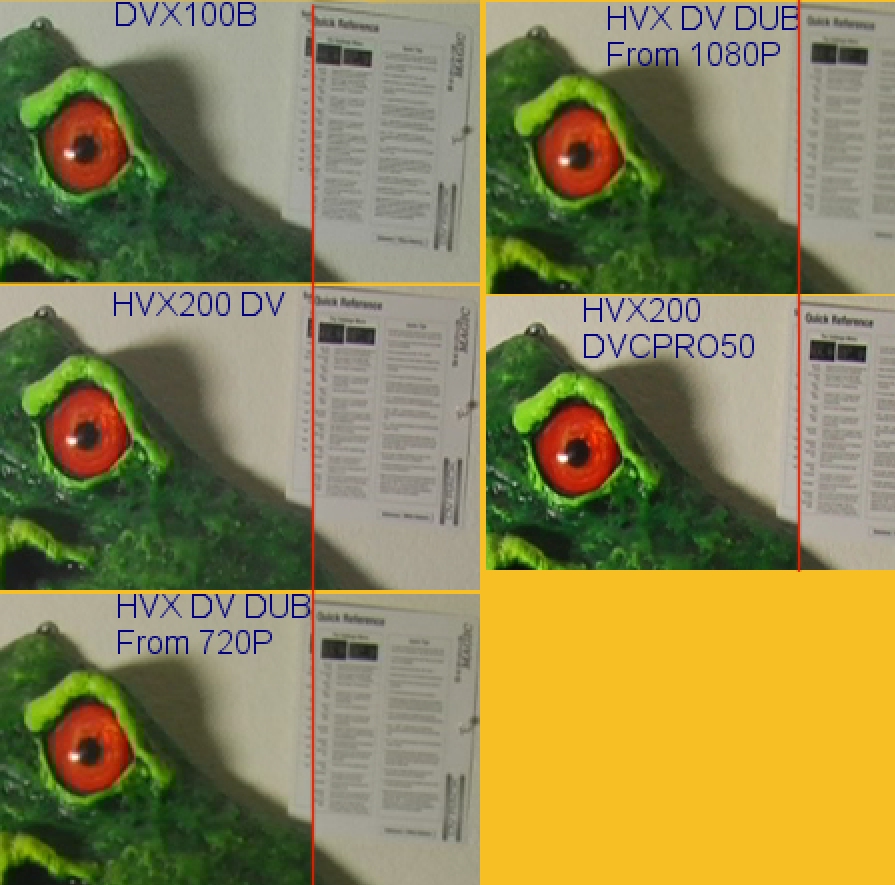
The problem is that the downconvert goes to DV, which means 4:1:1 color sampling.
If you downconvert outside of the camera, you can get a cleaner image that is more like the DVCPRO50 image.
But in-camera DVCPRO50 is the best of the bunch, even in-camera DV looks better than the downconverted HD.
The problem is that the downconvert goes to DV, which means 4:1:1 color sampling.
If you downconvert outside of the camera, you can get a cleaner image that is more like the DVCPRO50 image.
But in-camera DVCPRO50 is the best of the bunch, even in-camera DV looks better than the downconverted HD.
Niels Neeskens
Well-known member
Yeah, me neither. Then I am just gonna use the 4 gb card (till bigger p2 card or cineporter) only for downconverting slow motion to dv. Thanx!
Niels
Niels
The HVX is a "Cheap", as in good value, standard definition DVC-pro color space camera. Meaning you can do green screen work 10,000 times easier than regular DV25 standard def that the DVX, and all mini DV cameras, shoot and capture in. Actually, i don't think that I have ever scene a really good composite pulled from DV25, acceptable to some clients, but not really clean.
That extra color space makes everything else better to. Skin tones have more depth and edges roll off smoother. I think of it like the difference between VHS to Mini DV. Everybody said Wow! except for the guys who were shooting Digibeta, and rightfully so.
Plus, the HVX is HD and do the over/undercranking that everyone has beeb playing with here. So you can experiment with it as your time and clients dictate.
--
Rob
That extra color space makes everything else better to. Skin tones have more depth and edges roll off smoother. I think of it like the difference between VHS to Mini DV. Everybody said Wow! except for the guys who were shooting Digibeta, and rightfully so.
Plus, the HVX is HD and do the over/undercranking that everyone has beeb playing with here. So you can experiment with it as your time and clients dictate.
--
Rob
To add to what Rob just said, there are many reasons for having the HVX over the DVX. First off, the quality of DV over the DVX. Just to have a camera that can do HD, DVCPro50 (a major plus like Rob mentioned with it's 4:2:2 capabilities) Native 16x9, and of course the quality that it delivers in Mini DV. I have several of my friends who own the DSR300 and the HVX and they tell me it's amazing how close those two cameras match.
Put all of things together with the fact that if your client needs something in HD, not HDV, you can do that job.
Simply put, this is a great camera.
Put all of things together with the fact that if your client needs something in HD, not HDV, you can do that job.
Simply put, this is a great camera.
ericcosh said:To add to what Rob just said, there are many reasons for having the HVX over the DVX. First off, the quality of DV over the DVX. Just to have a camera that can do HD, DVCPro50 (a major plus like Rob mentioned with it's 4:2:2 capabilities) Native 16x9, and of course the quality that it delivers in Mini DV. I have several of my friends who own the DSR300 and the HVX and they tell me it's amazing how close those two cameras match.
Put all of things together with the fact that if your client needs something in HD, not HDV, you can do that job.
Simply put, this is a great camera.
ok. the DVCPRO 50 captures in 4:2:2, but the downconvert goes back to SD. So, you are not going to keep the quality if you go to SD-DVD? From Barry's example, I don't see a big difference. Again, this is mpeg2, not h.264
TotalX, when going to DVD There are several benefits:
1) Keying works better (less compression, more color information)
2) Color corrections are nicer (fewer compression artifacts)
3) Converting to MPEG2 (in NTSC land) does not require color interpolation. Since MPEG2 is 4:2:0 and NTSC DV is 4:1:1 - they don't have the same arrangement of color information - some interpolation has to happen. This isn't a problem when working with 4:2:2 material (or 4:2:0 material either for that matter).
1) Keying works better (less compression, more color information)
2) Color corrections are nicer (fewer compression artifacts)
3) Converting to MPEG2 (in NTSC land) does not require color interpolation. Since MPEG2 is 4:2:0 and NTSC DV is 4:1:1 - they don't have the same arrangement of color information - some interpolation has to happen. This isn't a problem when working with 4:2:2 material (or 4:2:0 material either for that matter).