
Hey Guys, greetings from Chile!
So i'm about to start shooting a project with the Sony F3. I've worked with the camera before on a feature film. On that ocassion, the camera we rented had the paid upgrade that allowed us to record at 1.5G YPbPr 422 & S-Log via SDI output into an Atomos Samurai on 10-bit ProRes HQ. I really wanted the dynamic range that setting gave me, cause we basically had a guerrilla style shooting, always working in dark interiors with hot windows in the frame, struggling to get the most information possible.
NOW my situation is different. Yesterday i was told that I'll be filling in as a DP on a project that starts shooting tomorrow. They have an external recorder, Blackmagic's Hyperdeck Shuttle 2, which is capable of outputting 10-bit 422 Prores HQ. The camera is also the Sony F3. The difference this time is that the camera only has the free firmware update, that allows me to use the S-log Gamma curve to record internally, but only lets me record 1.5G YPbPr 422 & Video via SDI output.
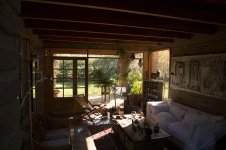

The first location where we'll start shooting is a house that has big windows all over the place; and the director told me that he would love to be able to "see" outside the windows without blowing them up. I don't have GEL ND's to put on the windows, but i have a couple of HMI lights (ARRI 1.2K PAR and 575 PAR) that can help me raise up the light levels inside the room, so i can try to see more detail on the outside (about 2 and a half stops difference).
MY QUESTIONS ARE THIS:
Which setting will give me the most latitude possible?
I was thinking about setting the Matrix to Cinema and the Gamma to S-Log, but i don't know if that settings have any influence over the "1.5G YPbPr 422 & Video" SDI output signal to the Hyperdeck.
And if so, is it good to match the Cinema Matrix with the S-Log gamma?
I'll appreciate any help
Thanks in advance!
Nicolas
So i'm about to start shooting a project with the Sony F3. I've worked with the camera before on a feature film. On that ocassion, the camera we rented had the paid upgrade that allowed us to record at 1.5G YPbPr 422 & S-Log via SDI output into an Atomos Samurai on 10-bit ProRes HQ. I really wanted the dynamic range that setting gave me, cause we basically had a guerrilla style shooting, always working in dark interiors with hot windows in the frame, struggling to get the most information possible.
NOW my situation is different. Yesterday i was told that I'll be filling in as a DP on a project that starts shooting tomorrow. They have an external recorder, Blackmagic's Hyperdeck Shuttle 2, which is capable of outputting 10-bit 422 Prores HQ. The camera is also the Sony F3. The difference this time is that the camera only has the free firmware update, that allows me to use the S-log Gamma curve to record internally, but only lets me record 1.5G YPbPr 422 & Video via SDI output.
The first location where we'll start shooting is a house that has big windows all over the place; and the director told me that he would love to be able to "see" outside the windows without blowing them up. I don't have GEL ND's to put on the windows, but i have a couple of HMI lights (ARRI 1.2K PAR and 575 PAR) that can help me raise up the light levels inside the room, so i can try to see more detail on the outside (about 2 and a half stops difference).
MY QUESTIONS ARE THIS:
Which setting will give me the most latitude possible?
I was thinking about setting the Matrix to Cinema and the Gamma to S-Log, but i don't know if that settings have any influence over the "1.5G YPbPr 422 & Video" SDI output signal to the Hyperdeck.
And if so, is it good to match the Cinema Matrix with the S-Log gamma?
I'll appreciate any help
Thanks in advance!
Nicolas

