FS5: Does Slog3 clip at 94% in HD with the fs5?

lagmandokk

New member
Hello.
I am a bit confused about the use of slog 2 and slog3 with Sony FS5 in HD. In Doug Jensen`s masterclass he said that slog 3 clips at 94IRE, and that rules it out for his use. This is for 4K and 8 bit. But unclear if this also was valid in HD.
Then I listen to Alister Chapman who says this is only a 4K-problem, and that it does`t apply in HD. In HD we have 10 bit and everything is great.
So these two seem to agree.

Then I read the “Ultimate Exposure Guide for Sony FS5” by Dennis Hingsberg, and he also says that slog3 clips at 94% IRE. But this is under a section for 10 bit slog image, so it must apply to the HD-picture and not the 4K.

So I am confused. Very likely I have misunderstood something. But could you help enlighten me?
• Does slog3 clip whites at 94% in HD? What does this practical mean? I understand it as everything over is lost.
• Does not this make it unfit to use in high dynamic situations where you will grade in post?
 
I believe what you're seeing is an issue of whether your image is making the best use of the container.

If you think of Slog3 (and Slog2) as buckets. You can fill each bucket with light and your camera can only fill the Slog3 bucket to 94IRE (to be honest i think it's less than that). The sensor is good enough for that amount of range. You can't do anything about that.

When you have an 8 bit signal, as in 4K. That means you have 255 code values to play with. Now i've never ripped apart the FS5 signal to know what the curve is really like but generally with Slog3 you have raised blacks to start with. So instead of 0 being black it's usually around 20, to 24. If your Slog3 container is not being filled to the top (and if you say 94IRE out of 109IRE then that's about 220 code values.) So your image can use up 200 code values out of a possible 255. That's quite a reduction so when you say 8 bit it's not even close to 255 code values.

In HD the percentages are the same but your values would be 80 to 880 instead, that's 800 possible tonal values and therefore plenty for the image.

That is what everyone means.

I don't know whether it's possible to use Slog2 on the FS5, but for 4K certainly i think that's a better choice. You still have raised blacks but the highlights should fill the whole of the slog2 bucket (which is smaller than the slog3 one). In the A7x series of cameras Sony tweaked the log curves and actually have them lower than 20, more like 16. Which does make a difference in 8bit!

If this didn't make sense let me know.

cheers
Paul
 
S-LOG3 always clips at 94 IRE. It doesn't matter whether it is 4K, 2K, HD, or whatever. S-LOG3 is S-LOG3 regardless of the codec or camera being used. This is easy to see for yourself if you hookup a WFM to the camera's output.
 
Hi, the 10-bit table is to illustrate how data is distributed across slog3 and the clipping at 94% is indeed a separate matter. The reason slog3 clips at 94% is because the rest is reserved for cameras that will be higher than 14 stops dynamic range. Ie. Slog3 will be able to support more dynamic range capable cameras in the future.

Cheers and hope the FS5 guide has been helpful overall.
 
S-LOG3 always clips at 94 IRE. It doesn't matter whether it is 4K, 2K, HD, or whatever. S-LOG3 is S-LOG3 regardless of the codec or camera being used. This is easy to see for yourself if you hookup a WFM to the camera's output.

The Slog curves are log, they don't roll off in the highlights and so the more you put in eventually you should clip.

Same for Slog2 (and any other log curve)

So the curve is flat at the base, so there's is a level at which is 'black', usually around 20-24 in 8 bit but as you pour more light in you should get to a point where you clip the container at the maximum value the container can hold.

I'm looking from the perspective of the actual code values in the files and what i'm saying is that i don't believe the FS5 has enough latitude to fill the Slog3 curve, just like the A7x series of cameras cannot. And if you record in Slog2 vs Slog3 then you will get more tonality in the Slog2 version simply because it is using more code values.

But are you saying that if you stuff 20 stops into an Slog3 curve (which can only hold 14.5 i think so you'd be filling the container 100%) then the highlights will still clip at 94IRE? If that's the case then the application you're looking at which is normalising it to 94IRE.

I confess i'm more on the vfx/data side, looking at values than the video side looking at IRE values (which have no real meaning in post these days)

cheers
Paul
 
mC8E5Zt.jpg

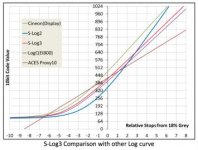
I don't know whether this image shows correctly but see that the log curves have no rolloff in the highlights, so they will all clip when the container is full. And that clip *should* be the maximum value of that container. Anything else is wasting space and is implementation dependant.

cheers
paul
 
lagmandokk,

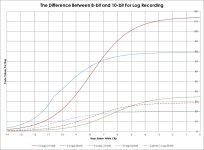
just to add to what the others have said, I've quickly knocked up a chart which gives an idea of the 'shades of gray' per stop for S-Log2, S-Log3 in both 8-bit and 10-bit, plus 8-bit Canon C-Log as a comparable, commonly-used 8-bit log curve.

The axis at the bottom is stops below white clip, ie 0 is where the camera clips (six stops above mid gray for Sony FS7/F5/F55, about 5 1/3 stops above mid gray for the C300mk1), and -14 is 14 stops down from that.

Here it is:
Log8bitor10bit.jpg
So the vertical axis shows you the difference in values per stop, ie the difference between white clip and a stop below white clip is around 113 values for 10-bit S-Log2, but just 28 values for 8-bit S-Log2. For 10-bit S-Log3 it's about 79 values but for 8-bit S-Log3 it's only 20 values.

Log encoding uses the fact that if you have enough code values per stop at the most critical brightness (ie mid gray through to a stop or two over for skin tones), that will be sufficient for any stop level (though more will always be better). As a guide, mid gray for C-Log is around 24 values per stop, which I would consider the barest minimum (it generally works, but only just).

As you can see, S-Log3 at 8-bit is rather below that, where S-Log2 sits above.

Far more important and clear to me is, if you have the choice, don't shoot log 8-bit, and the FS5 offers 10-bit for HD. That puts you comfortably beyond 'making do', and gives a lot more scope for creative adjustment. If you are going to shoot 4k, the codec option drops to 8-bit. My preference is colour rendition over resolution, but if you are shooting 4k, go for S-Log2..

This has all been about contrast, but another aspect is colour gamut. The C300 shoots a sort of tweaked Rec709 for colour, in part to simplify grading for non-colourists, but to a large extent because those 8-bit values ain't great for a wide gamut. I haven't shot with an FS5 yet, but if you are going to shoot log at 8-bit, I suspect that S-Gamut is going to be rather sparce in terms of colour detail. I'd be interested to know what others do on the colour gamut side shooting 8-bit log on the FS5,

Ben
 
Last edited:
Thank you very much for very in-depth answers. I need some pressesing to fully understad it all, but bear with me here:

When I am out shooting a sunny day and want some shots of the subject backlit, is slog2 better because it can take higher values? Still a bit unclear to me what of the two that is best in these situation.
 
Yes. S-LOG2 is usually the better choice outdoors and in uncontrollable lighting conditions or with bight highlights.
I'm sure other people will disagree, but one of the cool things about shooting RAW with my F55 is that I can process a clip as either S-LOG2 or S-LOG3, and I find S-LOG2 usually works best in the situations I mentioned above.
 
Ben, thanks a ton! Your graph and explanation is AWESOME. Thanks.

To the OP's original point: yes. I did a bunch of testing and was baffled by this clipping thing myself. As they say, it's true. It clips somewhere between 92 - 94 (and I'm ready to believe those with more tech skill than I that it's 94% exactly). This seems to be true with all of the Sony's we've tested: FS7, FS5 and a6300.

Of special note RE a6300, you don't get a waveform in-camera. By hooking up an external monitor with waveform we confirmed the clipping. Note especially that the histogram reflects the clipping but does not "pile up" the pixels toward the high or low end. It just clips them off. Gone. The histogram has about 5% blank on both dark and light ends with no indication that i's simply tossing data beyond that -- so be super careful on that camera knowing it's got a "no data" space on the histogram on both ends (due to the Slog3).
 
lagmandokk,

if you are talking 8-bit 4k, S-Log2 is the least bad option whichever way you look at it.

If you are talking 10-bit, there tend to be strong opinions one way or the other, but frankly in terms of the end result you can achieve, there is no 'better' or 'worse'.

S-Log2 has more data spread in the highlights, but handled well both S-Log2 and S-Log3 have way more spread than is needed for a good end result.

S-Log3 has a more even spread across the dynamic range, for flexibility in the shadows and is very close to Arri LogC and Canon C-Log2 in its distribution. 10-bit LogC and 10-bit S-Log3 have both been used extensively throughout the industry to great results.

Equally, S-Log and S-Log2 (mathematically S-Log2 is just S-Log underexposed a bit to fit in an extra half stop of highlights) have a strong pedigree in numerous productions going back to the F3 and F35.

Once you move beyond 8-bit, the prime causes of a great deal of issues (eg banding) frequently come from the codec compression or the way that post software communicates with the codec on the way to the screen. Having 10-bit data get passed as 8-bit at some point is a common one which can make a 10-bit log recording look iffy when it should look fine. I've heard that Avid via the AMA connection can easily be set incorrectly and appear to give nasty banding, which has nothing to do with the log curve itself,

Ben
 
Last edited:
maybe off topic but because this is about the FS5 log and highlights I though I would post it here vs starting another thread.

The cameras default log settings for both SLOG2 and SLOG3 have the knee set to auto, I switched back and forth but honestly can't see any difference but auto anything often makes things harder or at least inconsistent. My question is do you guys set the knee manually? and if so what values and why?
 
Last edited:
You'll want to turn off the auto knee in all of the camera's gamma modes. It's an awful feature that shouldn't even be on the camera at all. But with that said, I'm pretty sure that auto knee or any other knee setting you select won't function if S-LOG is selected. I haven't actually checked so I might be wrong, but I'm 99% sure that would be the case.
 
So Slog3 will always clip at 94 IRE.. it can never go over this level.. ... why was it deigned like that.. does the not full bit bucket have any effect in reality..

Thanks
 
Last edited:
lagmandokk,

just to add to what the others have said, I've quickly knocked up a chart which gives an idea of the 'shades of gray' per stop for S-Log2, S-Log3 in both 8-bit and 10-bit, plus 8-bit Canon C-Log as a comparable, commonly-used 8-bit log curve.

That's a great graph.

I did some research with the A7s and the various modes and distributions here

http://blog.inventome.com/Blog/2015/8/a7exposure/Sony-A7s---how-to-expose---cine-or-log?

No one has addressed the point about whether Slog3 stops at 94IRE or not? I don't think so but others say it does? To me this is the point of the original post about using all 8 bits of the bucket.

Also you raise a great point about colour tonality too, this is compounded by the fact that your colour is stored in YUV containers most of the time, the the concept of 8bit RGB doesn't work. I have been writing a post about what happens with compression really and also to look at the nature of the UV containers and it is true to say that your colour channels have much less range in.

So your choice of colour gamut makes a difference (a smaller gamut is able to store tonality better in a limited range) and the 8bit vs 10bit is a really good question. Or is it better to do 8 bit 4K and downsample in post - this is almost a method of boosting 'apparently' tonality in files.

You need to choose a colour gamut that is big enough to contain the gamut of the sensor. I really don't know why manufacturers give you a choice (well i do, but they shouldn't). SGamut isn't an ideal choice, SGamut3.cine is better. But the stalwart of 709/sRGB really isn't good enough. There are even chips on the macbeth chart that are outside the 709 gamut and all cameras can easily produce reds beyond this too.

cheers
Paul
 
Just answering my own question i just tried an artificial test.

I have a linear ramp with 8 stops over mid grey and saved that as ProRes 4444 in Slog2 vs Slog3 vs Cineon. That ramp will clip all containers.

If i bring those files back (in Nuke) as raw files then i can see in all cases the ramp clips at 1.0, the full range of the file so all flavours clip, just each of the flavours starts clipping at a different point as expected.

If i take this movie files into PPro i also see a full clip on the scopes, so there's no 94IRE clipping that i see in this case. I'd love to see where you're seeing 94. Personally in the OP case i believe that because that's as far as the FS5 can go?

cheers
Paul
 
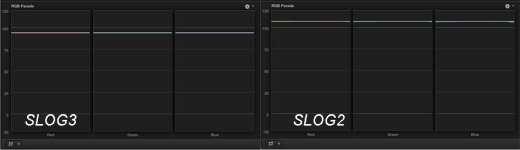
Admittedly I am not very tech savvy but I just pointed at well lit white card increased the gain and opened up an f1.4 lens then looked at my scopes.... slog 3 flat lined at 94 and SLOG 2 at 109
SLOGclip.jpg

Just answering my own question i just tried an artificial test.

I have a linear ramp with 8 stops over mid grey and saved that as ProRes 4444 in Slog2 vs Slog3 vs Cineon. That ramp will clip all containers.

If i bring those files back (in Nuke) as raw files then i can see in all cases the ramp clips at 1.0, the full range of the file so all flavours clip, just each of the flavours starts clipping at a different point as expected.

If i take this movie files into PPro i also see a full clip on the scopes, so there's no 94IRE clipping that i see in this case. I'd love to see where you're seeing 94. Personally in the OP case i believe that because that's as far as the FS5 can go?

cheers
Paul
 
Last edited:
RayB,

I think you have those two images labeled the wrong way around - S-Log2 at 109% and S-Log3 at 94%. ;-)

Paul - when you say you made a linear ramp, do I take that to mean that you created the ramp in software, rather than got it from shooting with a camera?

The equations for S-Log2 and S-Log3 will give you values for any linear input; that doesn't mean that any input value is a legitimate possibility from the camera. You mentioned 8 stops from mid gray. The Sony cameras have highlight headroom of dead on 6 stops at nominal ISO. This is what leads to 109% for S-Log2 and 94% for S-Log3.

Now if you shift CineEI ISO up in post without clipping highlight data, the effective clip would be above 109% for S-Log2 or 94% for S-Log3. In fact, 109% in S-Log3 would equate to around 7 2/3 stops above mid gray. In post you can do this with a shaper LUT, but not being a raw user I don't know whether the CineEI metadata slider will feed out values above six stops. If you have been using Sony's raw code to test your linear ramp, it sounds as though that is happy to feed out values above 8 stops. That makes sense, and is the approach I've taken with LUTCalc-generated LUTs.

Post software tends to work on floating point data, so in that context there is no need to limit to 6 stops. Limited bit-depth codecs are another matter, and S-Log3 is implemented to match the results of extended-range using S-Log2, for consistency in the way the camera operates.

Keeping a log curve within legal range offers safeguards against post software which doesn't properly handle extended-range material. I have a couple of pretty plausible ideas as to why 94%, but they are educated guesses, so I'll leave them for now! ;-)

HOWEVER, the camera always limits recordings and the input fed to MLUTs to six stops of headroom. If you set the MLUT in camera to be S-Log3, the maximum white clip will always be 94%, whether at native or if you set the CineEI ISO up higher.

[*** Geekout which Paul might find interesting - everyone else move along ;-) ***]

One last headache for me is in Resolve and with the 'auto' range setting. I find it rather silly that the waveform in Resolve has a 0-1023 scale. This does not directly relate to code values. If you set the clip range to 'data' it does, but if you set it to 'legal' then the scale should show 64-940. I can't understand why they didn't just go with percentages, as it gives the impression that you are seeing the true code values.

S-Log2 certainly sets correctly to data under 'auto', and S-Log3 seems to when recorded XAVC. My habit when playing is to take the approach from a Sony workflow paper and explicitly set the range to 'data'. That way looks and LUTs (including the Sony ones) will be correct and consistent with their appearance in camera.

It's currently giving me a headache in relation to Blackmagic cameras funnily enough. I include blackmagic fim curves in LUTCalc, and was going to add in Film 4.6k when it occured to me that by default LUTCalc produces Blackmagic LUTS which don't match those built into Resolve. I realised that Resolve default to interpreting BMC Film clips as 'legal' under auto; explicitly set them to 'data' and all is as it should be (I've used test clips downloaded from the net as I don't have a BMC). The funny thing is I have found threads online stating the 10-bit values for BMC Film based on the y-axis of the waveform scale, because it says 0-1023!

My headache is that I have to figure out what to do about the logic of what Resolve will do under 'auto' for all the different camera and log possibilities, when other bits of software (such as Lumetri in Adobe) seem to be rather more consistent,

[*** End of geekout ***]

Ben
 
Last edited:
Paul - when you say you made a linear ramp, do I take that to mean that you created the ramp in software, rather than got it from shooting with a camera?

Yes, it was an artificial test to check out the containers. My point is just that the clipping point isn't to do with Slog3 and QuickTime per se, it's just that the particular camera & settings being used cannot fill the Slog3 container. The question was also whether there is something in the software preventing anything higher than 94IRE, but the answer is no.

Keeping a log curve within legal range offers safeguards against post software which doesn't properly handle extended-range material. I have a couple of pretty plausible ideas as to why 94%, but they are educated guesses, so I'll leave them for now! ;-)

Certainly there is massive inconsistency with how software handles legal vs data - both concepts that are no longer valid in todays world. Even the same application on two platforms can do different things.

HOWEVER, the camera always limits recordings and the input fed to MLUTs to six stops of headroom. If you set the MLUT in camera to be S-Log3, the maximum white clip will always be 94%, whether at native or if you set the CineEI ISO up higher.

I don't generally use Slog3 so this is good knowledge. I didn't know that.

[*** Geekout which Paul might find interesting - everyone else move along ;-) ***]

I even made a coffee to read this with...

I have had numerous issues with Resolve and try to not use it. One of the biggest issues in the past was that the image gets slightly dithered which shows on the waveform making it pretty useless for any quantifiable work. I also found numerous inconsistencies with taking images in via different routes. This may well have been solved these days but i moved over to Speedgrade and in fact spend more time in Nuke. One of the benefits of Nuke is that you can switch the QT Reader into raw means means the YUV data. You can also explicitly set the pixel format and different pixel formats change the image slightly. So with a combination of raw (not RAW) and the nuke scopes i can be fairly confident of actually being able to count the tone values. If you haven't already you can get a non commercial version, i think that would allow you to at least have a look - PM me if you're interested.

The data vs legal is compounded by the movie container. ProRes is supposed to always be legal range according to Apple. But you can quite often find data range in, which breaks all those automagical interpretations applications try.

Slog2 is more complicated as i'm sure you know because some Sony implementations change the black level. The Slog2 out of the A7s range is lower than normal.

BMD cameras have a 1D LUT baked into each DNG, i wonder if it's possible to extract that and reverse engineer it and extract the exact tone curve being used? Although that would assume BMD cameras are true linear at source and i guess no one knows.

Lumetri has it's own issues. It's 32bit float but only in the panel. The data in PPro is sRGB gamma (i think)/709 primaries internally and this gets converted into Linear and then out again on each Lumetri panel. I've found many issues with the panel generating negative colour values very easily and then if you have a creative LUT applied those negative values will never get passed into the LUT and thereby create really odd results. I've found the issue compounded by adding shaper LUTs as inputs. And then even the exposure control isn't really proper exposure as it is done through an S curve.

IMHO Lumetri needs more work, it's trying to ram together linear workflow from speed grade with display referred grading in PPro and it's not quite a match yet.

The only thing i can think of that may help you in making the data/legal issue clear, is perhaps you can create a standard naming convention for your LUTs. Or perhaps add comments into each LUT so we can tell what the LUT was generated expecting to see. For the naming conversion maybe a default way of showing what the input range vs the output range is supposed to be. Bit like the arri LUT generator but more comprehensive.

That's a real pain with LUTs in that there's no defined way to tell what type they are just by looking!

cheers
Paul
 
Back
Top