Do you all think I'm getting close to the film look with my T2i?

I don't quite know. Usually when people refer to the film look they mean the professional cinema looking video look.
 
Usually when people refer to the film look they mean the professional cinema looking video look.

Then the answer is no, it doesn't look close to your definition of the "film look". Do you really need to ask?
To be honest, I think it looks like circa 1990 VHS.
 
You might find the Lift Gamma Gain thread on emulating the film look interesting.

Here's a Shane Hurlbut blog post talking about Dark Energy software, which is what he used on the Act of Valor footage that was shot on the 5D.

Here's a few rules of thumb for emulating the nebulous film look:

In camera: 24 FPS, Flat/Log profile, 1/45th shutter speed (motion looks better than 1/50th), Mist diffusion filter (blooms the highlights and lowers the contrast to improve the roll off, but it's optional), CPL filter (helps hold cloud detail), Grad ND (helps hold sky detail), ND filter, focus peaking (helps you nail focus), Exposure assist tools (zebra stripes, waveform, false color).

On set: Lights, Modifiers (softbox, snoots, barn doors, fresnel lens, flags, scrim diffuser, etc.)

In post: Transform color space to linear, noise reduction, sharpen, dither, transform color back to Rec.709, color grade (highlight recovery, saturation, color boost, mid-tone detail, contrast pivot), halation, optical distortion, vignette, film stock emulation LUT, 2.40:1 output blanking.

Saturation mapping would be better than using a film emulation LUT; see this Lift Gamma Gain thread.
 
I think I'm getting close to the film look.

sEBecOx.jpg - Click image for larger version  Name:	sEBecOx.jpg Views:	0 Size:	99.3 KB ID:	5692617

I imagine that the original probably looks less like film than this. So in that sense, yes, I think your grade probably is getting closer.

I don't know why this question always attracts so much quibbling, when to me it is dead obvious what people mean by the film look. Now how to achieve it is another matter.

The film look isn't the lighting. You can light a set like Hollywood, but if you shoot it with a Betacam, or even an HD videocamera with its default settings, it won't have the film look. It will have the soap opera look. Meanwhile, if you take a film camera out on the street, and use natural light, it will have the film look. So it isn't the lighting.

The film look isn't the grain. You can take the aforementioned soap opera, and add film grain, but it will still look like a soap opera, this time with noise, or at best something that a casual, untrained viewer might describe this way: "I think they were trying to make this soap opera scene look like it was an old movie, but it just looked cheap and fake." Meanwhile, if you shoot something on fine-grained 35mm film, and furthermore digitally remove all the grain, it will still have the film look. So it isn't the grain.

The film look is partially 24 frames per second (or thereabouts) but that isn't enough. If you shoot the nicely lit Hollywood set with a Sony F900, but with the default video look, it will start to look like film, but it will still look "cheap" in some way, or still partly have that soap-opera look. Also if you shoot something with film at 60 fps, and project it at 60 fps, it will have this weird cross-look of half-film, half-video.

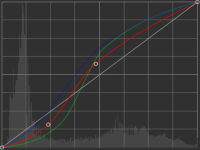
In my tests, the core film look is principally: high-contrast mids and low-contrast highlights. If you shoot something on video, and tweak the curves so that they have that S-curve (and it can't be any S, there is a narrow range. And it depends on the source material. One camera demands one S shape. Another demands another.)

Here's my rough application of an S curve to your image. It doesn't look like Hollywood, but it is starting to take on the look maybe of something shot on 8mm film. Perhaps I've already gone too far. I didn't have a lot to work with, starting with an 8-bit file. So it starts to fall apart when you apply the necessarily severe contrast to the mids. If you were working from a RAW file or at least a 10-bit log file, then you could have a smoother final image.

sEBecOx.jpg - Click image for larger version  Name:	sEBecOx.jpg Views:	0 Size:	99.3 KB ID:	5692617

Here are the curves I ended up with to go from your grade to mine:

sEBecOx.jpg - Click image for larger version  Name:	sEBecOx.jpg Views:	0 Size:	99.3 KB ID:	5692617

As you can see, I tweaked the 3 channels separately and to slightly different slopes. That helps too, because the default blend from most digital cameras isn't right.

An example of how you can remove a lot of the traits of Hollywood, to isolate what truly contributes to what people call the film look, are some Super 8mm films, especially if shot with slow film, to reduce the grain.

This video is handheld in natural light, with deep focus (because Super 8mm is a small sensor) and yet it screams film look:


And not because it has film grain (and a few film glitches). I wish I could take that out. But you can imagine how it might look with no grain, and the film look would remain. That's because the film look is mainly the contrast curve, how light in the real world is mapped to light on the screen, from dark to light. It is an S shape --- meaning that the lows are low contrast (mild slope), the mids are high contrast (steep slope), and the highlights again are low contrast (mild slope). You might add that it is the color, but the color will happen as a result of the high contrast.
 
Last edited:
Newest color grade:
mcIuDfm.png
 
Last edited:
In my tests, the core film look is principally: high-contrast mids and low-contrast highlights. If you shoot something on video, and tweak the curves so that they have that S-curve (and it can't be any S, there is a narrow range. And it depends on the source material. One camera demands one S shape. Another demands another.)

Are you saying that high contrast mids are inherent to film stocks in general or specific to 8mm circa 1970?
 
Total time of getting my color grade to that, 6 hours.

If it was shot properly in the first place grading could be done in a matter of seconds instead of hours to get a cinematic look -- which will never be achievable with this example. Give it up. Go shoot something new and start over.
 
Are you saying that high contrast mids are inherent to film stocks in general or specific to 8mm circa 1970?

I would say, film stock in general.

But let me be more precise:
  • The grade I did above, is too high contrast. I went too far last night, and when I looked at it again this morning, I was like, "They're going to laugh at me."
  • In general, however, the film look has somewhat higher contrast in the mids than video from the average videocamera (at the average videocamera's default settings)
  • I'm talking about telecined film on your TV, not film projected in a theater
The reason became clear when I pondered the problem of capturing a scene and replaying it on a TV:
  • the average real-life scene has around 10 stops, sometimes more, as you know
  • the average living room TV (or your computer screen) can show less --- like 7 stops or so, especially if you don't have its brightness maxed out
What do you do with the extra stops from real life? You have two main choices:
  • Cut them off. This results in the notorious artifacts of "crushed blacks", or "clipped highlights", or both
  • Reduce your contrast. For example, if 1 stop difference in real life results in only 1/2 stop difference in your TV, then you could fit twice as many stops on your TV. The bad part is, the image is low contrast --- "milky", as some describe it.
Old videocameras kind of did both, I think. They had crushed blacks and clipped highlights, as you know. But that wasn't enough. They further had a milky, low contrast image, to fit the 8 or 9 stops that they could capture in the 6- or 7-stop TV that you were viewing it on. Eww.

Film handled the problem in a more complicated way. First of all, film could capture more stops naturally. Second, it naturally rolled off the highlights --- and "rolling off" is just another way of saying that it "lowered the contrast" of the highlights. This bought film even more latitude to preserve the real contrast in the mids.

A film projector and screen had more latitude, like 10 stops. So there was little scrunching going on from the 12 stops film captured to the 10 stops bouncing off the screen.

But when people wanted to watch 35mm movies on their TVs, more scrunching had to happen. But the rolled-off highlights allowed the telecine machine to be set at a higher contrast without losing too much from the original film.

Psychologically, I think we recoil when contrast on screen differs too much from contrast in real life. But the mids are more important, because they hold the "content": especially human skin and human faces, which we are most sensitive to any discrepancy. (Often a video didn't really stick out to me when it was of trees and stuff, but when it cut to a human, I was like, "Eww".)

So to sum up, I think if you grade your image so that the mids are as close as possible to real-life mids --- in other words, like the TV looks about as it would if it were just a window, with someone behind it. Then the average person will naturally find it more pleasant. Film did this, which is why people entangle "film look" and "pleasant".

At least that's my current theory, and I'm sticking with it. I have studied this, and messed around with regrading images, for years. Bumping up the contrast of the mids is a reliable way to get the image looking much better, to me at least, and then afterward I say, "Oh yeah, and it also looks more like it originated on film."

---

P.S. Quibble all you want with what I have measured to be the actual dynamic range of real life and TVs (as opposed to what the TV's sales literature claims it to be). In general, I hope you agree that real life is higher, to some degree, than your average screen, and therefore that some kind of compensation must occur.
 
Last edited:
What is your favorite film? Find a scene or even a simple shot with one character and try to recreate it: composition, lighting, and color. You can compare what you are able to achieve against the original "film look" that you like so much and make little changes until it's close as you can get it. It's a good way to learn the techniques. Take a look at this:

 
QuickHitRecord, that is indeed a good exercise and you learn a lot just from analyzing an image that deeply, let alone recreating it.

It reminds me of a fun project I tackled 15 years ago, when a friend had a backyard film festival where he invited a group of people to each make films and then we watched them all in a (highly drunken) screening in his backyard. My girlfriend came up with the concept that involved recreating a bunch of classic scenes and we tackled it with hardly any help, I had one crew person half the time. We managed to wait until the last minute to make the film so it was a rush job and I didn't take anywhere near the time the guys in the clip above did, but it was fun to see how close we could get with the broad strokes. I believe I shot on a Canon XHA1 and edited in FCP (with the pretty minimal color tools available then). There is a link in the description to the original clips for comparison.

https://vimeo.com/173018993
 
I don't know if this will penetrate but if the goal is to create a film look, the solution is not what mojo to throw at it in color, it is to shoot it more mindfully to begin with.

The T2i is obviously long in the tooth but it is capable of much more than seen here. It looks like you shot at a very deep stop. The shot against the greens would have been much pretty with shallower depth of field. I would have guessed this was shot on an old camcorder with a tiny chip based on the DoF.

Also, a large part of what makes things look cinematic is being mindful of everything that is in frame and within your control and adjusting accordingly. If I had been tasked to shoot this, the first thing I would have done is to move the two white cars out of the shot. They are bright and distracting (and even clipped in level). On the reverse, move the character away from the wall to give some depth behind them.

The ambience that day was pretty flat, which isn't helping the goal of achieving a cinematic look. It would be tough to achieve by yourself, but using negative fill to shape the light on the characters would help that. Even on a very limited budget you can pick up a cheap fabric background setup on Amazon (generally sold for green or blue screen) and hang black material on it--if you move it close enough from the camera side you can start to create some shape.

As an exercise, if you were to recreate these setups using the ideas above and compare results, it might help you with the next project.
 
Back
Top