
Since there's still no ETA or even confirmation we'll ever receive the vLOG update, I've started working on a CineLikeD (highest dynamic range, up to 13 steps (usable 11-12), but ugly color science) to LOG LUT.
This includes many color transformations (biggest difference are skintones, reds and greens) as well as contrast.
Starting point is CinelikeD but without any flat settings to keep all the midtone detail (skintones, leaves etc..), lower noise and keep banding low.
This LUT adds compability to a whole universe of LOG to REC709 LUT files, many of them are for free!
dLOG is available for free as well, download here (version 1.4):
http://daten.ccmotion.de/dlog.zip
To achieve best results, use the following settings in camera:
Cinelike D
Contrast 0 (use iDynamic low for high contrast situations if needed or higher contrast values for low contrast scenarios)
Sharpness -5
Noise Reduction -5 (using no sharpness nor noise reduction this camera produces very fine grain which helps dithering the footage )
)
Saturation -2 (above, red channel clips quite easily)
Hue 0
No iDyn/iRes/Shadow/Highlight/MP
0-255
Make sure to avoid overexposure if possible. Use the histogram!
Add this LUT first, then add a layer with color correction/curves etc., then add a LUT of your choice.
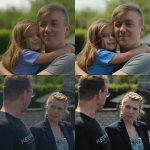
Some examples:
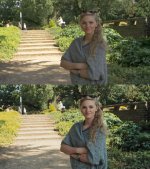
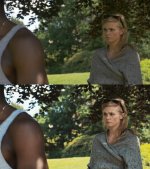
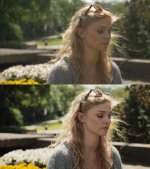
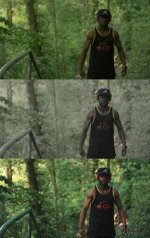
This includes many color transformations (biggest difference are skintones, reds and greens) as well as contrast.
Starting point is CinelikeD but without any flat settings to keep all the midtone detail (skintones, leaves etc..), lower noise and keep banding low.
This LUT adds compability to a whole universe of LOG to REC709 LUT files, many of them are for free!
dLOG is available for free as well, download here (version 1.4):
http://daten.ccmotion.de/dlog.zip
To achieve best results, use the following settings in camera:
Cinelike D
Contrast 0 (use iDynamic low for high contrast situations if needed or higher contrast values for low contrast scenarios)
Sharpness -5
Noise Reduction -5 (using no sharpness nor noise reduction this camera produces very fine grain which helps dithering the footage
)Saturation -2 (above, red channel clips quite easily)
Hue 0
No iDyn/iRes/Shadow/Highlight/MP
0-255
Make sure to avoid overexposure if possible. Use the histogram!
Add this LUT first, then add a layer with color correction/curves etc., then add a LUT of your choice.
Some examples:
Last edited:


