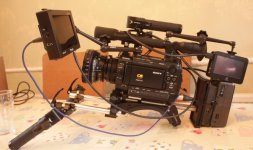
display options on HDSDI and HDMI out

Sparky874

Well-known member
Hello all. Got new F3 yesterday and getting it ready for a forth coming shoot. I need some help. I want to use my TVLOGIC 5.6 monitor as a VF and my NINJA out of HDMI to record footage. But as I want to use the TVLOGIC as a proper VF,i.e I want it to display certain info such as when I'm in record, colour temp, time left on cards etc - but I won't want this info to come out through the HDMI where I want a clean signal. Is it possible to turn off thid display just on the HDMI and keep it on the sdi out?

Thanks!
 
I believe the HDMI and SDI ports are either or; only one can be on at one time. Those are the two ports on the side of the camera. Video display for those two ports are either on for both or off. If you have the 1.10 upgrade already loaded on your camera this will activate the A port HD SDI out which is one of two dual ports on the middle top rear of the camera. There is no display information sent to the HD SDI A or B port; if you have a external recorder that has HD SDI in you want to plug it into the A port for 4:2:2 or the A B ports for 4:4:4 and monitor either HDMI with display turned on or SDI with display turned on. You can access the controls on the Video Set menu. If your external recorder is HDMI in only use the built in F3 monitor for character display and turn off the SDI\ HDMI video character display on the Video Set menu this will send a clean video feed to your Ninja. If you have an SDI or HDMI out of the Ninja plug the TV logic into it to make sure you are not recording any character display and to judge focus otherwise plug the TV Logic into A port. Just make sure SDI\ HDMI character display is turned off when sending the HDMI video to the Ninja. Good luck with the F3 it is a wonderful camera!
 
Last edited:
. Just make sure SDI\ HDMI character display is turned off when sending the HDMI video to the Ninja. Good luck with the F3 it is a wonderful camera!

This is the very problem I have. I need some information displayed on my TVLOGIC screen so I can use it as a proper VF, as I won't use the lcd panel at all. But you can't send the signal I need to the sdi out and send a seperate clean signal to the HDMI - it's any option to switch on or off character display to both. I'll just have to hold off using the Ninja and wait for the Samurai which I'll use via HDSDI. I hope this makes sense!
new F3 rig.jpg
 
Overall I think the output options, choices and which ones show display information are quirky at best. Seems like a good candidate for a firmware improvement. The one thing I would like to see is peaking or zebra info on one or more outputs (don't think that is possible now) Also waiting for an EVF that has better than 800X640 rez... haven't found one yet.
 
Back in the day you would spend 30 or 40 thousand dollars on one camera that would fit on the shoulder, lock to a tripod, have a hi resolution viewfinder, industry standard tape recorder everything you need in one package.
The technology today is the best it has ever been, you can buy a Super 35mm Exmore sensor camera that can output off of the chip via HD SDI uncompressed video that looks simply stunning. The price is you have to buy a lot of extras to make it all work, external recorders, camera upgrades, EVF’s, support equipment including follow focus, matt boxes, shoulder pads and lenses. Each item made by a different manufacture some who have never seen the camera you are using your new accessory on. I’ve found some of this equipment to be a bit quirky when mated with the cameras in my case the F3. It will take awhile but everything is only going to get better. If you have problems or suggestions email, call or write the manufacture tell them what you like to see changed. The nice thing about a lot of the extras we are buying is they are for the most part located here in the U.S. and the manufactures seem to be listening.
 
Back
Top