Direct Sunlight - Scene File Recommedation

Mark Kokkoros

Active member
Hello,

First let me say that I am a big fan of the AF100 and what follows is not a gripe about the camera:

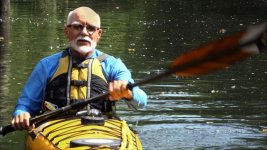
Yesterday I did a very picturesque shoot of kayakers on a stream with dappled sunlight. Used the TV logic 5.6 with Waveform. Everything looked good, even a 1/4 stop underexposed.

Looked at the footage today and will have to throw out 90 percent of it. Highlights do not fall off elegantly (you know the story). Thankfully this was not a client job, just a personal project. Nonetheless, it was important to me, and I want to learn from my mistake.

Most of my AF100 work is indoor with controlled lighting using a scene file that I find pleasing and produces minimal noise. My scene recipe is woefully inappropriate for exterior daylight shooting however. So, my question is:

Does anybody have a scene file that will provide decent (predictable) results under difficult exterior lighting conditions?

As a point of reference: I have the venerable HPX500 that gives me smooth, reliable results under these conditions.

Thanks,

Mark
 
Did you use the 'in camera' waveform monitor? Did you use the built in ND's?
I think you'll have a better result that way. I just did an outdoor shoot of some talking heads,
and I used the on board ND's for a wonderful result. The hightlights are'nt perfect, but pleasing.
 
Hi Rob, here's an example. Shot at f4.5 (ND 1):
Example.jpg

Used the WF on TVLogic 5.6

Here are the settings:

Film Cam
Detail: -4
V Detail: -2
Coring: 0
Chroma Level: -1
Chroma Phase: 0
Color Temp Ach: 0
Color Temp Bch: 0
Master Ped: -2
A. Iris Level: 0
DRS: Off
Gamma: B.Press
Knee: Low
Matrix: Norm1
Skin DTL: Off
 
Last edited:
Going from memory, so forgive me if I'm mistaken, but in order to change your highlight knee settings you must switch the gamma settings from CINE-LIKE V or CINE-LIKE D to one of the other settings like HD NORM.
 
To give you the best out of harsher sunshine I would shoot in either Cinelike V or Cinelike D and watch that waveform-monitor closely so that nothing is clipped. You don't want caucasian skin to go above 65 or so and to get the least amount of clipping I would also shoot at 5600K preset outdoors. With Cinelike V you end up with something that looks good out of the camera but with a bit contrasty image than Cinelike D.
 
To give you the best out of harsher sunshine I would shoot in either Cinelike V or Cinelike D and watch that waveform-monitor closely so that nothing is clipped. You don't want caucasian skin to go above 65 or so and to get the least amount of clipping I would also shoot at 5600K preset outdoors. With Cinelike V you end up with something that looks good out of the camera but with a bit contrasty image than Cinelike D.

Editman - thanks. Are you suggesting to keep the top of this kayaker's head at, or below, 65 ?
 
Did you use the 'in camera' waveform monitor? Did you use the built in ND's?
I think you'll have a better result that way. I just did an outdoor shoot of some talking heads,
and I used the on board ND's for a wonderful result. The hightlights are'nt perfect, but pleasing.

The NDs have as much effect on the Highlights as they do on the Shadows so are considered a global effect. They dont really solve the O.Ps question apart from how they work with exposure control.

@ Mark.. when you find the scene file with best roll off for highlights...still make sure you protect your highlights by exposing them safely.

Outdoors, I would save the highlights at the expense of the shadows.

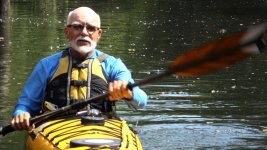
BTW - the image you have frame grabbed...I would believe is entirely gradeable.
The highlight on the kayakers head seems to have detail and the shadow also has detail ...so I would consider that a very good exposure in those conditions. Not sure why you would think that unuseable because there is plenty there to work with.
 
Hi Mark,

I carry several toupees in my kit. Seriously...I would have had him put on a floppy hat or paddle into some full shade (I've done lots of celebrity fishing shows). Fortunately, fishing is best in early morning so I could use attractive backlight. Looks like you were in the mid-day sun which always sucks on the water. A bald white guy is a no win situation, absolutely NO WIN. I can't think of any video cameras that I use often or own where this would be a "safe" shot, and I have shot Dr. Phil. In my belt pouch I have powder, but it's hard on water to powder.

If you're working fast, even if you have a separate scene file for situations like this, who has the time to think about switching files? Let alone watching a waveform? And often there's no time, (or the editor can't), grade in post.

So my two cents: if you're shooting on the water and you can't do early morning or late afternoon sun then a hat or shade are your best options.

All the best.
 
Hi Mark,

I carry several toupees in my kit. Seriously...I would have had him put on a floppy hat or paddle into some full shade (I've done lots of celebrity fishing shows). Fortunately, fishing is best in early morning so I could use attractive backlight. Looks like you were in the mid-day sun which always sucks on the water. A bald white guy is a no win situation, absolutely NO WIN. I can't think of any video cameras that I use often or own where this would be a "safe" shot, and I have shot Dr. Phil. In my belt pouch I have powder, but it's hard on water to powder.

If you're working fast, even if you have a separate scene file for situations like this, who has the time to think about switching files? Let alone watching a waveform? And often there's no time, (or the editor can't), grade in post.

So my two cents: if you're shooting on the water and you can't do early morning or late afternoon sun then a hat or shade are your best options.

All the best.
 
^ Doesn't it keep blown highlights more white than yellow?

My guess is that the yellow is a result of overdriving the sensor circuitry and will occur anyway if one goes there with overexposure. (I have never ever seen it on any of my footage so I always imagine that its a relatively extreme O.E situation that causes it.)

Point really is that one should not be blowing the highlights in the camera ( particularly the AF100)

The O.Ps issue does not appear to be extreme at all and I would like to see what he does in the grade with it/
 
Hi Mark,

A bald white guy is a no win situation, absolutely NO WIN.

Was thinking exactly the same, regardless of the profile you use your on a hiding to nothing without being able to control the environment more. Even in studio conditions they use make up artist's to take the shine of bald heads!

Steve
 
What I did, and would have suggested to you would be to ND2 and if necessary go up in small increments with an iso bump to keep more of the darks.
You can always correct the brightness in post, but at least you don't lose too much in the highlights. This might (MIGHT) also be the only time you would want to use the DRS to keep some of the black detail.
 
What I did, and would have suggested to you would be to ND2 and if necessary go up in small increments with an iso bump to keep more of the darks.
You can always correct the brightness in post, but at least you don't lose too much in the highlights. This might (MIGHT) also be the only time you would want to use the DRS to keep some of the black detail.

I dont understand that suggestion at all!

Want to explain this more.

For a start... you can not always "correct the brightness in post"... if you have not protected the highlight data by your exposure.
 
Diolugue (from Color).jpg

Tada! But seriously, its not that bad. I was expecting a lot worse and had to search for the blowout.

This took me about 2 minutes to do, and could get a hell of a lot better (this is a little too yellow) with a few more tweaks.

Don't beat yourself up. I owned a af100 and that would be a very very hard scenario to expose for.
 
Thanks to everybody for your thoughtful responses.

Direct sunlight is challenging, even for some of the industry's best cameras.

Maybe I should refine my question a bit. Here goes:

What specific scene file settings (knee, DRS, etc) will help me get the most "even" falloff to the highlights?

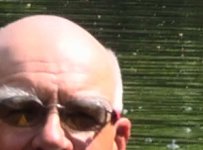
Here is an ungraded 100% crop:
HeadExample.jpg
Highlights abruptly shift from skin tone to pink to white-yellow. Seems like the channels clip at different levels.

Again, thanks for taking the time.

Mark
 
Of course the channels clip at different levels. Think about human skin -- it's largely pink-ish. Most of it is made up of red. So when it is OVERexposed, the red will clip first. Then, as you continue to overexpose further, the blue and green will get brighter, but the red's already clipped so it can't get proportionately brighter. So that raises the percentage of blue and green in the signal, as compared to the red. And what do blue and green make, in video? Yellow. So the more you overexpose, the more yellow you get.

The solution is really simple -- don't overexpose, and don't let your color channels clip.

There are two ways to go about that -- one, you can desaturate the chroma so that the red won't be that much hotter than the green & blue, and two is to just use your zebras to keep out of the trouble zone.

Normal skin exposure should be a max of about 70 IRE. Put your zebras on 70, and expose so that you don't really see any zebras anywhere on the face, except at the very brightest spots (such as the sun reflection on his head or on his nose). Those spots can show a little zebra, but there shouldn't be any on the rest of his face.

If you want to prevent chroma clipping on skin, under normal settings, you've GOT to keep your skin below 82 IRE. 82 is the point at which the red channel starts to clip. Remember that IRE measures overall brightness, not the brightness of the individual color channels! Brightness is made by about 59% green, 30% red, and 11% blue, all combined. So when looking at the waveform monitor or the zebras, you're not seeing brightness "in the red channel" or "in the green channel", you're seeing a combined value that takes the brightness of the green and multiplies it by 0.59, then takes the brightness of the red and multiplies it by .3, and the brightness of the blue and multiplies that by .11, and then adds it all together. Which is fine and works well, but doesn't tell you the INDIVIDUAL color clipping point. And once you start clipping color channels, you are by definition overexposing. So, as the doctor says, "don't do that."

If you want a relatively clip-proof skintone setting formula, use CINELIKE-D gamma, NORM1 matrix, and put your chroma level at -7. Using that recipe, your skin tones will be pristine and clip-proof up to about 92 IRE. Which is ridiculously hot, but if you need it, that's one way you can get it.

If you want absolutely clip-proof, set your gamma to cinelike-D, norm1 for the matrix, -7 for the chroma level, and set your zebras to 90%, and never ever ever let your zebras show up on your skin tones, and you will always have perfectly rendered properly-colored skin with no clipped color and no yellow shift.
 
Back
Top