Depth of Field and Auto Focus Issues - HMC40

richke

Well-known member
Hello helpful people! :)

So I had some free time yesterday and I wanted to do some test shots with a cool DOF. I have the HMC handbook and I was following their suggestions with my standard lens. I stood pretty far away from a tree and zoomed into it 100%. Behind the tree about 20 feet is a car. I was trying to blur out the car but keep the tree in focus and I just could not do it. Even subtle turns of the ring seemed to make both objects go blurry. I followed the chart in the book and changed the Iris so it was darker(not sure what F it was though)

I have the cam set to manual focus but even if I left the focus blurry it would auto adjust the focus back. I have messed with this inside before on my shots of my toddler and it would not auto focus back.

1 - any ideas or tips for the DOF

2 - any ideas on why it keeps adjusting my focus?

I know I am probably doing something wrong but I do not know what it is.
Thanks,
Rich
 
One problem with a 1/4" image sensor is the large DOF. The best solution is to get a strong ND filter to cause the irus to be as widw open as possible, this helps to reduce the DOF. This would be in the range of ND1.2 to ND 1.8 in full sunlight.

Another trick is to use a very high shutter speed, like 1/250 or 1/50 of a second to allow for lower F-Stops. The one danger is that the with 24P and even 30P video, the higher shutter speed can create a strobe like effect on motion.


Bob Diaz
 
I think my wife is buying me the wide angle lens and some ND filters for out doors. That kinda of sucks. I thought the book was saying it was possible to do on my HMC40 with stock equipment. Bummer.
 
Try this:

1. Separate your subject from the background as much as possible. Use a medium or head shot at 10 ft or less. Background as far behind as possible, say 25ft.
2. Open the aperture to wide open, and use external ND filters as needed.
3. You may also cheat the focus point closer than the subject while still keeping them in focus with the existing DOF. This would put the background more out of focus.

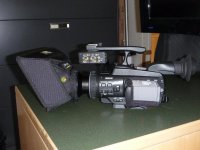
A WA adapter will not help you with shallow DOF, but is nice to have. Note that most of the WA attachments do not have filter threads. There was a discussion about the WA adapters a few months back, do a search. Here is a photo of the Panny version with a ballistic nylon lens hood.

Grant
 

Attachments

  • P1000161.jpg
    P1000161.jpg
    84.8 KB · Views: 0
richke, what you described sounds different from what I've been able to do with my HMC40. For example, I've been able to focus on a chapstick 2-3 feet away from the camera and moderately blur out the background about 2 feet away from the chapstick when I first tested out the camera. Even in close quarters, it was still possible to achieve a narrow DoF in a bedroom. Your camera should have allowed you to separate the tree from the car.

As for why your HMC40 keeps adjusting its focus. There are a few ways of making it to auto focus as far as I know. The first is holding one of the user buttons with the auto focus feature assigned to it, but I doubt you were accidentally holding it down. The second is zooming too far in a subject that the zoom starts to change your focus on the fly (but in my experience, this only occurred when the camera was close to the subject such as 4 feet from a plant, so I believe your situation rules this out). The third is the likeliest: you somehow enabled the auto focus touch feature via the touch screen, used it to place a green reticle marker on a certain point of the screen, and let it stay enabled. This feature allows you to simply touch a point on the screen where you want the camera to be focusing on (if you had two characters facing the same direction such as on Star Trek: The Next Generation with Picard and Riker facing the viewscreen, you could tap on the fly between their faces to gradually focus on the one who speaks. Another example for the usefulness of the feature is picking a point where you want the camera to always to focus on and manipulate the positioning/movement of the camera for a specific desired result, though, I can't imagine why). This is most likely the source of your auto focusing issue, however, I just tested this myself and found that if you just operate the focus ring while the auto focus feature is enabled, the feature gets nullified (the green reticle marker is still there for some time, but the feature no longer functions) UNLESS you keep touching the touch screen that constantly places a new reticle marker each time, thus screwing up your intended focus point that you keep trying to set using the focus ring.

These three ways I mentioned are possible culprits with the last as the likeliest for your auto focusing issue ASSUMING that your HMC40 was not set to Auto (a little two-option switch that offers Auto and Manual) during the time of practicing with the tree and car as well as assuming that your focus button was not accidentally hit causing the switch to auto focus from manual focus (auto focus is indicated by AF in the lower-right corner of the screen and manual focus is indicated by MF in the same corner). If you have auto focus enabled using the focus button or have the camera set to Auto mode, the camera will eventually auto focus no matter how you try to use the focus ring yourself (you may get the desired point in your DoF, but it will soon change due to either one of these features being enabled).

I hope you found this post to be useful in troubleshooting your issue.
 
Hello helpful people! :)

I followed the chart in the book and changed the Iris so it was darker(not sure what F it was though)

1 - any ideas or tips for the DOF

Rich

When you say you changed the iris so it was dark, do you mean that you were stopping down - going to a higher number? If this is so then you went the wrong way. Stopping the iris down increases DOF. For shallow DOF you need the iris wide open. For the HMC-40 this would be 2.8 at maximum zoom
 
Hey guys I did find that I did have the Auto Focus on when I tested this before. I just stumbled across this button when shooting my son's football games. I figured when you set the camera to "Manual" everythign was manual. My fault. :) I am also going to by some ND filters to help so I can turn up the apture and still get a non-blown out shot. I have been busy with my 13 month old so shooting days are limited until I can get her to stop charger the camera when she sees it. :)
 
Back
Top