cyvideo
Veteran
Hey All.
How's this for an odd behaviour. Would love to know if anyone else has seen or experienced the following?
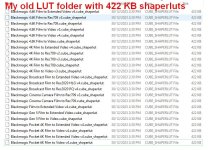
A couple of weeks ago, I did a clean installation of Windows. So prior to doing the installation I did the right thing, I backed up my Resolve Database to an external drive. At the same time, I backed up the LUT folder that contains all the default LUTs that come with a Resolve install, PLUS my custom LUTs that I had installed. The Resolve default LUTs install in two locations. One being "C:\ProgramData" and the other being "C:\Users\username\AppData\Roaming\Blackmagic Design\DaVinci Resolve\Support\.LUT".
Upon reinstalling Resolve 18.4 I restored the Project Database. All good all projects came back to life 100%. I then restored the LUT folder back to its "C:\ProgramData" location.
Now the fun started. From inside Resolve, the only LUTs visible were the default LUTs that came with the Resolve install. Why???. So I checked the C:\ProgramData location. All my custom LUT folders were all there, all named correctly. Why was Resolve not seeing my custom LUT folders?
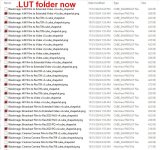
Upon further investigation I now noticed that every single cube LUT, which all have the extension .cube were now all renamed .cube_shaperlut. Very strange that every cube LUT now had this new ".cube_shaperlut" extension.
Totally beyond me how this had happened. I couldn't even begin to address this anomaly. Didn't have the time as I had a client on the way in. "No problem." I thought. I'll change the extension back to .cube from .cube_shaperlut. Easily done by using "Bulk Extension Changer 1.3". So I ran Bulk Extension Changer, and within a couple of seconds every LUT in the LUT folder was now showing the correct .cube extension.
I then fired up Resolve and was happy to see all my LUT folders now showing up correctly. Great! So I loaded up the client's project, which now needed some updates and changes. The next problem now raised it's head?? No clip in the project Color Tab was showing any effect from any applied LUT. The LUT was listed on the Node and checking which LUT was applied indicated that yes the correct LUT was registered to that node but it was having no effect on the clip. W-h-a-t??
So back into the C:\ProgramData LUT location to see if I could spot anything that would indicate what was causing this strange behaviour. Then I spotted something odd. Every LUT without exception was now showing a size of 422 KB. That's like a couple of hundred LUTs that were now all the same size? Not possible.
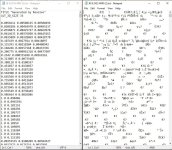
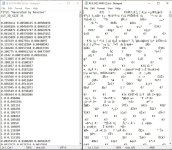
So I grabbed a couple of the LUTs and opened them in a text editor to check their content structure. Hence, the name of this post, "Davinci Resolve Ancient Egyptian Hieroglyphs LUTs". Every LUT had changed from a numeric value and text entry to what looked like Egyptian Hieroglyphs. Total rubbish, in other words. Look at the attached JPG.
The solution was to delete all the non-default Resolve LUTs from their default C:\ProgramData LUT location, and then replace all those LUTs with the appropriate LUTs from my off-board LUT archive drive. Upon firing Resolve back up, the world was back on its axis. All projects were now reflecting the correct LUT applications along with any grades that had been applied.
Apparently I'm not the only one who's seen this. A quick Google found many instances of random phantom ".cube_shaperlut" instances... butt no solutions. Hence, my posting my solution to this strange anomaly, should anyone else run into it.
All very Twilight Zone?
Chris Young
How's this for an odd behaviour. Would love to know if anyone else has seen or experienced the following?
A couple of weeks ago, I did a clean installation of Windows. So prior to doing the installation I did the right thing, I backed up my Resolve Database to an external drive. At the same time, I backed up the LUT folder that contains all the default LUTs that come with a Resolve install, PLUS my custom LUTs that I had installed. The Resolve default LUTs install in two locations. One being "C:\ProgramData" and the other being "C:\Users\username\AppData\Roaming\Blackmagic Design\DaVinci Resolve\Support\.LUT".
Upon reinstalling Resolve 18.4 I restored the Project Database. All good all projects came back to life 100%. I then restored the LUT folder back to its "C:\ProgramData" location.
Now the fun started. From inside Resolve, the only LUTs visible were the default LUTs that came with the Resolve install. Why???. So I checked the C:\ProgramData location. All my custom LUT folders were all there, all named correctly. Why was Resolve not seeing my custom LUT folders?
Upon further investigation I now noticed that every single cube LUT, which all have the extension .cube were now all renamed .cube_shaperlut. Very strange that every cube LUT now had this new ".cube_shaperlut" extension.
Totally beyond me how this had happened. I couldn't even begin to address this anomaly. Didn't have the time as I had a client on the way in. "No problem." I thought. I'll change the extension back to .cube from .cube_shaperlut. Easily done by using "Bulk Extension Changer 1.3". So I ran Bulk Extension Changer, and within a couple of seconds every LUT in the LUT folder was now showing the correct .cube extension.
I then fired up Resolve and was happy to see all my LUT folders now showing up correctly. Great! So I loaded up the client's project, which now needed some updates and changes. The next problem now raised it's head?? No clip in the project Color Tab was showing any effect from any applied LUT. The LUT was listed on the Node and checking which LUT was applied indicated that yes the correct LUT was registered to that node but it was having no effect on the clip. W-h-a-t??
So back into the C:\ProgramData LUT location to see if I could spot anything that would indicate what was causing this strange behaviour. Then I spotted something odd. Every LUT without exception was now showing a size of 422 KB. That's like a couple of hundred LUTs that were now all the same size? Not possible.
So I grabbed a couple of the LUTs and opened them in a text editor to check their content structure. Hence, the name of this post, "Davinci Resolve Ancient Egyptian Hieroglyphs LUTs". Every LUT had changed from a numeric value and text entry to what looked like Egyptian Hieroglyphs. Total rubbish, in other words. Look at the attached JPG.
The solution was to delete all the non-default Resolve LUTs from their default C:\ProgramData LUT location, and then replace all those LUTs with the appropriate LUTs from my off-board LUT archive drive. Upon firing Resolve back up, the world was back on its axis. All projects were now reflecting the correct LUT applications along with any grades that had been applied.
Apparently I'm not the only one who's seen this. A quick Google found many instances of random phantom ".cube_shaperlut" instances... butt no solutions. Hence, my posting my solution to this strange anomaly, should anyone else run into it.
All very Twilight Zone?
Chris Young

 As I said earlier. When you bring new LUTs or LUT folders into the correct ProgramData "LUT" folder Resolve scans the LUT folder and then makes a bunch of new ".cube_shaperlut" entries in the ".LUT" folder. Which now cross-references with the LUTs in the ProgramData\ LUT folder. Also found under Users\Roaming, in the .LUT folder, are a whole swag of new .PNG picture files. One for each new .cube_shaperlut entry that has been created.