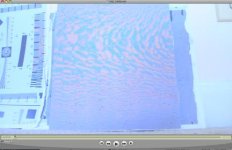
D90 - How to "set it" on the highest bit-rate

Tim Joy

Veteran
D90-bit-maker.jpg

Haven't fully tested this, but seems to work well so far, I always get a bit-rate between 18-24 m/b

Directions for use

1. Fill your screen with the above image and stare at it for 3.7 minutes.
2. (optional) Shake your head slightly and defocus your eyes, allowing the image to play tricks on you.
3. When time is up, look back at the D90. Isn't it pretty now?
4. Shoot your scene and enjoy a high bit-rate.*


I tried printing out the pattern on plain paper, but it didn't work as well
as pointing the camera at the screen. I realized that pretty much any
complex pattern works, especially trees with lots of branches. It seems
like the camera determines the bit-rate from the first thing you record.
If you start on a white sheet of paper, it's very low. (4-7 m/b) But, if you
begin recording on something complex and colorful, it's high.

Some things to test-
Does it improve picture quality?
Is the bit-rate is variable, negating the whole process?
Does it affect overheating-


*Might possibly maybe probably only work when shooting complex images, such as the one above. In other words, Production design.
 
Last edited:
But does it really stay in high bitrate as you pan away? I highly doubt it. It's variable bitrate after all, adapting to every individual frame separately.
 
Interesting. Thanks for sharing.

Do we know how variable 'variable' is? Is it really frame by frame? I would find that hard to believe, but I really have no idea myself.
 
1. Point camera at image above, focus, fill the frame.
2. (optional) Shake camera around gently.
3. While doing the shimmy-shake, or not, start Record.
4. Shoot your scene and enjoy a high bit-rate.


)

5. Relax your eyeballs and try to see the unicorn caressing the dolphin.


Thanks for your efforts, let's see if this bitrate trick really works.
 
Do we know how variable 'variable' is? Is it really frame by frame? I would find that hard to believe
why, it's the simplest variable scheme there is. they simply use the same quantization table for all frames and let it become whatever size it gets. try saving two different jpegs at the same settings, different size, right? keeping the bitrate across several frames requires considerable computing power. by the way i'm not guessing, as i said just open a stream in your favorite jpeg inspector.

/matt
 
Last edited:
ok, i've verified it, the table is the same no matter what the subject and it doesn't vary as far as i can tell even as you scrub through a clip. thus when you shoot your subject the camera has no idea that you were just shooting a complex color chart and thus can't change any settings because of it. this doesn't necessarily mean that it can't be made to work, it "just" means that i haven't been able to reproduce it.

/matt
 
yeah, I have no idea about how computer languages and data efficiency/ compression work. but i'm up for learning.

Can you please clarify your last post? What do you mean the table is the same?
 
I have no idea about how computer languages and data efficiency/ compression work
i think you do, you don't need to be a programmer. as i said just save two different images as jpegs with the same settings and observe the file sizes. it's just how jpeg works.

/matt
 
I was using the QT movie inspector, which must only display the very First bit-rate it encounters.

Could be easily verified by calculating Bit-rate x #of seconds compared to the actual file size.

At least it's a psychedelic experience to try. :)
 
I'm confirming what Matt already verified earlier i.e. the same no matter what the subject. Neither have I been able to reproduce it.
Did my tests on tripod w/ manual lens, 30sec video clips.

First video pointing at the complex color chart before panning over to the subject.
Second video starting directly on the subject, after LV restart.

First: About 24m/s when still pointing at complex chart, dropping to 6,3m/s on subject.

Second: Same subject 6,3m/s.
 
For those who are on the quest for the highest bitrate, here's some of my results. Interpret it as you like.

Setup:
Camera on tripod, in manual mode w/ correct exposure, static subject, same lightning conditions, manual focus, Active D-lightning off

Picture Control - Standard default: Sharpening below, Contrast 0, Brightness 0, Saturation 0, Hue 0 (avg. bitrate)
Sharpening 0 - 12,2m/s
Sharpening 1 - 12,3m/s
Sharpening 3 - 12,4m/s
Sharpening 5 - 12,5m/s
Sharpening 7 - 12,6m/s
Sharpening 9 - 12,7m/s

Picture Control - Standard default: Sharpening 3, Contrast below, Brightness 0, Saturation 0, Hue 0 (avg. bitrate)
Contrast -3 - 12,3m/s
Contrast 0 - 12,4m/s
Contrast +3 - 12,5m/s

Picture Control - Neutral default: 11,9m/s
Picture Control - Vivid default: 13,1m/s
 
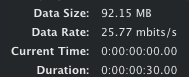
I printed out a sheet with thousands of straight lines, basically it would give you an instant headache if you stared at it. When I ran a test with D90, I topped 25.77 megabits a second, but it was not a constant, it fluxuated between 18-25.

Picture 3.jpg
Picture 4.png
 
Last edited:
It's important to remember that this increase in bitrate doesn't mean increased quality, it just takes more bits to compress a high complexity scene to the same crappy quality as a low complexity one. What we can do is shoot at high gain, that means more bits are allocated to register the noise, thus high frequency detail comes along in the process. The downside is of course that noise doesn't exactly improve an image either. :-) Try it though, stop down until you get noise in a well lit scene and the bitrate goes up and the sharpness slightly too. :-)
 
So it's a catch 22 you'd say, even with a higher bitrate, it's just using more bits to compress, and either way, image quality is just about the same. Heh I guess I can throw all my testing out the window...
 
this is actually a good thing, compared to hdv for example which is constant bitrate and falls apart when scenes go too complex. the problem is that the quality level is set too low. it varies between 10 and 25 instead of between 25 and 50 which would make more sense.

/matt
 
1. Fill your screen with the above image and stare at it for 3.7 minutes.
2. (optional) Shake your head slightly and defocus your eyes, allowing the image to play tricks on you.
3. When time is up, look back at the D90. Isn't it pretty now?

Yes, that's much better man. The D90 over there looks AMAZING now and I believe this will improve her performance on the next shoot; some kind of imbued special something from staring, inexplicable, even for the likes of Matt. One thing though, I stared for 7.7 minutes which also involved many more head shakes as the session induced a head shake/tick. Thanks Yeehaanow. :)
 
Back
Top