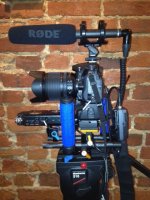
D800e and audio from XLR

I have a camera-mounted shotgun mic and a Sennheiser wireless receiver connected to the XLR inputs of my Tascam DR-100. The Tascam is connected to the Nikon with a Sescom attenuation cable. You don't need a splitter that Tavarino mentioned because the Nikon D800 has a headphone out. I prefer using the audio from the Tascam because the converters are of higher quality than the ones in the camera, but it is easier to sync the two tracks in post if the Nikon records the exact same audio (which also serves as a backup). The photo shows how I mounted everything on my D7000 rig.

http://www.sescom.com/product.asp?item=LN2MIC-TASDR100

rig.JPG
 
Giganova,

You nailed in the center!

Wonderful finding that Sescom Interface Cable for the D800 + the DR100MKII.

Thank you.
 
Last edited:
I use a similar system with the Sescom cable and using the DR-05 mounted on top or on a bracket.

I have a camera-mounted shotgun mic and a Sennheiser wireless receiver connected to the XLR inputs of my Tascam DR-100. The Tascam is connected to the Nikon with a Sescom attenuation cable. You don't need a splitter that Tavarino mentioned because the Nikon D800 has a headphone out. I prefer using the audio from the Tascam because the converters are of higher quality than the ones in the camera, but it is easier to sync the two tracks in post if the Nikon records the exact same audio (which also serves as a backup). The photo shows how I mounted everything on my D7000 rig.

http://www.sescom.com/product.asp?item=LN2MIC-TASDR100

View attachment 59344
 
I'm planning a somewhat unconventional approach: I'm going to use the D800's built-in sound for a reference mono audio mix (left channel) and a time code track (right channel), both coming from the second system, which will be a MOTU 4Pre:

http://www.motu.com/products/motuaudio/4pre

...which will be running on a MacBook Pro, probably using Digital Performer software (or Pro Tools 9 if I can get it to play nice with the 4pre/TC generator app). The 4pre will live in a small Gator bag the boom op can wear, originally designed for lavs, but quite well suited to this application as well (I've tried putting a different 4pre-sized MOTU box in it and it fits perfectly):

http://www.bhphotovideo.com/c/product/317239-REG/Gator_Cases_GM_1W_GM_1W_Wireless_Mobile_Pack.html

The 4pre can record up to 4 mics/lavs while bus-powered via FW800. I will send the (heavily attenuated) audio mix and TC tracks to the D800 via a long 1/4" L/R to 1/8" stereo cable (tried this already, and with the D800 input levels set at "1", even with minimal attenuation of the source it's acceptably clean). The TC will return to one of the the 4pre's line inputs when fewer than 4 mics are used, or via a tiny RCA to SPDIF adapter to the 4pre's SPDIF input if all 4 mic inputs are being used:

http://www.bhphotovideo.com/c/product/770110-REG/KanexPro_AUA2DCV_Analog_to_Digital_Audio.html

(The above will be in the bag, powered by a small 4.8v (4x AA rechargable) battery pack I built from parts from Radio Shack, and tested successfully)

The D800's TC track will be used for on-set playbacks to slave the clean 2nd sys audio.

Key benefits:

-Up to 4 channels of simultaneous, high quality audio in Pro Tools or Digital Performer (both of which are OMF-compliant).

-Full-quality, synchronized, multichannel, mixable audio playback on set (the 4pre's separate stereo outputs can be sent to a video monitor, TV set, speakers, etc.).

-Mono mix of all 4 mics on camera for quick playback without using TC/4pre/slave.

Later in post, OMF can be used to import the audio to the NLE (probably FC7 in my case). Or, instead of going the OMF route, the TC embedded in the direct-imported NLE video clips can be used to slave the 4pre (or other multichannel interface) again for a real-time synchronized transfer to the NLE.

Hope this is interesting to someone other than me!
 
Last edited:
I have a camera-mounted shotgun mic and a Sennheiser wireless receiver connected to the XLR inputs of my Tascam DR-100. The Tascam is connected to the Nikon with a Sescom attenuation cable. You don't need a splitter that Tavarino mentioned because the Nikon D800 has a headphone out. I prefer using the audio from the Tascam because the converters are of higher quality than the ones in the camera, but it is easier to sync the two tracks in post if the Nikon records the exact same audio (which also serves as a backup). The photo shows how I mounted everything on my D7000 rig.

http://www.sescom.com/product.asp?item=LN2MIC-TASDR100

View attachment 59344

Could someone explain to me what is going on here please.

I'm a photographer learning now about sound. I have a h4n, a D800 and a Sennheiser lav set. Until now I have used independently and synced.

There looks to be 2 XLR's into the Dr100 which is fine and a Seacom cable out of the headphone also into the DR100. I can't quite follow how the camera sound out is recorded on the DR100 when both the shotgun and lav are used, the DR100 being a two channel recorder. Even if it is recorded there is still the sync that is required.

Sorry if I am completely missing the point here but I'm still on the steep bit of the learning curve :cry:

EDIT: I think I have answered myself part of this. The two XLRs could be stereo i.e. 1 channel and the headphone input the other channel OK that makes sense. But how is it much easier to sync the sound when recorded this way?
 
Last edited:
I can't quite follow how the camera sound out is recorded on the DR100 when both the shotgun and lav are used, the DR100 being a two channel recorder. Even if it is recorded there is still the sync that is required.
The camera records the sound from the DR100 not vice versa, so sound in-camera gets synced to the video and THIS is your reference track for syncing later in post... ;o)
 
The camera records the sound from the DR100 not vice versa, so sound in-camera gets synced to the video and THIS is your reference track for syncing later in post... ;o)

Many thanks. It is completely obvious when you know the answer!
 
So I can plug in a Zoom H4n and it will record to the card in the D800? Plus record to the SD card in the Zoom?
 
Back
Top