D800 problems with external monitor during recording

thx3600

New member
Hi everybody,
when I use an external monitor via HDMI, video on the monitor looks great and perfectly 16:9 when in live view mode, but when I press record the video on the external monitor change as the camera is now sending a smaller video format and the monitor takes a few seconds to adjust to the new stream.
Ok, it's a known problem with the camera as Nikon quotes it as "less than 1280x720", but I'm trying to find a way for the video not to squeeze on vertical with 2 black stripes (as letter box).
I tried different set up without success.
Last firmware upgrade didn't fix it.

Any advice is well appreciated.

Bye
Roberto
 
It's The reason I didn't. Buy one...plus the fact that Nikon hardly ever updates its firmwear...they completely ignored the d90...good luck
 
...may already be doing this set up?

Hi reygun, thanks for reply.
Yes I did it without any result.
The problem is during recording (not on LiveView); I don't understand why the image should squeeze on vertical???
Bye
 
Well...the D800 has already had 2 firmware updates in its one year on the market...including one that came out a week or two ago. So...yeah.
 
Hi everybody,
when I use an external monitor via HDMI, video on the monitor looks great and perfectly 16:9 when in live view mode, but when I press record the video on the external monitor change as the camera is now sending a smaller video format and the monitor takes a few seconds to adjust to the new stream.
Ok, it's a known problem with the camera as Nikon quotes it as "less than 1280x720", but I'm trying to find a way for the video not to squeeze on vertical with 2 black stripes (as letter box).
I tried different set up without success.
Last firmware upgrade didn't fix it.

Any advice is well appreciated.

Bye
Roberto
When memory cards are in output signal changes from 1080the to 720the on REC press. If you are recording externally, take out the cards. Then output signal will stay 1080. If recording externally, set monitor input select to Auto.
 
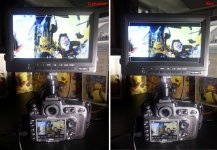
To better explane the problem, here is a picture with comparison of 2 situations:

D800 rec squeeze.jpg

I test it also with my TV at home: same result.

Any ideas?
Thanks
Roberto
 
It looks like your monitor on the left is displaying 4:3 and the one on right 16:9

I plug my CaMax monitor into the output on the HyperDeck Shuttle II
It shows exactly what I am recording.
I do not remove the cards, but do not record to card simultaneously.
Otherwise the resolution drops on the external recorder.
All the info including histograms can be shown on the D800 LCD at the same time.
 
HyperDeck Shuttle II
It shows exactly what I am recording.
I do not remove the cards, but do not record to card simultaneously.

You should double check about having a card in the camera while you output via HDMI for external recording purposes.

I know Atomos and other sources tell you NOT to have ANY cards in the camera because when you do it automatically defaults the HDMI out to 720.
 
Last edited:
I have been leaving the cards in my D800 for the last three weeks without problems (unless I also record to one of them).
I have the shuttle set to record 1080P at 30fps. (1920x1080) 10 bit 4:2:2 at a bit rate of 220Mbps (DNxHD) .
 
It looks like your monitor on the left is displaying 4:3 and the one on right 16:9...

I know, it's unbelievable but the image in left monitor is a perfect 16:9 and the one in the right monitor with two black stripe is squeezed on vertical.
I did a test at home connecting D800 to TV: same results.
I wrote to Nikon Italy, the did the test with a D800 and an Ikan VX7e monitor and they didn't have any problem.
What happen to my Nikon???
Anyone suggest to take it to Nikon service?

Bye
Roberto
 
I am thinking of switching from my Shuttle 2 to a Ninja 2 for one reason:
The Ninja has the ability to record DNxHD 36.

The highest use I have for my "Home Movies" is BlueRay disc for TV.
A BlueRay disc is only 8 bit with a maximum of 32 Mbps
220 is way overkill and I do not understand why Black Magic does not provide a lower option yet.

As far as the low resolution screen goes, I use an external monitor.
I would be using it to control the recorder only.

My friend has a Ninja 2 and I will be using it in a couple weeks.
I will test the "card in" problem then.
I will also test the record to both to see if the Ninja reduces the image to 720P.
 
Back
Top