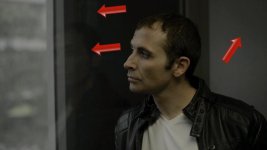
D800 posterization

macgregor

Veteran
I'm finding a lot of banding in the D800 footage. This is not a codec issue since the exact same artifacts are visible if I use an external recorder. And this is not an 8bit defect, since I´m not even grading the footage. The posterization is clearly visible in the shots with deep shadows.

Anyone else seeing these?
 
I'm finding a lot of banding in the D800 footage. This is not a codec issue since the exact same artifacts are visible if I use an external recorder.

Please do not be offended by this question -- it must be asked: Are you sure you are recording "clean" uncompressed video?
The D800 is fully capable of compressed video output on its HDMI port, whilst recording to memory card.

-- Bob Elkind
 
Please do not be offended by this question -- it must be asked: Are you sure you are recording "clean" uncompressed video?
The D800 is fully capable of compressed video outphttp://www.dvxuser.com/V6/images/smilies/cool.pngut on its HDMI port, whilst recording to memory card.

-- Bob Elkind


yes :cool:
 
Some captures:

Image1.jpgImage4.jpg

And some notes:

- this kind of posterization occurs weather I record on the cards or externally
- these are non graded stills
- visible in multiple applications, so it doesn't seem to be the workflow
- visible with all picture styles, but the more contrasty ones hide the posterization better since they make the shadows darker, but if you look for it, it´s there
- I´ve seen it in multiple ocassions under different lighting

Edit: I just noticed that dvxuser forum recompressed the stills a lot, still that posterization that the arrows are pointing looks the same in the original files.
 
Miguel, another question or three:

What ISO are you using?
What in-camera noise filtering settings are you using?
Is the posterisation (or contouring or banding) equally apparent at different ISO settings and noise filter settings?

-- Bob Elkind
 
Those are shot at iso 100 and 200.
Actually I was going to try shooting at a very high ISO setting to see if the noise fixes the problem. ;D
 
Isn't it a 8 bit limitation?

'Contouring' is much more complicated than simply '8-bit'.

Keep in mind that all JPEGs are 8-bit (per colour plane), and the vast majority of LCD displays are 6-bit (per plane) devices which are masquerading as 8-bit (per plane) devices.

-- Bob Elkind
 
OK, here you go, for all those skepticals:


Link to a high quality 1080p MP4: https://dl.dropbox.com/u/13362047/poster.mp4

This is what I did. I set up the D800 on a tripod and did the following:
- adjust the exposure manually to have a constant amount of light (about 1 stop underexposure)
- picture style set to neutral. Noise reduction set to OFF.
- then I went from 100ISO to 3200ISO and compensated with the shutter speed
- I recorded both internally and externally, with a Ninja recorder
- I imported the footage in Vegas and AE (to rule out workflow issues, both show the same posterization levels), and I raised the shadows a tiny bit to better see the posterization (the artifacts are visible also in the ungraded version). Then I exported the movie using 32-bit color processing.

Early conclusions: By looking at this quick test (notice the darkest area of his face and the wall on the left), I can see the posterization disappearing around 400ISO-800ISO (as soon as there is enough noise in the shadows to break the banding).
I need to go out and test more but I'd rather live with a bit of noise than with those posterized shadows.
 
Pre-grading, 8-bit footage shouldn't show posterization. It is after grading than having only 8 bits per channel becomes a big issue. The problem here is that there's some grading in-camera. From my tests with Flaat, I've found that while the in-camera image processing is much better on the D800 than on the D7000, it's still far from perfect (or, even, far from what the in-camera jpg processing can give you). The camera first debayers the image and creates an intermediate image with 422 8-bit color, then applies the picture control, contrast and saturation settings, etc, then records the result to H.264 420 8-bit (or outputs 422 8-bit through hdmi). The problem is that the intermediate image has a lot more contrast than it should. With a picture control, you can flatten it out and bring up the shadows, but it will show this kind of posterization. Even so, as workhorse option, I'd still go for Flaat_11p instead of Flaat_10p, but you have to be aware that reducing contrast and flattening the image is not 100% free in terms of IQ. In any case, with the D800, this posterization hasn't bothered me that much: if you're having issues with it, you can apply Stu Maschwitz's solution: gentle denoise, gentle add grain. The downside is that this may slow you down quite a lot.
 
and the "add grain" is important too (as you said, at high ISO the noise makes the banding invisible; well, grain is just a prettier kind of noise)
 
Well, banding occurs at lowest ISOs, and neat video removes noise, so how do you plan on removing posterization with neat video? :beer:
 
if you're working on a deeper color space, it will soften the edges of the posterization, creating artificial color shades in between (like upsampling an image, it goes to higher-bit color without actually increasing the information content), then the grain will mask it a bit more easily; it doesn't do miracles, and it does slow down your workflow quite a bit, but it kind of works
 
Back
Top