D600: HDMI out

From that second link:

UPDATE 2: Here’s a video of Jeromy Young (the illustrious CEO of Atomos – maker of the Ninja) showing the D600 + Ninja 2 combo working at 100% at Photokina: https://vimeo.com/49862540. Very promising! (Thanks for the links Cheesycam, Herbert & Chris). Looks like I’ve probably just missed something in the setup. I’ll update this post when I know more.
 
From that second link:

In some of the earlier shots in that video the ninja is clearly showing a still image. The GH3 is obvious as it isn't even plugged in, but if you look closely with the VG900 it is plugged in but the image is still despite people walking infront of the camera. It was plugged in to the d600 but it could be that it was just showing a still from another source.
 
On Atmos forum there is a thread about this http://forum.atomos.com/showthread....There-I-was-about-to-buy-a-D600&p=684#post684

In that thread Atmos responds by saying that yes there was a black border on the footage, they just didn't notice it at the time. Read the thread to get it in context.


Yes, that kind of surprised us too. So we went back and looked at the Photokina footage, and that border IS there. We just didn't notice it (trade show and all that). Nikon UK have subsequently confirmed it too and will be sending this up the tree to Nikon Japan. We will keep you posted.

Steve


I don't think Nikon is doing this to protect the D800, then they would not have advertised clean HDMI as a feature on the D600. Hopefully it will be resolved.
 
Last edited:
D600 Black Edge with Nanoflash

D600 Black Edge with Nanoflash

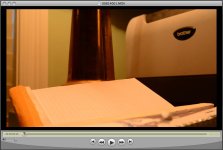
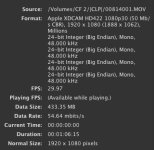
I just did a test with my Nanoflash... see attached photos. Note raster size in the first few lines of the movie inspector... not 1920 X 1080 it's 1888 X 1062. Hope they fix this. Hate Nikon for dumb stuff like this.D600 Black Edge.jpgD600 Movie Inspector.jpg
 
I have the BM hyperdeck 2 and the Nikon D600 I am having the same issue of not being able to get uncompressed HDMI footage out of the camera. I will post if I get it figured out..
 
I posted the following in a thread on the D600 on 9/13 when it was announed. Now I guess we know what they meant! It is performing to spec I think (see below.)

I guess that is the area they allow for display of camera settings via HDMI? When they turn the settings off, they don't resize the image?

++++++++++++++++++++++++++++++++++++++

Do you guys understand this statement from the Nikon web site:

When recording a movie through an HDMI interface, the output image may be
smaller than the value set with the "image size/frame rate" menu.

http://imaging.nikon.com/lineup/dslr/d600/features05.htm#a13

​
How is the image "smaller"? As in less than 1920x1080?

I assume they mean that the image is sized for the LCD, with space around it for the camera info. Then when you remove that from the HDMI output, the actual image size is slightly smaller?

I also assume there is no net impact on the output?

Thanks!
Michael
 
Hi Syberfilm, I don't think there is anything we can do unless Nikon fixes the raster size in firmware. I think I am going to return it Monday to Amazon... or just be satisfied with the internal recording. I got it for a second camera (or third) to use with my Sony F3. Nikon has a tin ear for this kind thing. I didn't want the D800 because of the super high pixel count (don't need that since I have a Phase One P40+). I know that Philip Bloom is aware of the problem as well as the lack of manual control and spoke to Nikon at Photokina yesterday.
 
Capturing uncompressed footage via HDM with Nikon D600..

You have to use the live view with the BM Hyperdec and Ninja. If you engage the record section it will not work.. Switch to Live view and the Atomos and the BMC hyperdeck will start recording clean uncompressed over HDMI.. I am going to make a seperate post for people trying to figure it out.
 
Capturing uncompressed footage via HDM with Nikon D600..

You have to use the live view with the BM Hyperdec and Ninja. If you engage the record section it will not work.. Switch to Live view and the Atomos and the BMC hyperdeck will start recording clean uncompressed over HDMI.. I am going to make a seperate post for people trying to figure it out.

This guy https://vimeo.com/49952287 took out the SD card so record mode isn't the problem.
 
You are correct.. I may be returning it myself... Such a shame... It is a nice camera. but it really is not doing what is advertised..
 
You are correct.. I may be returning it myself... Such a shame... It is a nice camera. but it really is not doing what is advertised..

Atomos and Nikon might sort it out if it isn't a deliberate cripple. It looks like it aliases a bit too much for my liking and the low light doesn't seem to be as good as the MKIII. It probably has the edge in dynamic range though.
 
Shipping back to amazon.. The D600 is major disappointment. I was thinking of hanging onto it for a firmware update.. But after recording to the BMC Hyperdeck and seeing the black box around the footage. If you were plan on buying this for the video out. Wait until they have a fix. You also have no manual controls in live view. If you only use it with the SD cards it is awesome... The video looks great. For photography this camera is incredible.. But for uncompressed HDMI so far a bust.
 
I posted the following in a thread on the D600 on 9/13 when it was announed. Now I

Do you guys understand this statement from the Nikon web site:

When recording a movie through an HDMI interface, the output image may be
smaller than the value set with the "image size/frame rate" menu.

http://imaging.nikon.com/lineup/dslr/d600/features05.htm#a13

​
How is the image "smaller"? As in less than 1920x1080?

Michael

Nobody seems to understand that, not even Nikon support, I have asked when the D800 came out, as exactly the same sentence is in the D800 specs as well.

Has anyone tried taking the SD cards out of D600 before HDMI recording to see if it makes a difference ?

Martin
 
I've tried everything, including taking the card out, and still nothing. The camera is incapable of outputting full HDMI for recording as is. And some folks have mentioned camera settings, and really there aren't many setting to select. The only thing that does work, is if you select the HDMI output to automatic, the recording device will recognize the 23.98 frame rate.

The D600 is a great camera, but it isn't the baby D800 we all hoped for. I think hardware-wise, it shares more with the D7000 than the D800.

There's a video out there, with a Nikon USA executive, Lindsay Silverman, Sr. Product Manager, talking about how you can record clean HDMI out to an external recorder. I guess he didn't test it.
 
You also have no manual controls in live view.
Do you mean that the D600 works the same as the D5100 in Live View mode? On the D5100, you must set your aperture before entering Live View, and you are then unable to set shutter speed manually. The way to work with this on the D5100 is to shoot in Aperture Priority mode, preset your shutter speed to 1/60 sec (or 1/50 in PAL regions), and use auto-ISO to set your exposure via the light meter. You can then make fine adjustments with the Exposure Compensation button. Once you get used to the semi-manual controls, it's actually quite convenient and compensates for the lack of a Live View histogram.
 
Do you mean that the D600 works the same as the D5100 in Live View mode? On the D5100, you must set your aperture before entering Live View, and you are then unable to set shutter speed manually. The way to work with this on the D5100 is to shoot in Aperture Priority mode, preset your shutter speed to 1/60 sec (or 1/50 in PAL regions), and use auto-ISO to set your exposure via the light meter. You can then make fine adjustments with the Exposure Compensation button. Once you get used to the semi-manual controls, it's actually quite convenient and compensates for the lack of a Live View histogram.

No I believe it is not quite that bad on the D600. You can control shutter and iso manually in live view, but Aperture has to be set before entering live view. So it is the same as the D7000, and not like the D5100.
 
You can control shutter and iso manually in live view, but Aperture has to be set before entering live view. So it is the same as the D7000, and not like the D5100.
OK, so the D600 is more like a full-frame upgrade of the D7000. I still like the D5100 Aperture Priority style of shooting video, using its auto-ISO features, and that technique works on the D7000 as well. Since all three of these cameras lack a Live View histogram, I don't see how you can accurately set a manual exposure anyway...
 
Back
Top