D600 Footage Test

Iluxa007

New member
[TABLE="class: tborder, width: 100%, align: center"]
[TR]
[TD="class: alt1, bgcolor: #EEEEED"][TABLE="width: 100%"]
[TR]
[TD="class: alt2, bgcolor: #D3D6DD"]https://vimeo.com/51753898
[/TD]
[/TR]
[/TABLE]


[/TD]
[/TR]
[/TABLE]

I had a chance to shoot some D600 footage this morning. I used various settings and only used f/2.8 lenses. Pushed the ISO to the max with pitch dark areas and was quite a bit impressed, especially shooting with 2.8 lenses! I rarely shoot video these days but wanted to test it anyway since Nikon sensors recently started to have more features for video, especially different frame rates. Dynamic range is great and ISO is impressive compared to the previous 5DmkII I had.
What I really disliked is the fact that you cannot change the aperture value WHILE being in live view mode! You have to close the live view in order to change it. You can still change ISO and shutter roll but cannot change the aperture value. I simply don’t understand why Nikon made it this way. Not that it’s a big issue for me but it is a huge issue for other videographers. Anyway - all in all, a great camera!
BTW, I made a mistake- the ISO for the interior shot is 6400 and NOT 64,000 :-)
Lenses I used:
Nikon 14-24mm f/2.8G
Nikon 24-70mm f/2.8G
Nikon 70-200mm f/2.8 G VRII
 
Actually you CAN change the aperture in LV! and while rolling if you choose. Just turn the aperture ring. All the lenses you chose unfortunately do not have that ring available to turn, being: G lenses. Also I might add that you were right in choosing high end lenses to go High ISO. That is what is needed to make high ISO work. Same with the 5DMk2, as soon as you want to go high ISO, choose the best lenses you can afford, preferably pro-line lenses.
 
This entire video was shot at 1080p @ 30fps. The only clip that was 720 @60 slowed down in premiere is the soccer ball landing into the puddle.
 
Actually you CAN change the aperture in LV! and while rolling if you choose. Just turn the aperture ring. All the lenses you chose unfortunately do not have that ring available to turn, being: G lenses. Also I might add that you were right in choosing high end lenses to go High ISO. That is what is needed to make high ISO work. Same with the 5DMk2, as soon as you want to go high ISO, choose the best lenses you can afford, preferably pro-line lenses.

Yeah, I don’t think I will be getting any D lenses :) the only D lens I had was back in my D300s days in 2010 which was a 50mm. I didn’t like it much. G is the way to go.
 
I didn't really want to start a new thread since nobody really seems to have this camera, so here's a video I made for a friend with the D600:

https://vimeo.com/51188739

Most of the video was shot with an AI-S 50mm 1.4 lens at f2 and ISO 160, though I used the GH2 with a 14-140 and some stupid high ISO on all the pocket dolly shots (mostly because I was too lazy to pull the D600 off sticks for those shots).

I'm overseas at the moment, but as soon as I get home I also have some random stuff I shot with available light and fast primes.
 
Thank you both for posting. Hendosan, interesting about the GH2 footage being mixed in. I liked the D600 image better. The Nikon has a smoother look as well as better color imho. Not far away though. The look of the D800/D600 is very appealing.
 
Yeah, it was mostly a time saving thing (I only had 4 hours to shoot in the space and wasted about 20 minutes trying to get the D600 balanced on a Pocket Dolly + friction arm.

It DOES look worse, but mostly because of the high ISO and Panasonic lens. I believe that at the same ISO and same lens/f-stop the image would be a lot closer.
 
The deal killer for me w/ the D600 is no flip-out screen :(.QUOTE<<<

I use a Camax H056 monitor mounted on the side of my TriPod.
This allows me to pivot the camera 360 degrees.
The 5.6" LCD is higher resolution and has focus peaking.
Works much better than a "flip-out" screen.
 
D600 owners, how do you feel about the camera at this point? I got one assuming it'd be similar to the D800. There doesn't seem to be a lot of D600 vs. D800 video tests, but I'm starting to feel like the D600 is actually fairly bad at video, and definitely worse than the D800.

I did some low light tests last night and was pretty disappointed. The resolution doesn't look like it's full HD, and the moire is just appalling.

http://www.youtube.com/watch?v=E_fYcz_xQVc
 
Doesn't U tube automatically downsize your video to 720?
At any rate the video looked much better than "appalling" to me.

Yes, the D600 is much more challenging to shoot with than a D800.
I have both and use the D800 for my "Home Movies".

I am wondering if the V2 might be better than both because you only need 2-3 MegaPixels for HD1080P Video?
 
There aren't really any DSLR's that resolve 1000 lines, so it's not really a fair standard to hold these cameras to. Get a GH2 (or GH3 when it's out) if you want high res videos but relatively shallow DOF, otherwise you'll have to deal with compromises in resolution. Also, the video looks a bit janky but it's not like you put a ton of production behind it either. An expensive cam doesn't make a great image - you gotta have good lighting, composition, and camera movement. If you did those same shots on an Arri Alexa, it'd still look janky.

I have both a GH2 and a D600 and I'm pretty happy. But I generally light everything I shoot, so the footage doesn't break up as easily. I think the 5Dmk3 will definitely beat the D600 in high ISO noise reduction.

I haven't shot a lot of video with the D800, but from my memory aliasing and moire are worse on it compared to the D600 (not by much though). D800 will be easier to use for video right now since Nikon hasn't fixed the aperture glitch in movie mode.
 
Last edited:
Of the footage I've seen, it seems like the D800 does a lot better in terms of moire/aliasing, but I haven't shot it so I couldn't say myself.

Using a wider lens on the D600, I seem to get heavy aliasing in every shot, which is really what bothers me the most about this camera. I put up a few wide clips from the D600. Those that have tried the D800 as well, do you think the D800 would be this bad?

http://www.youtube.com/watch?v=FnY1NIitPOY
 
The D800 has definitely much less aliasing/moire.

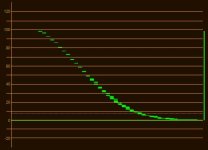
At least, as eolian helped me check out (because that was you, right?), it gives you a nice light-response curve, with a bit more contrast than the D800 but still with 11 stops of DR and a near-log light response when using Flaat_11

This is what he got with his D600 (in non-ideal conditions, consider this a preliminary measure):
Flaat_11p_preliminary.jpg

This is what I got with the D800:
flaat_11p.jpg
 
So what this means is the D600 has the same DR with the D800 but more aliasing?
Can you please explain what is Flaat_11?
Thank you!
 
Yes, same DR (at least close enough that we couldn't detect any differences, but this test was done in far from optimal conditions), more aliasing/moire (I haven't tested that, I'm just repeating what others report). Flaat is my suite of picture styles (http://www.similaar.com/foto/flaat-picture-controls/index.html), its design aims were (i) flat light response curve that is easy to grade (ii) improved skin tones (iii) improved DR. I'm pretty sure I succeeded on (i) and (ii), I have my doubts about (iii). Flaat_11 would be the workhorse option for Nikon D800 and D600.
 
Sam, thank you for your work on Flaat. I've actually been using Flaat_12 on the D600 and the amount of noise isn't especially bad, especially if you keep the ISO's pretty low. It's a very flexible profile.

The only thing that gives me issues is that the D600 seems to bias a bit towards red especially in the skin tones. This usually isn't an issue since I can just pull down the red midtones, but it's something I noticed even in the standard profiles.
 
That happens with Flaat for Canon too, and is solved with the Tone parameter (0 is usually too magenta, 1 is what I like best, 2 can be too orange). I guess the Nikons have a similar parameter too, to control the green-magenta axis of white balance? (I don't have a Nikon DSLR, I just borrowed one for a couple of days for developing and testing a Nikon version of Flaat).
 
Samuel, yeah that was me and thanks again for your work on the profiles.

My skin tones on flaat seem a little on the orange side actually. I had suspected it's due to not having set the white balance smack on but now that the red skin tones have been mentioned, I'll need to test this more.


Also, I think I just figured something out that could help compensate for the lack of a histogram. You can map a fn button to "View photo shooting info" (g1) in movie settings. If you keep your settings in movie and stills mode the same, then you can quickly hit this button while in movie mode live view, and it'll give you a meter to show you where the camera's matrix metering sees your scene's exposure. Of course, far from ideal, but I've had a hard time judging exposure from the screen especially when using Flaat, since everything looks brighter, so I'm using this as a way to check.
 
Back
Top