cs6 audio problem ***Please help

StrobelPhotography

Well-known member
Hi, I recently shot a corp video on a canon 6d and a 7d m1. Everything appears as normal throughout my workflow but in the interviews the voice tracks are missing or garbled only when playing back on mobile devices. The video sounds fine on tablet and computer.

shot Canon h.264 (sound recorded through an h5, I put the mic into the h5 and then put a lineout to the camera so the sound is baked in the video so to speak, this way I don't have to keep hitting record on the h5 and there's no combining files later in post. I've done this method on about 25 or more videos without a problem.)
to cs6
to audition
back to cs6
to youtube

I've never had a problem with this workflow before but on this video, like i said everything appears to be normal. But when I upload it to youtube and play it specifically on mobile devices it has sound issues. and the sound issues are only on tracks where people are talking. it sounds kind of garbled slightly. I output it a million different ways but no luck. I also identified the problem clips and transcoded them to prores but still had the same problem. The only way I could solve it was to play the clip through my speakers and re-record that to my h5. then insert that sound file in cs6. What is happening here? I'm scared that this will happen again and I really want to figure this out. thank you!!

I've uploaded a clip here:

https://youtu.be/y5PguUaIQSM
 
Last edited:
That is strange. On my computer it sounds good as you said. On my iphone4s I hear what sounds like garbled music which on the computer I hear no music at all. I don't know what to do.
 
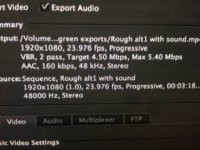
outputting at 48khz, but like I said, I tried outputting a bunch of different ways but no luck. I have not changed the sample rate tho.

IMG_5495.JPG
 
That is strange. On my computer it sounds good as you said. On my iphone4s I hear what sounds like garbled music which on the computer I hear no music at all. I don't know what to do.


there is music there too. I tried removing the music and just outputting the clip by itself but then it's just nothing. just silence.
 
Since this is an audio problem, it's odd that the one piece of kit you DIDN'T twll us about was the mics!

What mics were used? How were they connected? Did you by any chance use an XLR -> 3.5mm adapter?

The issue is that some adapters will take the two XLR wires and simply connect them to the two 3.5mm wires. In other words:


  • XLR signal + to left
  • XLR signal - to right

(or vice versa). So what you end up with is the two stereo channels containing exactly the same audio, but 180 degrees out of phase. This will sound OK when you play it back as stereo, but the two sides will cancel out when you play back as mono -- e.g. on a phone with one speaker.

If you didn't use an adapter, then maybe you somehow inverted one of the audio channels in post, with the same results.

Hope this helps....
 
I used my trusty mkh416 in a rode blimp, ktek carbon pole interally cabled, to port 2 on h5, then used the line out -15db or so on the h5 to the camera, pre-amp on the camera turned all the way down to one stop from the bottom. Thats how I do 90% of all my low budget type corp work or youtube work in general.
 
I get the jist of what your saying though and I will check my settings on the h5 now. maybe I bumped something that set it to stereo, but I'm pretty sure I set it to mono.
 
you know what...Maybe I accidentally conected the line out to the headphone jack...that would output a stereo signal...let me test that.
 
I hear very faint music with a beat, on both my phone and PC. There's definitely something in the background of your audio clip, most likely music playing off in the distance that you didn't pay attention to when you were shooting. Do you have a clip (straight from the camera) of nat sound taken just before or after the interview that you can upload?
 
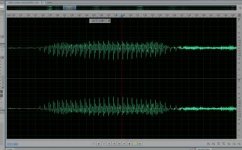
Well the two channels are definitely out of phase. I loaded the soundtrack from your YouTube clip into Audition, and it's as clear as a bell looking at the waveforms... also mixing down to mono, the dialog immediately vanishes (apart from some residual squeaking).

So -- probably at the point where the mono was converted to stereo -- one of the channels has been flipped, and that's certainly the problem. I would suspect something in the H5 or its connections. The H5 *SHOULD* do the mono->stereo mix correctly, but I wouldn't be surprised if they just screwed it up.

Hope this helps...


Screenshot (11).jpg
 
A simple fix would be to just delete one of the channels in Premiere, then duplicate the remaining channel to get stereo.
 
I'm not working in stereo in cs6 as far as i know. just one track...

Scratch that...I never really looked before. Yeah there are two tracks...
 
Last edited:
Well the two channels are definitely out of phase. I loaded the soundtrack from your YouTube clip into Audition, and it's as clear as a bell looking at the waveforms... also mixing down to mono, the dialog immediately vanishes (apart from some residual squeaking).

So -- probably at the point where the mono was converted to stereo -- one of the channels has been flipped, and that's certainly the problem. I would suspect something in the H5 or its connections. The H5 *SHOULD* do the mono->stereo mix correctly, but I wouldn't be surprised if they just screwed it up.

Hope this helps...


View attachment 112940


Ok, so i went into one of the problem clips... clip>modify>audio channels> and then i changed both source clips to the left channel. then I put it in a new time line, output it on stereo 48khz and it's working great. thank you for helping on this. I can't seem to replicate it, so I'm not sure what happened. It was very hot that day tho so maybe there was a small glitch somewhere either mechanically or something on my part...but I'm glad to know that I can fix this if it happens again. thanks you guys especially Atticuslake for being so smart and helping me with this. much appreicated.
 
I can't seem to replicate it, so I'm not sure what happened.

The two tracks were out of phase with each other. Look at the graph -- you can see it. Probably nothing more than a wiring problem, or you (that is, your equipment) just took a balanced signal at face value without processing. A balanced signal uses two signal paths are out of phase to cancel out noise; that's perhaps where you got two channels for a mono recording, one out of phase with the other.

EDIT: the out-of-phase problems show up on handhelds because they are typically mono devices. To play the mono they sum the two channels together. So if they are out of phase, you get... nothing. Sound familiar?

If you play this on a stereo (two speaker) system it'll just sound a little spacey (aka phasey, very diffuse sounding, hard to locate the source) but unless you're listening for it you might not hear it.
 
Last edited:
Back
Top