Bruce Watson
Veteran
I've done something I shouldn't have, apparently, to cause a cross dissolve to fail. Hopefully someone can identify where I went wrong and tell me how to correct it.
Context: PPro CS6, a two camera (both AVCHD) edit. Pulled both camera feeds into a source sequence, then nested this into a multi-cam edit sequence (using the multi-camera monitor to pick camera angles). Then I nested the multi-cam edit sequence into a target sequence. The target sequence is where I've got trouble. Client wanted me to edit out every "um", pause, and distraction, so the target sequence has had about 15 minutes of footage removed and it's down to almost exactly an hour. Client is happy. I'm doing the finishing now, cleaning up the color corrections, sweetening the sound a tad, adding some video transitions, etc.
I'd like to use some cross dissolves for those edits that end and start on the same camera angle. To "smooth over" the the obvious continuity disruptions that couldn't be solved by using different camera angles. Most of these work just fine, and look great. But a couple failed, and the images below show one of the failed cross dissolves.
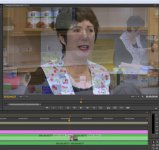
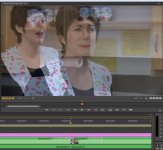
The first image shows the first half of the transition. The error is that it's using the post-roll from the other, not chosen, camera angle. The second image is from the second half of the transition which is using the correct pre-roll. So the first half of the transition fails, but the second half works just fine.
Now, I don't *have* to use a cross dissolve here. But I'm trying to learn what the limitations are so I can get better at multi-camera jobs. So... why did PPro pick up the wrong footage for the first half of the transition? How do I correct this one? How do I set myself up so that future ones will work like they should?
Context: PPro CS6, a two camera (both AVCHD) edit. Pulled both camera feeds into a source sequence, then nested this into a multi-cam edit sequence (using the multi-camera monitor to pick camera angles). Then I nested the multi-cam edit sequence into a target sequence. The target sequence is where I've got trouble. Client wanted me to edit out every "um", pause, and distraction, so the target sequence has had about 15 minutes of footage removed and it's down to almost exactly an hour. Client is happy. I'm doing the finishing now, cleaning up the color corrections, sweetening the sound a tad, adding some video transitions, etc.
I'd like to use some cross dissolves for those edits that end and start on the same camera angle. To "smooth over" the the obvious continuity disruptions that couldn't be solved by using different camera angles. Most of these work just fine, and look great. But a couple failed, and the images below show one of the failed cross dissolves.
The first image shows the first half of the transition. The error is that it's using the post-roll from the other, not chosen, camera angle. The second image is from the second half of the transition which is using the correct pre-roll. So the first half of the transition fails, but the second half works just fine.
Now, I don't *have* to use a cross dissolve here. But I'm trying to learn what the limitations are so I can get better at multi-camera jobs. So... why did PPro pick up the wrong footage for the first half of the transition? How do I correct this one? How do I set myself up so that future ones will work like they should?