F3: Creating onboard LUTs

morgan_moore

Major Contributor
Im sure the info is out there somewhere but can people give me a prod in the right direction for having a pop at making some LUTs for my F3 (full version)

Im talking monitor Luts not start point for post work..

But of course having the same look to kick off in Resolve would be nice.

I tried some Sony software but it seemed as sexy as something written on a ZX spectrum in 1984..

S
 
http://blog.abelcine.com/2012/03/19/s-log-and-the-f3-–-part-4-in-camera-look-up-tables/

You can use the Sony CVP File Editor as per Andy: This is MAC version of it: http://blog.abelcine.com/wp-content/uploads/2012/03/CvpFileEditorV4.2Mac_Zip.zip

LUTs in-camera on the F3 are unfortunately limited to 1D which means at most you can control levels and a bit of contrast for each individual RGB channel but you can not for example adjust hue, saturation or more advanced adjustments.

The F5/F55 apparently does support 3D LUTS as of the December firmware which I am starting to get into slowly.
 
THanks.

Ive played with that CVP thing.

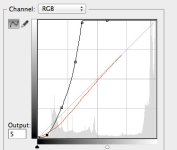
Basically trying to make my own gamma curve - super crushed and punchy

But the bobbles just dont go where i want!

I dont know if there is another way with a better GUI

S
 
I guess im going to want something that looks like this..

(simply I want to crush those noisy blacks so I dont see/rely on them and also clip the part of the highlight roll where there is not much data due to the super flat curve)

curve.jpg
 
Last edited:
My only advise for an F3 in-camera LUT is putting your IRE values back to normal, ie bring 38% grey to 50%, and 68% white to somewhere between 90-100%. You can also knock down the RED channel which on the F3 I always found to be a bit predominant in the slog mode.
 
Christian.. to clarify I need an external box with that solution?

Money may not be a problem but baggage is.

Could I use some of that kit to set up then leave the box at home?

S
 
the BMD box is not useable with LUT's - so far no fix has been offered... a bit worring that box would be recomended by Pomfort

reasonably priced options that work and do not destroy the image are the EEcolor and the FujiMini...

BMD works fine as long as you do not load a LUT into it BTW, i own three of them use them between Avid MC and plasma screens

No need for critical color in offline

Use the FujiMini in our color and online suites
 
Last edited:
Although I have not tried this workflow. Shipsides demo dscribes & shows a 3-D lut
solution.
Dermot, could you elaborate?
blog.abelcine.com/.../s-log-and-the-f3-–-...
Mar 27, 2012 - In this last part of my Sony F3 and S-log series, I go over how to generate 3D LUTs that ...
 
That curve does all you mention - you will even see a red dip!

question is is there a nice way of doing it..

Ah yes sorry I missed your image, I was on a mobile device and didn't see it but that's exactly around what I might try to replicate.

As you also suggested, by crushing your blacks slightly on monitor it can force you to light your blacks more on-set which will result in cleaner shadows and much higher detail in your darker tones. Doing that is somewhat similar to rating the ISO of your camera lower (or using CineEI mode) for the purpose of lighting your scene brighter knowing you will reduce levels in post and hence reduce the overall noise.

As for how to do it, did you check out Andy's videos?
 
the BMD box is not useable with LUT's - so far no fix has been offered... a bit worring that box would be recomended by Pomfort

reasonably priced options that work and do not destroy the image are the EEcolor and the FujiMini...

BMD works fine as long as you do not load a LUT into it BTW, i own three of them use them between Avid MC and plasma screens

I was looking into the HDLink solution about a year ago. What I was able to determine from user reports was the HDLink Pro DVI version was usable but the other two were not. I know of one DP who used it on set until he moved on from the F3. His colorist used LUTs and the Pomfort app to make them, then loading them into the HDLink.

Dermot, do you have the DVI version of the HDlink or the HDMI one?

If you read through the customer reviews on the B&H site you will see the DVI one is getting the praise although it is not clear from the reviews if anyone is actually using the LUT feature of the unit.

http://www.bhphotovideo.com/c/search?Ntt=blackmagic+design+hdlink+pro&N=0&InitialSearch=yes&sts=ta
 
You could create your 1D LUT using AE or Davinci and likely convert it very easily to CDL or whatever Sony F3 needs. Its mainly a file with three columns of numbers that represent the transformation curve.

Open up that F3 de-slog LUT I sent you and look at it with notepad.
 
I have three DVI versions that i use in single link/422 to DVI to HDMI set-up, from Avid MC to a Panasonic Plasma, and they all show the bend in the toe when any LUT is enabled.

i also have one that i use on my home machine, duallink/444 to DisplayPort to a DreamColor - same thing - a bend in the toe... very obvoius if you are monitoring full range... can't imagine that anyone could overlook it, or find it acceptable really

And a very good reason to always have external scopes... this is the poster child for screwing up your blacks while looking at the internal scopes be it in FCX, Smack, Lightworks, Resolve or speedgrade and thinking you are OK when you really are not...

more here;http://www.lightillusion.com/forums/index.php?action=vthread&forum=13&topic=34

BTW... i think they are great value, but poorly made with the SDI contectors epoxied to the motherboard and then held in place only by the bezel - and best suited to a editsuite where they will not be subject to too many plugin/unplug cycles

I take the Aja Hi with my cameras, better built, and as the BMD can't use the LUT that it loads, there is no advantge to taking it out of the shop, the Aja is built to last on set, as is the Fuji for that matter

We now use the Fuji IS-MINI between our finishing/gradeing systems and the monitoring, and always with hardware scopes !
 
Last edited:
If you are using a single camera can you use the Fuji IS-MINI on it's own or do you have to use the IS-100 to manage and load the LUTs into the IS-MINI.

I see the IS-MINI MSRP (retail sales price) is $1300. Not sure what the IS-100 goes for.

http://www.fujifilm.com/products/motion_picture/image_processing/is_mini/#features

Thanks for all of this info Dermot. Most helpful.

EDIT:

More useful informaiton on the Fuji IS-MINI:

http://www.postmagazine.com/Publica...eptember-1-2013/Review-Fujifilms-IS-Mini.aspx
 
Last edited:
Back
Top