Creating a movie poster

wish you could have kept the first one up there. from what i remember seeing that first one it was like BAM! really powerful. maybe because i've already seen it executed in the first one, there doesn't seem to be the power in this one. my only reason for thinking this is that the color on the logotype (which computer monitors are horrid) seems a bit washed out. the rest of the text (on my monitor) looks like a reddish-purple, while the logotype looks pink.

were the text and logotype the same color on the previous poster? maybe that's what gave it the power. i do love the distressed texture in the black. maybe lose it in the logotype to bring back the oomph? it seems as if the effects you've added to the logotype (the distress, the dimension) have weakened it.

the only other thing i would consider (and i'm not saying it's bad) is the credit block at the bottom. it feels like the text is to large for a typical credit block. i don't think it looks bad, just looks different.

still iike it a lot, though. defintely has a vibe with the big logo and the text running into it. very strong. just think it could be stronger.
 
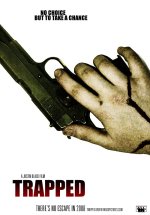
Any thoughts on how this could be improved? It didn't take too much work, so I'd be up for changing it if there are any good suggestions.

85pc5df.jpg
 
my two cents...

the composition is great and i LOVE the white.

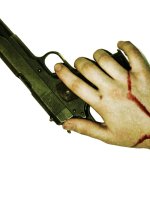
what makes it feel a bit amateur is that the image looks like it was shot with a digital camera. and the blood, while placed perfectly, looks fake (color). here's a quick color adjustment of the image to see how slightly stylizing it can make it stronger (?)

you might consider addressing the type at the bottom to be more cohesive. the text is a bit spaced out. look at a hollywood poster and make it look as close as possible, with dates, websites, credits, logos, etc. a good credit block goes a long way to making the poster look professional, as weird as it sounds.

(looks like zak beat me to some manipulation. nice contrast/grain. and the vignette is nice, too).

I updated with a second image, including text and such and a modified image. plus made the blood more MPAA-friendly by going black.

suggestion: add a tagline, something to get an interest in the film, something that teases. since the credits are not final, don't include them. i added "a film by" above the title and kept the brotherhood pictures logo. also, a website is FAR more important and professional than an email. and most of the time you can do a subdomain on a hosted site. we did this for our films so we didn't have to buy new domains for each film, but it still looks professional AND reinforces the company name.
 

Attachments

  • 85pc5df.jpg
    85pc5df.jpg
    110.5 KB · Views: 0
  • 85pc5df2.jpg
    85pc5df2.jpg
    149.3 KB · Views: 0
Last edited:
Thanks for the input guys. Zak, really thinking of stealing your idea. How did you do the vignetting? I'm going to do something similar, with no grain added and a different treatment on the hand and gun.
 
8epxvuf.jpg


Second attempt. Decided to try it without the vignetting, and different colouring on the hand and gun.
 
Great stuff rubbersquare. I'll definitely keep something like that in mind next time I have a go at it. By the way, image was shot on a Rebel XT. I'm surprised the guns looks so small, but it is real.
 
Last edited:
How big will I be able to print that poster at decent quality? The image is 8MP. I'd like to have it about a meter tall if possible.

Also, can you recommend a printer to do very few prints? Less than 10 probably.
 
The biggest problem I have with it is that the fingers are flexing, whereas if a person was holding a gun and had been shot and was lying on the pavement, the fingers would be outstretched and limp. Try it yourself, hold a gun handle like object in your hand, lay down and go completely limp. Your fingers move forward until they're held in place by gravity alone and from t he angle you're taking the pictures, the fingers are moving in, being held in place by conscious thought.

Reshoot it with the actor's hand not even "holding" the gun but instead just putting the gun on the ground and the hand laying limp over it. I would even have the actor let his hand go limp in the air, then place it over the gun without moving it, and see where the fingers wind up. Then take the picture.

Right now it looks like a person who's "sort of" alive holding the gun. You may be going for a person who's not-quite-dead, not-quite-alive, but then you'd be half-assing it. It should be either black & white or purposefully disingenuous. If the action doesn't perfectly ring one of those statements right off the bat, then it falls flat.
 
The hand looks a little splotchy (maybe the lighting). My eye keeps getting drawn to the redness on the knuckles. If you could desaturate or whiten-up the hand it would create a starker contrast with the red blood. It'd also make it look more like the owner of said hand has bled out.

davide
 
i like the background. Like the splatter of blood. LOVE the new title treatment. Still think what's missing is contrast. If you squint your eyes and look at it, everything is somewhat the same tone. Too much midtone in both the background and the hand. Look at how the hand stood out against the white, or how (not to say mine was good), there was a lot of contrast (and dead-ish bloodless flesh) the hand look more grainy. I think you're on the right track with the new title treatment and the blood splatter (as MPAA-unfriendly as it may be, it creates a nice pattern and look), you just need to create contrast (think of it as conflict) in the image. my less-than-two cents.
 
Thanks for the input. I agree, but I'm having some trouble figuring out how to gain that contrast. Perhaps make the gradient/vignetting less expansive?

Also, do you think the credits blurb stands out enough?
 
I'm a photographer, and I love film. My personal photography has always had a movie feeling.. short of moving on to cinematography, I'd love to get into designing movie posters.. This thread is great inspiration, and not just for the movie maker ;)

Here are a couple examples of my work; see potential for poster design? I may do up a couple mock designs to see if i can get any skills in the area with your guys help.

From doing some minor composite work in the past, I think there's a lot to be said about shooting the right image, the right way first.. then adding the essential typographical elements or additional photography.. starting off with good images will lead to great results.

breakdown: cracked paint bg overlayed from seperate shot outside the studio lit by window light,
rest is shot with flash..
long strip softbox on the right,
white umbrella for fill
one umbrella onto a white bg.
rim light with snoot off the right side of the frame onto the hand with knife
adjusted curve to push the blacks out of range

deciet.jpg


shot out of focus onto a steamed pane of glass using a polarizer filter.
lit by flash, large boomed softbox on upper left (close to center, over my left shoulder)
blue bg lit by one umbrella
color temp adjusted for cool feel.

lost.jpg
 
Last edited:
See my avatar. Its an old movie from Jules Dassin. Bright color background catches the eye. Brown Bunny uses the same, crappy movie but some reason they have it at all of my video stores (voted worst movie at cannes). Kill Bill 1 & 2 (awesome). Simple, maybe over done, but for someone with a o.k. camera or lack of photoshop skills, magic wand that image on a bright background. presto!
 
evolution of Heart of Now poster, adding more "white" to create a reference point for the orange...

postered2.jpg


another work in progress....

ifhyposterfg6.jpg
 
Last edited:
I'd use rubbersquares. I find your fleshy hand is too pretty. The skin tone on the arm is different then the the knuckle, and thats different then the fingers. There seems to be a glare coming off the glossy blood on the wrists as well. I love the background tho. But it seems your vision is the real skin color hand (always good to keep your vision) so maybe use zaks. his darker gun and hand would go perfect with the concrete floor. (ask permission to use theirs tho :p)
 
Back
Top