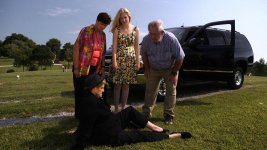
Wow! That was a Mighty White house you had to deal with. The sunlit side looks right on the verge of blowing out. And yet I think I can see some detail on the ground under the truck. And the skin tones look good. Not bad for a $3500 camcorder! I haven't tried DRS yet. Guess I should!

Navigation
Install the app
How to install the app on iOS
Follow along with the video below to see how to install our site as a web app on your home screen.
Note: This feature may not be available in some browsers.
More options
You are using an out of date browser. It may not display this or other websites correctly.
You should upgrade or use an alternative browser.
You should upgrade or use an alternative browser.
Could anybody guide me towards getting good results with the AF100?
- Thread starter Sttratos
- Start date

Jon Hout
Active member
Wow! That was a Mighty White house you had to deal with. The sunlit side looks right on the verge of blowing out. And yet I think I can see some detail on the ground under the truck. And the skin tones look good. Not bad for a $3500 camcorder! I haven't tried DRS yet. Guess I should!
Yeah, I was pleased with the results. The director did a last minute location change because this "location was perfect," and he neglected to tell me about that little detail. You should have seen the look I gave him when I saw that bright, white beacon sitting there...
But all's well that ends well eh?
- Jon
I never use the underexpose rule mentioned early in this thread, and I never shoot with anything other than Cinelike-V because I heard Barry say that gives the most latitude in post. I've used Cinelike D once and shifted to fluo once when I wanted to get rid of the yellow tone of these fluorescent energy saver bulbs. I usually look at the LCD, does it look right? I have my DRS on all the time to roll off the highlights, then I go to the waveform, make sure it's not clipping. I think the surrounding color adds to the overall color and sometimes the AF100 looks good and sometimes it doesn't.
This was shot with an Olympus 12mm on the steadicam, the Lumix 14-42 hand held and the 85mm on a tripod, also used a GH2 in a few shots.
http://www.youtube.com/watch?v=9mgcC-dJe90
This was shot with an Olympus 12mm on the steadicam, the Lumix 14-42 hand held and the 85mm on a tripod, also used a GH2 in a few shots.
http://www.youtube.com/watch?v=9mgcC-dJe90

mainstreetprod
Veteran
I've been following this thread trying to figure out why I, a guy who has been a hobbyist for many years but a serious shooter for only a few, could shoot a whole feature with this camera and not have more issues with highlights than I did. Then I went back and looked at the scene file I went with for most of the shots - a custom file from AbelCine called "Alex 1"(I used it verbatim but with a slightly lower detail level and occasional minor tweaks for certain shots). It was designed from the ground up to deal with and improve on the AF's handling of highlights, and I liked the results so much when done that color correction consisted pretty much of just fixing white balance problems. Below is a copy and paste of the designer's notes on coming up with the scene file (pay special attention to the "Knee" setting):
While reading Barry Green’s excellent book, “The AF100 Book,” I was intrigued to learn how the various scene settings in the AF100 actually work. After some experimentation, I created my own custom scene file (creatively named “Alex 1″). Here’s what I did, and why I did it.
Operation Type: Film Cam – This simply means that the camera uses film-style settings (such as ISO instead of GAIN), and shoots at 24p as a default.
Rec Format: PH 1080/24p – This is the highest quality the camera can capture, and that’s what I want.
VFR Mode: Off – I can turn this on and off from the back of the camera, and defaulting to “Off” is a good idea because the camera does not record audio in VFR “On” mode.
Detail Level: +2 – I’m not 100% convinced that this is the best setting, but I do like to have a sharp image, so this is what I’m using for now. If I start having issues with noise, I will turn this down to “0″ or perhaps “-1.”
V Detail Level: 0 – This is additional detail between vertical lines. I don’t see any reason to add this, so I keep it at “0.”
Detail Coring: -2 – Turning Detail Coring up will reduce noise and smooth skintones. Sounds great, in theory, but in practice I find that it gives a very electronic, plastic-like look to surface textures. Since I don’t like skintones that look like plastic, I’ve turned this down.
Chroma Level: -3 – This camera captures very chroma-rich images, which is great. But, since too much of a good thing is no good, I’ve turned this down a bit to suit my taste. I can always boost it in post.
DRS: Off - This is “Dynamic Range Stretching,” which also sounds like a good thing until you realize how much noise it introduces to the image.
Gamma: B.Press – I chose “B.Press” rather than one of the “Cine” settings for three reasons: first of all, it has the lowest inherent noise of any of the Gamma options; secondly, it does pretty much what I usually have to do in post – lower the shadows and boost the midtones; third, and most importantly, it allows me to use a “knee” setting, which the Cine settings do not allow.
Knee: Mid – This is the key to curing the AF100′s harsh, clipped highlights. Instead of capturing all the possible detail until 100% and then cutting off abruptly, the Knee setting electronically tapers off the highlights starting at about 90%. The difference on any particular portion of an image is subtle, but the cumulative effect is a softer, more film-life progression of highlights to pure white.
Matrix: Norm2 – As Barry Green describes it, “Norm2 offers brighter colors … a little less green, and a little more blue across the color spectrum.” Sounds good to me.
Skin Tone Dtl: Off – Go away, Ken and Barbie!
Interestingly, as soon as I started shooting with this scene file, my first thought was, “Hey, this looks like a 5D Mark II.” The blacks aren’t as crushed as they are with the 5D2, but the overall impression does have a bit more of the 5D “pop” that we’ve come to know and love.
Here’s a simple shot progression that goes from overexposed to underexposed, to show how the “Alex 1″ scene file compares to Cine-D. As you can see, the difference is not dramatic, but the custom file gives more contrast and, although it has less latitude, the roll-off to white is less harsh than with Cine-D.


While reading Barry Green’s excellent book, “The AF100 Book,” I was intrigued to learn how the various scene settings in the AF100 actually work. After some experimentation, I created my own custom scene file (creatively named “Alex 1″). Here’s what I did, and why I did it.
Operation Type: Film Cam – This simply means that the camera uses film-style settings (such as ISO instead of GAIN), and shoots at 24p as a default.
Rec Format: PH 1080/24p – This is the highest quality the camera can capture, and that’s what I want.
VFR Mode: Off – I can turn this on and off from the back of the camera, and defaulting to “Off” is a good idea because the camera does not record audio in VFR “On” mode.
Detail Level: +2 – I’m not 100% convinced that this is the best setting, but I do like to have a sharp image, so this is what I’m using for now. If I start having issues with noise, I will turn this down to “0″ or perhaps “-1.”
V Detail Level: 0 – This is additional detail between vertical lines. I don’t see any reason to add this, so I keep it at “0.”
Detail Coring: -2 – Turning Detail Coring up will reduce noise and smooth skintones. Sounds great, in theory, but in practice I find that it gives a very electronic, plastic-like look to surface textures. Since I don’t like skintones that look like plastic, I’ve turned this down.
Chroma Level: -3 – This camera captures very chroma-rich images, which is great. But, since too much of a good thing is no good, I’ve turned this down a bit to suit my taste. I can always boost it in post.
DRS: Off - This is “Dynamic Range Stretching,” which also sounds like a good thing until you realize how much noise it introduces to the image.
Gamma: B.Press – I chose “B.Press” rather than one of the “Cine” settings for three reasons: first of all, it has the lowest inherent noise of any of the Gamma options; secondly, it does pretty much what I usually have to do in post – lower the shadows and boost the midtones; third, and most importantly, it allows me to use a “knee” setting, which the Cine settings do not allow.
Knee: Mid – This is the key to curing the AF100′s harsh, clipped highlights. Instead of capturing all the possible detail until 100% and then cutting off abruptly, the Knee setting electronically tapers off the highlights starting at about 90%. The difference on any particular portion of an image is subtle, but the cumulative effect is a softer, more film-life progression of highlights to pure white.
Matrix: Norm2 – As Barry Green describes it, “Norm2 offers brighter colors … a little less green, and a little more blue across the color spectrum.” Sounds good to me.
Skin Tone Dtl: Off – Go away, Ken and Barbie!
Interestingly, as soon as I started shooting with this scene file, my first thought was, “Hey, this looks like a 5D Mark II.” The blacks aren’t as crushed as they are with the 5D2, but the overall impression does have a bit more of the 5D “pop” that we’ve come to know and love.
Here’s a simple shot progression that goes from overexposed to underexposed, to show how the “Alex 1″ scene file compares to Cine-D. As you can see, the difference is not dramatic, but the custom file gives more contrast and, although it has less latitude, the roll-off to white is less harsh than with Cine-D.
Exposure +3

Exposure +2

Exposure +1

Exposure +0

Exposure -1


Last edited:

Mike Harvey
Veteran
I always liked the look of B-Press but don't use it that often. I have a shoot for a birthing center in two weeks... I doubt over-exposure is going to be an issue, but I think I might want to try modified version of this out.

SJX
Veteran
I've been following this thread trying to figure out why I, a guy who has been a hobbyist for many years but a serious shooter for only a few, could shoot a whole feature with this camera and not have more issues with highlights than I did. Then I went back and looked at the scene file I went with for most of the shots - a custom file from AbelCine called "Alex 1"(I used it verbatim but with a slightly lower detail level and occasional minor tweaks for certain shots). It was designed from the ground up to deal with and improve on the AF's handling of highlights, and I liked the results so much when done that color correction consisted pretty much of just fixing white balance problems. Below is a copy and paste of the designer's notes on coming up with the scene file (pay special attention to the "Knee" setting):
Do you have any footy or frames from your feature? To me B.Press always looked more like video than Cinelike D. Besides, doesn't setting the knee so low reduce your dynamic range? Cinelike D is already supposed to be the gamma with the widest dynamic range, and by setting the knee so low I think you are reducing B.Press dynamic range even more. You also don't mention your master pedestal setting and neither does the Alex guy.
mainstreetprod
Veteran
 @mainstreetprods
Your grabs show exactly what the camera does with "proper exposure" and at the same time... shows exactly why some complain about highlight "issues"
Frame grabs were Alex's, not mine- grabs from my feature above and below.
.
Do you have any footy or frames from your feature? To me B.Press always looked more like video than Cinelike D. Besides, doesn't setting the knee so low reduce your dynamic range? Cinelike D is already supposed to be the gamma with the widest dynamic range, and by setting the knee so low I think you are reducing B.Press dynamic range even more. You also don't mention your master pedestal setting and neither does the Alex guy.
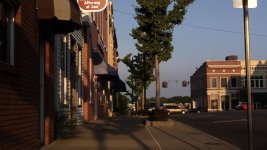
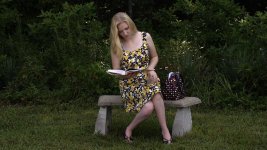
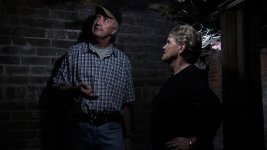
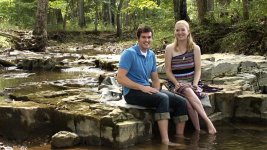
Master ped was kept at factory setting. Highlights not much of an issue on any of these scenes, with the exception of the sun shining on the rocks in background at creek. Here's mine:







Last edited:
mainstreetprod
Veteran
Excellence in exposure control. well done.
Those that moan about issues...and wont post examples... can learn from you .
Thanks for the kind words, exposure was done with zebras only as I can't read a waveform or histogram, at least on the fly, those who can IMHO have no excuse.

Shooter
Veteran
Thanks for the kind words, exposure was done with zebras only as I can't read a waveform or histogram, at least on the fly, those who can IMHO have no excuse.
Spend some time and learn your waveform info.
Its vital, easy... and it tells you exactly where everything sits in the level scale.
Your zebras only tell you what is sitting at and above.... whatever you have set them to.
You need to know where everything else is because it affects detail info and color ( and noise)
PS. for zebras only...you have a good eye and feel for levels already. The "eye" is important in the tool box
mainstreetprod
Veteran
Spend some time and learn your waveform info.
Its vital, easy... and it tells you exactly where everything sits in the level scale.
Your zebras only tell you what is sitting at and above.... whatever you have set them to.
You need to know where everything else is because it affects detail info and color ( and noise)
To me, the waveform looks a bit like the sonogram they show you of your kid in the womb - just can't make out exactly what they are talking about. One day the light bulb will come on and I'll be that much closer to knowing what i'm doing.
groveChuck
U-matic Member
Ha ha, me too! "Look honey, it's a boy, no, a girl? No, it's a talking head! Awww...."To me, the waveform looks a bit like the sonogram they show you of your kid in the womb - just can't make out exactly what they are talking about.
I use it but have far from mastered it.