Could anybody guide me towards getting good results with the AF100?

Ive recently been shooting a bunch of pieces to camera out side on very bright days (thats like every day here in Sydney)I have previously been shooting with cine D and grading but as my client wants it broadcast in minuets so I started baking in the look as there was no chance to grade any of it. To cut to the chase, I have been really happy with the result.
So give this a try...

Cine V
Norm 2
detail -4
Vdetail -4
Corring -2
Chroma -3
Chroma phase +2
Pedistal -2
drs 1 (some times)

Expose faces so 65ire is only just visible in the highlights on the zebras.
I now white balance with the variable setting and just eyeball it. Black balance regularly.
And im using a reflector and/or a single 1x1 light panel.


How do you match your white balance shot by shot if you are eye balling? You have two monitors set up side by side or an A/B switch set up that you can go back and forth to match? How time consuming and impractical it is to do that when shooting outside on location?
 
In fact she is correctly exposed but part of the background is under a tent=in the shade and thus you really can't see the bright light in this shot. I also used a large reflector to compensate the hard sunlight.

How hot do you want your face to be? Trust the WFM and spot meter. Great tools to get it right.

White balance in daylight shouldn't be more difficult than to set the camera at 5600K.
 
Yes, I like the spot meter sometimes better than the WFM because as I said, often I can't tell what is the face in the WFM.

But it is still not enough to work out the problems. The face can be correctly exposed and you still get either yellow casting in background, or washed out low contrast blooming effects with mushy skin tones. Even if the spot meter says the right number.
 
Last edited:
Another example of a more run-n-gun footage from last year. This shot in January and in Sweden with the sun really low. I believe I had the camera set to 5600K straight.
 

Attachments

  • AF101_RNG.jpg
    AF101_RNG.jpg
    78.2 KB · Views: 0
Sttratos, would you please share some screen shots? You are getting the best advice and have seen examples that work. I think talking it through further seeing what your seeing would be valuable to you.
 
Last edited:
Hscully, did you just remove a picture? I could swear I saw you posting a frame with a waveform grab. The right side of your frame is what I was talking about when I mentioned yellow. The highlights were starting to turn yellow and high light reflections looked like yellow electrical fixtures even though they are not artificial lights.
 
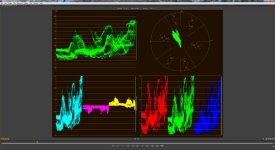
Here is a screen shot from what I'm shooting now. I haven't done anything to correct it. This is right out of the camera. As you can see from the waveform it's blown, the RGB parade shows red clipped. It's not too great BUT the skin is exposed OK. So I think it's still usable. There are other problems including a cast of reddish brown from the building... anyway, here's some blown out sunlight that looks OK. I moved them out of there for a safer shot but we may use this. I think the composition is nice.

I think Editman's comment about it being out of focus helping is accurate from my experience. This is shot with the same settings suggested here except the HDNorm.
 

Attachments

  • K&L71.jpg
    K&L71.jpg
    46.6 KB · Views: 0
  • K&LWaveform.jpg
    K&LWaveform.jpg
    63.2 KB · Views: 0
Hscully, did you just remove a picture? I could swear I saw you posting a frame with a waveform grab. The right side of your frame is what I was talking about when I mentioned yellow. The highlights were starting to turn yellow and high light reflections looked like yellow electrical fixtures even though they are not artificial lights.

Yeah, the screen shot had my brother in it from Skype, so I figured I'd spare everyone that and do it over. Yes, that's yellow but the sun cutting through there also had that tint. I think red is clipping so it gets a little yellow. So yeah, it's not going to bloom exactly to white but it's not a tough fix and I don't think the whole shot is blown, do you?
 
No I don't think the shot is blown at all. It looks nice. Of course that having beautiful women in the shot always helps. :)
But I think the shot still works mainly because the problematic area is almost off screen. If the pan had been a little more to the right I think it might have blown the shot. Sometimes you can't leave the problematic areas off frame.

Did you have bounce or light on them?
 
I did have a white bounce on them. Yes, it's blown technically and yes, they're pretty girls :) That always helps!

Once you go over 100% on the waveform then bad stuff happens. I have read other forums where this is a problem so it's not unique to the AF100. It's just one of the limits of shooting video. In film they always talk about protecting exposure in the shadows because the highlights can blow out to a lovely white. Blown is blown. It's not always possible to keep it in acceptable range on the WFM but if you do, you'll do well, if you don't.. then you're overexposed and have to live with it. I don't think it's bad or unexpected.

I've been under 50% on faces and its not bad. You just run the risk of noise, but if you push a little in that direction, underexposure, I find the results a little better.

I picked up a butterfly scrim recently. As you pointed out in an earlier post, there's a reason all those HMIs are out there on the street when they shoot this stuff ;) We didn't have the budget for a genny and HMIs so we just did the best we could under the circumstances
 
Last edited:
How do you match your white balance shot by shot if you are eye balling? You have two monitors set up side by side or an A/B switch set up that you can go back and forth to match? How time consuming and impractical it is to do that when shooting outside on location?


I guess I eye Ball pretty well, cause I don't use a 2nd monitor. Don't know how time consuming your idea is, never tried it. I have my dp6 that I have calibrated the best I can and I look at the scene and make adjustments where I see fit. I do tend to look at where I am and what light sources there are around me and make a rough calculation in my head as to how it might affect the scene. I get good results that so far has been very consistent. Shot several commercials for broadcast this way and I have even received comments about how little correction or grading is needed from the editor/color grader. My clients love it.
 
Stratos-

I just shot a feature with an AF (which I just sold) and believe me, it's not just you. I found two things really tough on the AF: exposure and focus. I figured out the first shooting day that shooting faces with a lot of sky in the shot on an overcast day was near impossible. Fortunately most of our shooting days were beautiful weather, usually we just needed a little bounce light and all was good. A couple of times I found myself not just using a reflector, but a mirror to bounce enough light on the face to compensate for the sky background (causing squinting of course).

I came to the AF from the HVX world and very seldom had exposure issues. The AF requires a lot more work and skill to get similar results. Focus was a bear too, even with an external monitor with 1:1 focus assist. I focused very carefully and still found a lot of out of focus shots when editing. Quite a few, though, were due to the shallow field of focus and actors not hitting the mark as they did in rehearsal.
 
Stratos-

I just shot a feature with an AF (which I just sold) and believe me, it's not just you. I found two things really tough on the AF: exposure and focus. I figured out the first shooting day that shooting faces with a lot of sky in the shot on an overcast day was near impossible. Fortunately most of our shooting days were beautiful weather, usually we just needed a little bounce light and all was good. A couple of times I found myself not just using a reflector, but a mirror to bounce enough light on the face to compensate for the sky background (causing squinting of course).

I came to the AF from the HVX world and very seldom had exposure issues. The AF requires a lot more work and skill to get similar results. Focus was a bear too, even with an external monitor with 1:1 focus assist. I focused very carefully and still found a lot of out of focus shots when editing. Quite a few, though, were due to the shallow field of focus and actors not hitting the mark as they did in rehearsal.


Oh no. I was really hoping it was me. So you gave up on the AF100? What did you move to?

Now that winter is nearly here, grey skies is basically all you get and it's nearly impossible to keep skies out of the picture unless you shoot people against a wall all the time. I have to say I'm really sorry to read that.
 
Oh goody, we haven't had someone start a "What's wrong with the AF100 highlights?" thread for at least a week. I was beginning to worry. Cue the GH2 fanboys in five, four, three, two, one...
 
Oh goody, we haven't had someone start a "What's wrong with the AF100 highlights?" thread for at least a week. I was beginning to worry. Cue the GH2 fanboys in five, four, three, two, one...


What? My thread is not about high lights. It's about how to get good results with the AF100. It's not only high lights. It's noise, washed out colors and skin tones etc. But thankfully some nice folks here have given me great advice which I'm about to test. I'm glad not everybody has your attitude.
Speaking of tests, the reason I didn't post frames yet is because it has been rainy around here and sun is hiding. As soon as the weather changes a bit I will try to replicate the problems I speak about. But it seems other people also have the same problems. So maybe the problem is familiar enough. But I will grab some frames to show.
 
If you do shoot some example footage try to do an eyeball exposure how you would like to expose and then do another when you just go by the WFM and keep everything under 100% and if any face in the frame at max 65%
 
What? My thread is not about high lights. It's about how to get good results with the AF100. It's not only high lights. It's noise, washed out colors and skin tones etc. But thankfully some nice folks here have given me great advice which I'm about to test. I'm glad not everybody has your attitude.
Speaking of tests, the reason I didn't post frames yet is because it has been rainy around here and sun is hiding. As soon as the weather changes a bit I will try to replicate the problems I speak about. But it seems other people also have the same problems. So maybe the problem is familiar enough. But I will grab some frames to show.

Why not just post a frame grab or two from the footage that prompted you to start the thread? I'm curious to see. If you can, post a screen grab of the wfm as I did for comparison.

BTW, I would not "eyeball" exposure. Try editman's experiment. There's no need to eyeball it. Your camera is a big old light meter. Use it. If the waveform is difficult to see or understand use the zebras. I use both all the time.

Unfortunately, Cinesota's right (and pretty funny). There are lots of threads like this, griping about the AF100 and very often not productive because it appears the OP doesn't want to arrive at a workable solution, whatever that is. They would rather drone on about this aspect or that about the camera they don't like. The best way to give gravity to your claims is to post your results. Let's see those frame grabs!
 
Last edited:
Oh no. I was really hoping it was me. So you gave up on the AF100? What did you move to?

Now that winter is nearly here, grey skies is basically all you get and it's nearly impossible to keep skies out of the picture unless you shoot people against a wall all the time. I have to say I'm really sorry to read that.

I wouldn't say I gave up on the AF100- just recognized it's limitations and dealt with them. I really only sold it because by the time I get around to shooting another feature, it will be old news and heavily depreciated. I still have an HVX to shoot run of the mill stuff. I came to appreciate the AF100's ability to get great shallow focus shots using Nikkor lenses and adaptors. And the fact that I can view AF100 footage on a 24" Imac full screen and it looks great, while the HVX footage is obviously lower rez. I dont regret shooting the feature on the AF in any way. To me , all the AF needs to be the "perfect camera" is more dynamic range to prevent exposure issues, and built in 1:1 focus assist with a high rez viewfinder. 24mps worked fine for me since I did only light color grading.
 
The advice to underexpose faces and lift the mid tones in grading is a solid one. It is actually one of the only ways to get good looking skin tones under sunlight with the AF100. The AF100 has a well registered problem with highlights handling. Some try to play it down and say it's operator error. But it's definitely not as some others will testify, even in this thread. It's a very real fault of the camera and the only way is to underexpose as if there was no tomorrow. When you think your skins are underexposed, underexpose some more and you might be just there. The problem with this is that faces come out looking quite flat as with some of the examples posted here. The skin looks nice but it's a rather flat image. This is the reason that most good looking skin tones you see posted from the AF100 are either studio lighting, lots of soft lighting or flat lighting. If it's a good looking daylight shot it will have that underexposed flat look to it or it will look bad. But it's not that contrasty faces are not possible with the AF100. They are, specially under fully controlled situations. Like night shots for example. But even when the lighting is high contrast you can't really have highlights on your skins with the AF100. The contrast is there but the bright side is pretty flat looking:
attachment.php


This is one of hscully's screen grabs which are some of the best looking AF100 frame grabs I have seen out there, where they are not mushy or have ugly clipping, or are over sharpened and over saturated. They look really nice. But they are done under more controlled situations.

But under direct sunlight it's hard to control that. As said many times you have to close the iris till you see 55-70% (it varies depending on who you are talking to) zebras only on the brightest spots of your skins. This means effectively killing all hot spots on your skins, meaning no real highlights. Brighter parts of the face are not necessarily highlights. So you can get nice high contrast faces with the AF100, such as the above, although no easily. But you absolutely can't get anything such as these, neither in a studio or under sunlight:

blade-runner-harrison-ford.jpg

The_Godfather.jpg

maxpayne_large.jpg


Attempting anything like that with the AF100 would be suicide and would turn out a nasty yellow and have posterization all over it. To expose with the AF100 in all these shots you would have to close your lens till these highlights were no longer highlights but just brighter parts of the face, effectively flattening you faces. If you are willing to understand that and accept it, you can make ok looking skins with the AF100. If what you want is cinematography such as the above the AF100 is the wrong camera as it just can't handle it. Despite that, people will try to tell you that it's a matter of price point and if you want such images you should shoot film, RED or Alexa. But it is not. The GH2 costs much less and can give you much better results and so can the Canon 5D for example. It's a design flaw. If you can live with it good for you. If you can't you need to look elsewhere.

The closest thing and the best result I have seen around here towards that look is this:

attachment.php


It's again from hscully. But I would love to see that frame moving to see if that highlight would take an uncontrollable life of it's own and look all nasty once it's in movement. So I can't judge if it was fully successful. The image is also very desaturated which helps disguising the problem.
But in my experience any highlight will turn nasty specially if the actor is moving his face around much. So you have to pretty much kill any highlights.
 
Back
Top