Corrupt clips? Looking for a cause....

I just finished a show shooting 720/24pN onto two 8 GB cards that were rotated through P2 Genie on a PB G4.

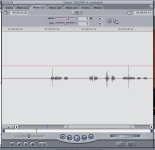
3 of the 8 card loads we shot would not import into Final Cut 5.1.2, so I used P2 Log to export those cards as XML. It seems that most, if not all, of the clips have corrupted audio. All four channels constantly cut in and out, and not in unison.
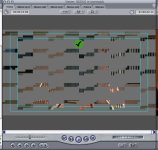
What's more-- at the end of the clip, I see flat grey macroblocking/artifacting-- something I have NEVER seen before with P2 footage.

Attached are screen caps of the artifacting and an example of audio waveforms from the bad channels (all channels are doing this, not just the XLR-in on CH 1/2). The waveforms should look much more lively than this.

Any ideas as to the source of the problem? Is it the camera?
 

Attachments

  • artifactsP2.jpg
    artifactsP2.jpg
    77.5 KB · Views: 0
  • audiobreaksP2.jpg
    audiobreaksP2.jpg
    60 KB · Views: 0
No, it's not the camera -- it's the Mac. This is a well-known problem, but there's not really a solution. Mac P2 software just isn't as solid as it needs to be.

Apple recommends not importing directly from the cards, they recommend making a "disk image" of the cards first. That way if you get a failed import, you can try again.

Sure would be nice if they'd just FIX THE SOFTWARE.
 
So I should make a disk image of the card files that P2 Genie created? Or was P2 Genie the problem in the first place and I should have made images directly from the cards?
 
There WAS the suggestion to use a disk image first, but it really doesn't do anything to help. P2 Genie is not the problem, the problem is OS X has a P2 bug.

Import your problem clips with P2 Log. I find sometimes, not 100% of the time, but the clips that don't import into FCP properly will import with P2 Log. Some files P2 Log can't import, FCP will import just fine. Go figure...

I can say that beta testing the version 3.0 of the FS-100 firmware, I'm getting much less of this problem. I'm not a Focus employee, I can't speak directly for them, but from what I "understand" they are implimenting some work around in the FS to this OS X problem. They're as frustrated with it as we all are.

Hey Apple, you out there? Hey, wake up!
 
So, for clarification, the problem is the import only? In other words, if I copy P2 folders to Mac HD, the folders aren't bad but you can't import to FCP. This makes me very nervous as we are about to do our first project with the HVX. I've read posts here but how common is the problem? Does it happen at all on PC?

Ric Shellhammer
Oceanside, CA
 
And for further clarification, what stage of the import causes the problem?
Is it the import into FCP, or is it simply the fact that the import is taking place on a mac (is there a specific version of OSX that is the issue)?

The ultimate question is... Can this be fixed somehow, or will I have to tell production that we need to reshoot?


BenB--
Is Focus' fix implimented only in the FS-100 unit or is it a driver that is installed into OSX?
 
This may be a silly question, but does it make any difference if the write-protect tab is flipped "on" on the P2 card during import?

I don't see it being an issue, but I figured I'd ask....
 
It's the process of transferring the clips from the card to the Mac where the "glitch" happens. FCP is innocent in this process; if you transfer the clips on a PC to a hard disk, and then plug that hard disk into a Mac with FCP, you'll find flawless footage.

I would always write-protect a card before offloading it.
 
Matt Irwin said:
The ultimate question is... Can this be fixed somehow, or will I have to tell production that we need to reshoot?
Do you still have the footage on the cards? If so, try re-importing from the cards. Or, try importing the cards onto a PC.

The easiest fix is to just not use a Mac to transfer footage over. Use a PC, transfer to an external drive, and plug that drive into the Mac to edit -- flawless footage every time.
 
No, unfortunately I don't still have the physical cards with footage on them. We were rotating two cards throughout the shoot, so I only have the last two rolls on P2 (which are flawless). The bulk of the footage is on an external firewire drive that we used to offload footage through the PB.

From now on I'll be using 1394 HOST or a PC laptop on set. Screw this noise. Time for Apple to get serious.
 
Matt Irwin said:
Time for Apple to get serious.

I totally agree! Would be nice if Apple FIXED THIS, seeing as how the majority of HVX users are on the Mac, right? Everyone needs to fill out the Final Cut Pro Feedback Page!

http://www.apple.com/feedback/finalcutpro.html
 
Matt Irwin said:
From now on I'll be using 1394 HOST or a PC laptop on set. Screw this noise. Time for Apple to get serious.
Exactly. I've been clamoring for this for months. I wish every HVX owner would go to that feedback page and DEMAND a fix.
 
I'm wondering how many folks with macs are having positive results? I don't doubt the problems, but as I am using a nearly identical work flow (24pn to p2 cards, offload to 2 seperate firewire drives using a powermac g4 and p2genie, import from those drives to internal media drive on a mac pro running fcp 5.1.2 I also use p2 log on the laptop to double check a few shots on the firewire drives before emptying the p2 card and ejecting. ) and have had no problems yet. I would estimate that over the last 10 months we have downloaded about 150 8 gig cards this way without a hitch.
Is there some variable that we can narrow down to that is causing the problems. or is it random and I should expect these problems to occur any minute now?


thanks, tim
 
Feedback filled out and sent.
Thanks for the support guys.

tacotim said:
I'm wondering how many folks with macs are having positive results? I don't doubt the problems, but as I am using a nearly identical work flow (24pn to p2 cards, offload to 2 seperate firewire drives using a powermac g4 and p2genie, import from those drives to internal media drive on a mac pro running fcp 5.1.2 I also use p2 log on the laptop to double check a few shots on the firewire drives before emptying the p2 card and ejecting. ) and have had no problems yet. I would estimate that over the last 10 months we have downloaded about 150 8 gig cards this way without a hitch.
Is there some variable that we can narrow down to that is causing the problems. or is it random and I should expect these problems to occur any minute now?
Up until a few days ago, I was in the exact same boat as you. I've been using Mac/P2 Genie/ FCP workflow and have not had problems. Then this happened. Why? No idea. Hate to say it, but typical Apple.
 
matt,

quick question, were you backing up p2 cards to two seperate hard drives, and if so, were the same clips on both hard drives corrupt? or were different clips corrupt ? Also, what version of OSX are you running on the laptop you use for offloading? We are running 10.4.7

thanks, tim
 
BenB said:
Import your problem clips with P2 Log. I find sometimes, not 100% of the time, but the clips that don't import into FCP properly will import with P2 Log. Some files P2 Log can't import, FCP will import just fine. Go figure...
Ben, since you don't have P2 Log Pro or the newer versions of P2 Log your comment is outdated.

In the early versions of P2 Log, a valid Contents folder and intact XML file was required. But we worked hard to give P2 repair tools within the Pro version. Now you can even repair clips that have become disassociated with the XML and P2 folder structure.
 
Not that this will help anyone who's experiencing this distressing problem, but I've captured hours of P2 from my HVX (via Firewire) onto my G5.

Sometimes, I siimply drag the clips over using Finder - sometimes I capture directly to FCP 5.1.2 using:
File > Import > Panasonic P2.

Most of my footage is 720PN and I've never had any corrupt or unusable P2 files.

I never take the P2s out of the HVX.

Slightly OT - I've been very impressed by the reliability of the HVX's 1394 connection. I had a Sony Z1 before and it was the very devil to get FCP or OSX to recognise it.

Andy
 
andynick said:
Not that this will help anyone who's experiencing this distressing problem, but I've captured hours of P2 from my HVX (via Firewire) onto my G5.

Sometimes, I siimply drag the clips over using Finder - sometimes I capture directly to FCP 5.1.2 using:
File > Import > Panasonic P2.

Most of my footage is 720PN and I've never had any corrupt or unusable P2 files.

I never take the P2s out of the HVX.

Andy

You're right Andy, it doesn't really help the problem as some people work with more than 2 cards and cant stop shooting to tie the camera up as a transfer station.:Drogar-Dum(DBG):
 
Back
Top