Correct exposure for S-log2

These are the mapped exposure values for a grey card and white card:

Screen Shot 2014-02-15 at 6.53.31 PM.jpg

You can see with slog2 that where you decide to place middle grey from your scene should be around 32% IRE on your waveform monitor. A white card at around 90% reflectance would read 59% on your waveform monitor.

Basically because of the nature of the curve to slog, everything is lower than we might expect. If you don't consider these values then you run the risk of adding a lot of compression of your image in the highlights region. Shooting 1-2 stops over middle grey is not necessarily bad, there are good reasons, for example depending on the scene itself, when you might decide to shoot dead on these slog2 values, or shoot over them.

Myself and many others calibrate our light meters to our camera's middle grey value in various gamma modes (such as slog2) so that on set we can light and check exposure using our light meters and get consistent exposure for middle grey values. Of course you don't need a light meter and can use a waveform monitor function on your monitor, but because slog compresses what you'd normally see from 0-109% down to 0-60% it becomes a difficult to use for exposure unless you can use LUT's to bring the levels back to normal full range values.

For more information on using light meters for exposure take a look at this thread I started:

http://www.dvxuser.com/V6/showthread.php?318606-If-a-light-meter-is-good-enough-for-Deakins
 
Last edited:
I would definitely make some tests myself. From my early tests, my conclusion was to over expose about 1.5 to 1.75 stops about 50-60 IRE on skin/gray. This was using an O7Q. With the new FW I have revised this value down a bit.

I don't recommend shooting Slog2 in the internal codec on the 700. Others may and it may be OK in very contrasty situations, but not for a well lit scene. It is better to find a PP that closely matches the desired final product and pretty much fills the histogram on the 700.

I am just saying if you control the lighting you normally don't need the bigger dynamic range and if your histogram is only using ½ of the range and you shoot in 25mb/s 8bit, you will probably end up with banding and noise when graded.


On the O7Q you have much more latitude for grading in post, that is where Slog2 really shines. 11+ stops of dynamic range. Now you have 12bit 4K RAW either kept RAW or ProResHQ 230mb/s 1080. Lots of latitude.

So run some tests in a bunch of different lighting setups and get familiar with what to use in what situation. There is no one answer, or shortcut. You need to do your own tests and analyze your results in your NLE workflow or with editors/colorists you work with.

I know this may sound like a pain, but with more complex settings and more control you have to spend time figuring out how to get the most out of your kit. The bottom line is we now have much better tools, but they will only give better results if used properly, and yes it is harder not easier. Working with these new tools take longer and is more intense so you have to charge more, but the results are well worth it.
 
After using the Sony F3 for two years and several discussions and sharing information on the forums, I would agree with what Olof said; that scenes which do not have a lot of contrast really don't benefit much from shooting in slog2, especially with the pain that comes with exposing it "right" in-camera and later removing slog from the image which to do properly involves more than just adjusting curves from your single RGB channels. In that case you are better off using a cine gamma or hyper gamma and getting the look as much as possible in camera leaving yourself some latitude you might want for grading later.

slog is better where you have lots of highlights or fuller range scene but if you are controlling your light you can achieve fantastic results without using slog.

I've been using the F55 with slog2 now for about a year now, again not always because it's "needed" but mostly so I can refine my post-workflow process working with it and really try to pull out a more Alexa or filmic look from it. To me, most of that being how the highlights get manipulated.

what are tips for correct exposure for interviews? What should be zebra value for skin?

Just realized I never answered the 2nd half of your question.

So if you want to place your skin at 50% middle grey then in slog2 mode you would aim for 32% as per the chart I posted.
 
Basically because of the nature of the curve to slog, everything is lower than we might expect. If you don't consider these values then you run the risk of adding a lot of compression of your image in the highlights region. Shooting 1-2 stops over middle grey is not necessarily bad, there are good reasons, for example depending on the scene itself, when you might decide to shoot dead on these slog2 values, or shoot over them.
If shooting interviews in controlled lighting. Is there any negative sides for exposing skin at 70%? Background is dark and it looks quite grainy... or it can easy be fixed in post?
 
Remember with slog the exposure scale is exponentially increasing as you get close to 109% IRE.

If you look at the chart I posted above, 32% on your waveform monitor is actually 50%. Then 70% in slog2 is around 90% IRE. If you place skin at 70% in slog you are really not leaving any dynamic range above that. I would not recommend placing your skin at 70% in slog2 mode. Usually (and depending on preference, style, etc..) skin tones (middle grey let's say) is placed one stop over or under middle grey. Sometimes 1.5 to 2 stops over middle grey.

But to place it that high is not worth it and really not the point of shooting slog to begin with. If it was linear-RAW then the story is a bit different but this is slog.

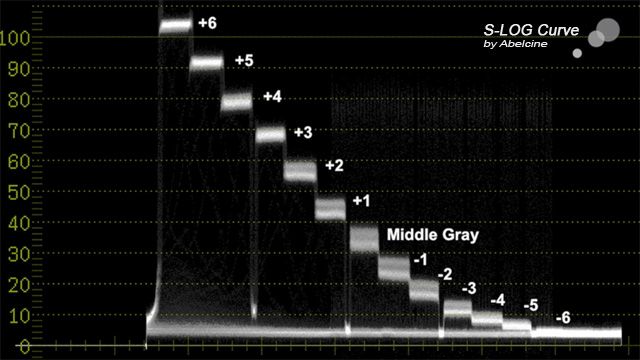
Look at this curve for regular slog1 to get an idea of the distribution of stops throughout your slog range. If you put skin at 70% in slog mode it would end up where you see +5 on the chart. Hardly any dynamic range above that is there?

Abelcine-SLOG-curve.jpg


What you might want to consider is lighting your darker background if possible so that it hits around 8-12% IRE and then in post you can slightly crush just the shadows and end up with super clean looking grain free blacks.

If you're not lighting your dark background or can't then you can increase your ISO so that your background registers a little higher on your waveform monitor (8-12% IRE) then go on to lighting your subject's skin relative to that so that it's 1 to 1.5 stops higher than 32%, say 45% or 50% IRE. Later in post you can bring the entire exposure back down 1 to 1.5 stops and you will decrease the noise, improve the effective signal-to-noise ratio, and only have robbed yourself 1-2 stops from the top end in the highlights region.

When I approach lighting I do it in layers ie. background, foreground, subject, etc.. so that everything is more or less lit separately but relative to each other so my overall scene contrast ratio is pretty controlled.

If you have any interest in reading about using lightmeters for the purpose of lighting, check out this thread I started http://www.dvxuser.com/V6/showthread.php?318606-If-a-light-meter-is-good-enough-for-Deakins

Cheers,
 
Last edited:
I've been shooting a lot of slog2 over the last couple of days - docco style, so exposure is just roughed in then corrected in Resolve later on (using resolve ACES - slog2 IDT, Rec709 ODT). I've generally been putting skin tones at 40-50% (using false colour) they come out about right. Thing is, there's so much latitude that, eve if they're a little over, they pull back fine.
 
I've been shooting a lot of slog2 over the last couple of days - docco style, so exposure is just roughed in then corrected in Resolve later on (using resolve ACES - slog2 IDT, Rec709 ODT). I've generally been putting skin tones at 40-50% (using false colour) they come out about right. Thing is, there's so much latitude that, eve if they're a little over, they pull back fine.

How do you have your false colour setup Colin?
 
One caution against using false color when shooting in slog is that the range values of false color will not match up to what they are in a log scale.

So while one stop over slog middle grey might show as a color on your monitor, you would be missing other key levels you would typically want to monitor.
 
One caution against using false color when shooting in slog is that the range values of false color will not match up to what they are in a log scale.

So while one stop over slog middle grey might show as a color on your monitor, you would be missing other key levels you would typically want to monitor.

Sorry, I'm really tired, so I'm not sure what you're trying to say. I don't have it on all the time, if that's what you mean. I just use it because you can't set the Zebras that low - just to rough in the skin tones. It's also useful to check areas that are close to clipping (highlights or shadows). I generally find it quite a useful reference to quickly flick on. I'll also check the WFM - or just the regular image - it's pretty easy to see what's problematic just with that.
 
One caution against using false color when shooting in slog is that the range values of false color will not match up to what they are in a log scale.

So while one stop over slog middle grey might show as a color on your monitor, you would be missing other key levels you would typically want to monitor.

The false colour on the O7Q happens after the Slog is applied. You can adjust the various limits for each colour and for green you can create a from and to setting. So as you mentioned above if you want to target 42-52% for skin tones rather than 32, that's easily done and you can flip in and out of it at a touch. It's really well thought out.

cheers
Paul
 
If you can adjust the setting values for false color that is great, but many monitors use fixed values which utilize the full waveform scale with traditional values of interest. Also using an exposure tool on an slog signal rather than LUT'd slog signal means you reduce the overall granularity of monitoring the signal, and again slog is a super hyper curve with exponential representation of the image.

I sometimes monitor in slog too don't get me wrong - just pointing out that using LUT's is the best way to monitor exposure when working with log gammas. Sony really got this backwards when they introduced log gammas and should have introduced in-camera LUTs at the exact same time for the benefit of working in a "traditional" scale.
 
If you can adjust the setting values for false color that is great, but many monitors use fixed values which utilize the full waveform scale with traditional values of interest. Also using an exposure tool on an slog signal rather than LUT'd slog signal means you reduce the overall granularity of monitoring the signal, and again slog is a super hyper curve with exponential representation of the image.

I sometimes monitor in slog too don't get me wrong - just pointing out that using LUT's is the best way to monitor exposure when working with log gammas. Sony really got this backwards when they introduced log gammas and should have introduced in-camera LUTs at the exact same time for the benefit of working in a "traditional" scale.

Right. Well, CD have only just enabled a LUT for Slog2 so, previously I was only able to monitor that (hence using the false colour to set exposure). Now that the LUT is in place I'll expose/monitor with the LUT applied (using false colour again, as I like that, but looking to the yellow 'white person skin tones' setting as my guide).

At the end of the day, the only important thing is to make sure you understand the tool you are using and what it is telling you.
 
Yep I completely agree.

Nice to see CD has some foresight into what makes for a good tool, unlike Sony who has lagged behind with such a concept.

:)
 
Back
Top
