I'm on a Mac and using Premiere CS5.
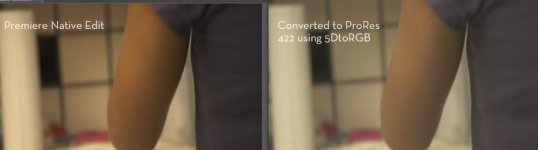
I read this article on EOSHD which states that OS X clips the Blacks and Highlights if you edit the AVCHD footage natively when using Premiere CS5. From the pictures in the article, it certainly looks that way.
http://www.eoshd.com/content/8076/how-mac-osx-still-screws-your-gh2-fs100-nex-footage-a-must-read
The article suggested using 5DtoRGB which transcodes the AVCHD footage to ProRes and keeps the black and highlights from clipping. I have several questions
1) Mac users, do you guys transcode your footage (a serious pain in the neck and something I wish to avoid), and if you edit natively, have you noticed this dynamic range loss issue? Is there a work around or some type of box in Premiere to check that will bypass the clipping problem?
2) If you do transcode, which Mac based application do you use? Is 5DtoRGB the best app. for this?
3) Finally, which flavor of ProRes do you guys prefer? 422 HQ, 422 or 422 Lite?
Edit: I just checked myself and there is a very noticeable gamma shift when comparing the 5DtoRGB transcoded ProRes footage to what is natively imported into Premiere (same clip, side by side). I'm hoping someone knows of a way to work with the AVCHD footage natively and still get the proper dynamic range, without having to transcode footage (Sucks big time).
I read this article on EOSHD which states that OS X clips the Blacks and Highlights if you edit the AVCHD footage natively when using Premiere CS5. From the pictures in the article, it certainly looks that way.
http://www.eoshd.com/content/8076/how-mac-osx-still-screws-your-gh2-fs100-nex-footage-a-must-read
The article suggested using 5DtoRGB which transcodes the AVCHD footage to ProRes and keeps the black and highlights from clipping. I have several questions
1) Mac users, do you guys transcode your footage (a serious pain in the neck and something I wish to avoid), and if you edit natively, have you noticed this dynamic range loss issue? Is there a work around or some type of box in Premiere to check that will bypass the clipping problem?
2) If you do transcode, which Mac based application do you use? Is 5DtoRGB the best app. for this?
3) Finally, which flavor of ProRes do you guys prefer? 422 HQ, 422 or 422 Lite?
Edit: I just checked myself and there is a very noticeable gamma shift when comparing the 5DtoRGB transcoded ProRes footage to what is natively imported into Premiere (same clip, side by side). I'm hoping someone knows of a way to work with the AVCHD footage natively and still get the proper dynamic range, without having to transcode footage (Sucks big time).
Last edited: