Converting AVCHD to AVC Intra Crazy?

...and also...I have never used a RAID .

MY main system specs are relatively humble...but a custom built system dedicated to Edit , audio and Graphics

Win 7 - I7 - 24GB RAM - 2x Nvidia GTX Cards.

I believe spreading the sources on various drives is advantageous and necessary considering no RAID. I have always done so. Makes sense to me. Must add - they are organised as well.
 
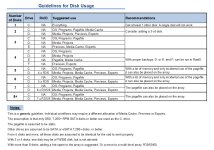
Erik, have you seen the suggested drive setup on the Adobe forum, like Shooter's?
Guideline+Disks.jpg

This thread isn’t new but it has lots and lots of info.

I have to try spreading out the media across several drives and see if it helps with performance. At home I can do this since I use an external five drive eSata port multiplier RAID0. I’ve used this setup for a few years and it’s pretty fast.

AJA Speed test.
207mbs Write.
236mbs Read.

At the station I have an internal three drive RAID0. No more drive bays left. I still have legacy and other projects that require FCP 7 unfortunately, and splitting up that RAID would be a chore.
 
I just did a conversion of one AVCHD card with 14.64 GB of media on it to AVC-INTRA 100 and the new P2 card is 110.52 GB. Thats huge and way larger than I originally projected. A little under eight times the size of the original AVCHD media card. I used Adobe Media Encoder to do the conversion.
 
I just did a conversion of one AVCHD card with 14.64 GB of media on it to AVC-INTRA 100 and the new P2 card is 110.52 GB. Thats huge and way larger than I originally projected. A little under eight times the size of the original AVCHD media card. I used Adobe Media Encoder to do the conversion.

What were the specs on the AVCHD footage? 1080p24? p30? 60i?
 
I found this on Wikipedia:

More over, the AVC-Intra Class 50/100 is now extended to Class 200 and Class 4:4:4. The Class 200 mode extends the bitrate to 226 Mbit / sec for 1080/23,97p, while the Class 4:4:4 extends the possible resolution from 720p to 4K with pixel depths at 10 and 12 bits.

Perhaps that's why it's 8 times larger instead of just 4?
 
Interesting. I can’t pick the quality of AVC-INTRA in Adobe Encoder so not sure what the nitrate is. I need to take a look at a clip inside Premiere to see.
 
I was reading in one of the adobe forums about this and they think this is a bug with CS6 that Adobe is currently working to fix, in the meantime a lot of mac premiere avchd users say that cs5.5 works perfectly...
 
Erik, I just ran a test on a sample of AF-100 files from a card that was about 3GB in size, and the resulting AVC-I folder was 12GB, which seems correct to me (24Mbps vs 100Mbps). Granted this was 1080p24, so perhaps that could be an issue? I am running the latest version of Media Encoder CS6 on Windows 7. I set up a preset to do AVC-100 1080p 23.976 with Render at Maximum Depth and Use Maximum Render Quality both checked.
 
Back
Top