Convergent-Design Odyssey 7Q Arrived

Michael Erlewine

Well-known member
Just a note to say I received the unit from B&H, but not the SSD drives, although I have a notice that they are now on their way.

Went through the process of registering the unit, getting a key for that, and entering the key to activate. Am now waiting for the FS700 activation key to arrive by email, and I will be all set.

The unit looks very nice indeed. It works fine so far.
 
Last edited:
Yeah, I got mine, today. Activated Basic and FS700 by phone....pretty sexy!
Two immediate observations..
1-wow, that neutric power connector looks really vulnerable and weak. When removing the connector, one must pull the connector straight out. If it gets rotated a tiny bit when half way out, It gets jammed in the O7Q.
2-the glass face is flush with the frame. Nothing to note except that it's unusual after a series of remote recorders with recessed screens.

Really REALLy really need DNxHD. Hard to beleive they shipped with no compressed codecs.
 
Last edited:
The activation key arrived, and I am good-to-go. Now what to do with 2K raw?

The power connector needs to have the little knob pointing to the back of the unit before you plug it it.
 
Just a not to say I received the unit from B&H, but not the SSD drives, although I have a notice that they are now on their way.

Went through the process of registering the unit, getting a key for that, and entering the key to activate. Am now waiting for the FS700 activation key to arrive by email, and I will be all set.

The unit looks very nice indeed. It works fine so far.

Hey Michael,

Congrats on receiving your O7Q! Just curious when you ordered from B&H. I called B&H this morning and they said they only received 1-2 units for their initial shipment, so I'm guessing you were one of those! I placed my order with them July 2nd, so hopefully not too far down the list :)
 
The activation key arrived, and I am good-to-go. Now what to do with 2K raw?
.

Make sure you are in 2K output on the FS700.
Use the PP7 Slog2 in Picture profiles
Set the Odyssey to FS700 2KRAW recording (see manual)
Set the record trigger to SDI in (this will use the rec button on the camera to trigger rec/stop) you must have media in the camera and record to do this.
Use WF on 7Q to set exposure after doing a white balance.
ISO will always be 2000 or more in Slog, don't let this fool you, over expose have the blacks at 25-30% on the WF in the Odyssey, this will seem to bright and it looks like it will clip but this is OK.
The image on the FS700 will look to bright as well, this is OK. This will probably be fixed in an upcoming FW update, but for now this is the best way to record 2K RAW.
Use Resolve light (free download from Black Magic) or Resolve if you own it to put the DNG's in a time line.
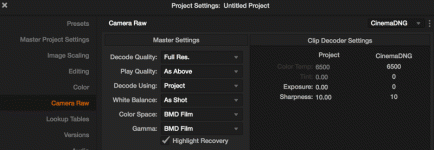
Use these settings in Resolve Project:
ResolveSet.gif

Now in the timeline select clips and do an auto color adjustment (option-A on a Mac), you will now have a nice image ready to just convert to ProResHQ or whatever, or you can further grade.
Render and drop into your NLE.

Have fun. The images are beautiful and very low noise.

I use the FS700 internal clips as proxy to quickly review the shots, they are a bit bright but just do a quick CC and they are OK for proxies. The renders from resolve take a while. You may want to archive the RAW DNGs for further grading.
 
Last edited:
I placed my order on April 16, 2013, so very early. People are getting them, because when I called for FS700 activation, they told me they were getting many calls for activation, which is why I had to wait an hour or so to get my activation code.
 
just got mine, as well. first impressions:
really nice display. terrified of the glass screen. need to get a screen protector on it, stat (could see a swinging BNC connector cracking it in the heat of production.) VERY lightweight. gonna work great as an oversized EVF. one quirk I observed right away is a substantial shift in color when switching the FS700 output from 4K to 2K raw- not sure which side that's happening on. really beautiful bit of engineering. now for some testing!
 
just got mine, as well. first impressions:
really nice display. terrified of the glass screen. need to get a screen protector on it, stat (could see a swinging BNC connector cracking it in the heat of production.) VERY lightweight. gonna work great as an oversized EVF. one quirk I observed right away is a substantial shift in color when switching the FS700 output from 4K to 2K raw- not sure which side that's happening on. really beautiful bit of engineering. now for some testing!
If you get a chance to post some of your tests we would love to see the results! Thanks!
 
just got mine, as well. first impressions:
really nice display. terrified of the glass screen. need to get a screen protector on it, stat (could see a swinging BNC connector cracking it in the heat of production.) VERY lightweight. gonna work great as an oversized EVF. one quirk I observed right away is a substantial shift in color when switching the FS700 output from 4K to 2K raw- not sure which side that's happening on. really beautiful bit of engineering. now for some testing!

From what I understand it's Gorilla Glass, so it should be pretty tough. Going to put one of those protector plastic sheets over mine anyways to prevent scratches.
 
From what I understand it's Gorilla Glass, so it should be pretty tough. Going to put one of those protector plastic sheets over mine anyways to prevent scratches.

yeah, I have some iPad screen protectors I used to use on my SmallHD. gonna install that immediately. I'm sure it's tough. but it's still glass and production is rough, so I just think some care must be taken. clearly, the build quality is really good though.
 
Dear Friends, The screen already has a screen protector on it. And Yes, it is Gorilla Glass. Respectfully, Dan Keaton, Convergent Design (For some reason my Return Key is not working!)
 
yeah, I have some iPad screen protectors I used to use on my SmallHD. gonna install that immediately. I'm sure it's tough. but it's still glass and production is rough, so I just think some care must be taken. clearly, the build quality is really good though.

quick update on that. started to apply one, couldn't figure out why I was getting all sorts of crazy air bubbles. until I discovered that the Odyssey already has a screen overlay (that incidentally also has all the printed data on it for connection identification.) after struggling with it for a while, I finally stopped for fear that I would damage that (much needed) info or introduce bubbles or dust where it didn't belong. fwiw.
 
Dear Friends, The screen already has a screen protector on it. And Yes, it is Gorilla Glass. Respectfully, Dan Keaton, Convergent Design (For some reason my Return Key is not working!)

So Dan or Mitch,

If it already has a screen overlay on it, does that mean if we scratch it somehow we can replace it? Is that something we can do or do we mail it back to CD?

So the 7Q does NOT need a 3rd party screen overlay?
 
Last edited:
So Dan or Mitch,

If it already has a screen overlay on it, does that mean if we scratch it somehow we can replace it? Is that something we can do or do we mail it back to CD?

So the 7Q does NOT need a 3rd party screen overlay?

This is a great question. Seems strange to have the overlay info on the screen protector. I feel like ideally it would be an overlay edge (where info is needed) then a separate screen section, that is easily replaced.
 
The Odyssey7Q does not need a 3rd party screen protector, but you can add this extra layer if you wish.

The screen protector on the Odyssey7Q does have our silk screening on it. It is field replaceable and while I do not have a replacement part price on it yet, that price will be very inexpensive.

If you damage the OLED panel itself, then that repair has to be done at our facility, and the price will be somewhere in the neighborhood of $350-400. That modest price gets you a brand new, recalibrated OLED panel.
 
As to the workflow suggested by olof (using resolve to make the dng's into a sequence) : Looks like a good workflow. But has anyone experimented with any form of cineform workflow yet? - As in converting the DNG to cineform and then editing is what I mean - that would save you alot of space and you'd still retain all the nice RAW information. Seems ideal - in theory. Of cource It's just an idea - I'm sure someone here could give a more qualified answer to wheather this would actually be a viable option.
 
@tscav: I didn't have the FS700, but I did post production for a short film that was shot on the Black magic at RAW setting and a handful of RAW DNGs from a Canon 5D3. I tried out the Cineform RAW conversion and while I did save A LOT of space (Film Scan 2 -- around 3:1 compression ratio, Film Scan 1 -- 5:1, wasn't bothered to try High) compared to the uncompressed RAW frames from both mentioned cameras (around 4-5 Mbyte/frame), I lose all the metadata and wasn't able to use Camera RAW setting in Resolve 9 (not sure about 10). Yes I can do all the RAW image processing either in First Light or the Cineform studio app but these settings doesn't carry through in Resolve (still not sure about 10). Resolve 9 treated the footage as normal debayered Cineform MOV with yucky green tint (Cineform studio compensated for that using its own metadata system that is not readable by Resolve).

You can certainly try it with the new FS700's footage and Resolve 10 to see if it's fixed. I understand the need to save storage space, but I think everyone should expect to prepare themselves for the increase in file sizes when moving into RAW. Hard drives are cheap enough though and those Cinema DNGs playback smoothly in Resolve with all the information needed to best utilizing RAW shooting :)
 
@tscav: I didn't have the FS700, but I did post production for a short film that was shot on the Black magic at RAW setting and a handful of RAW DNGs from a Canon 5D3. I tried out the Cineform RAW conversion and while I did save A LOT of space (Film Scan 2 -- around 3:1 compression ratio, Film Scan 1 -- 5:1, wasn't bothered to try High) compared to the uncompressed RAW frames from both mentioned cameras (around 4-5 Mbyte/frame), I lose all the metadata and wasn't able to use Camera RAW setting in Resolve 9 (not sure about 10). Yes I can do all the RAW image processing either in First Light or the Cineform studio app but these settings doesn't carry through in Resolve (still not sure about 10). Resolve 9 treated the footage as normal debayered Cineform MOV with yucky green tint (Cineform studio compensated for that using its own metadata system that is not readable by Resolve).

You can certainly try it with the new FS700's footage and Resolve 10 to see if it's fixed. I understand the need to save storage space, but I think everyone should expect to prepare themselves for the increase in file sizes when moving into RAW. Hard drives are cheap enough though and those Cinema DNGs playback smoothly in Resolve with all the information needed to best utilizing RAW shooting :)

Thank you for the explanation dangtienanh. Yeah that certainly makes sense - that was also what I worried about, the metadata not being carried over. And indeed it doesn't seem worth the space save. But it sure makes it more urgent to get CD to come out with some more compressed codecs (prores dnxhd or whatever) for those project where you don't really need Raw, but still would like to offer your client a little step up in quality without breaking your back (and filling up your hard drives) on the post workflow. Thank you for clarifying. Looking forward to see what support Resolve 10 , and also Adobe will bring, as is being discussed on other threads.
 
Back
Top