Duke M.
Veteran
I've read a lot of posts on this and other sites from people advising to turn detail off to avoid that halo around high contrast details that screams video.
I was developing two color PP's and also wanted more detail control so I started experimenting.
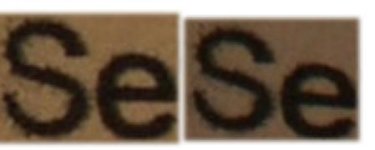
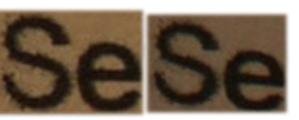
I shot some printed text that was printed on plain paper with an inkjet printer. Some ink bleed is visible, and actually helps you judge the detail level.
I shot with the detail off, then two slightly different detail ON profiles. I checked the focus after each shot. I did screen captures as BMP files and then crops from approx. the same areas.
Don't confuse halos with anti-aliasing. Square pixels must anti-alias to form smooth curves. Even detail OFF has anti-aliasing.
Download them, and zoom in with photoshop at 100%, 200% and 300% for a closer look. (Your browser won't cut it.) Look at the edges and give me your opinion on three questions:
A) Do they all have the same level of detail? Which one is better?
B) Do they all have the same anti aliasing, or do some have excessive sharpening resulting in halos?
C) Which one has the best balance between details and over sharpening?
___ The pictures ___
DETAIL OFF:
http://lifetimememoryvideos.com/gallery/DetailOffCrop.bmp
DETAIL ON - 1:
http://lifetimememoryvideos.com/gallery/RealColorDetailCrop.bmp
DETAIL ON - 2:
http://lifetimememoryvideos.com/gallery/RealColorDetail3Crop.bmp
___
I'll put the details of the PPs in the PP thread with a link here:
http://www.dvxuser.com/V6/showthread.php?p=2060716#post2060716
___
If that were the only two settings in the camera I'd agree to turn detail OFF, but there aren't and now I totally disagree.
I was developing two color PP's and also wanted more detail control so I started experimenting.
I shot some printed text that was printed on plain paper with an inkjet printer. Some ink bleed is visible, and actually helps you judge the detail level.
I shot with the detail off, then two slightly different detail ON profiles. I checked the focus after each shot. I did screen captures as BMP files and then crops from approx. the same areas.
Don't confuse halos with anti-aliasing. Square pixels must anti-alias to form smooth curves. Even detail OFF has anti-aliasing.
Download them, and zoom in with photoshop at 100%, 200% and 300% for a closer look. (Your browser won't cut it.) Look at the edges and give me your opinion on three questions:
A) Do they all have the same level of detail? Which one is better?
B) Do they all have the same anti aliasing, or do some have excessive sharpening resulting in halos?
C) Which one has the best balance between details and over sharpening?
___ The pictures ___
DETAIL OFF:
http://lifetimememoryvideos.com/gallery/DetailOffCrop.bmp
DETAIL ON - 1:
http://lifetimememoryvideos.com/gallery/RealColorDetailCrop.bmp
DETAIL ON - 2:
http://lifetimememoryvideos.com/gallery/RealColorDetail3Crop.bmp
___
I'll put the details of the PPs in the PP thread with a link here:
http://www.dvxuser.com/V6/showthread.php?p=2060716#post2060716
___
If that were the only two settings in the camera I'd agree to turn detail OFF, but there aren't and now I totally disagree.
Last edited: