
Navigation
Install the app
How to install the app on iOS
Follow along with the video below to see how to install our site as a web app on your home screen.
Note: This feature may not be available in some browsers.
More options
You are using an out of date browser. It may not display this or other websites correctly.
You should upgrade or use an alternative browser.
You should upgrade or use an alternative browser.
F65: Control panel problem
- Thread starter bitnaut
- Start date
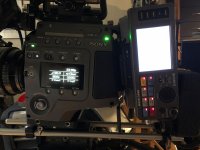
Thanks to a fellow forum member and F65 owner, I’ve been able to categorically determine this isn’t simply a power issue.
I have been informed that the SRK-CP1 control panel can also be found on the old Sony SRW-1/SRPC HDCAM SR recorder units which can be found relatively cheaply on eBay.
Question is, if I do pick up one of these older control panels, they most likely have older firmware in comparison to my current SR-R4’s control panel. Would I still be able to update the firmware on the control panel if/when my SR-R4 complains that the panel’s firmware is not compatible/up to date?
I have been informed that the SRK-CP1 control panel can also be found on the old Sony SRW-1/SRPC HDCAM SR recorder units which can be found relatively cheaply on eBay.
Question is, if I do pick up one of these older control panels, they most likely have older firmware in comparison to my current SR-R4’s control panel. Would I still be able to update the firmware on the control panel if/when my SR-R4 complains that the panel’s firmware is not compatible/up to date?
Not just any control panel :-(
Not just any control panel :-(
So it is true that the SRW-1/SRW-9000 and SR-R1/SR-R4 share a similar SRK-CP1 control panel, not all control panels are created equal.
Depending on the boot up screen, some versions support both, others do not. Here’s how to tell:
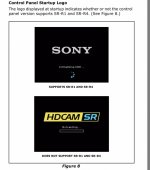
Hopefully I ordered the right one on eBay :-(
Not just any control panel :-(
So it is true that the SRW-1/SRW-9000 and SR-R1/SR-R4 share a similar SRK-CP1 control panel, not all control panels are created equal.
Depending on the boot up screen, some versions support both, others do not. Here’s how to tell:
Hopefully I ordered the right one on eBay :-(
Last edited:
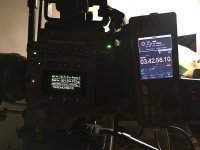

I think the control panel just can't boot up for whatever reason...initially a good one and a bad one look the same...screen and buttons light up when power is turned on but a good one goes the extra mile and shows boot up screen, mine doesn't. So, the main board is hooped, not the screen or buttons.
After more experimenting at the suggestion of a fellow member, I've found that although the SRW-1 control panel throws up an interface error and causes the record and tally lights to flash on the F65 and SR-R4 recorder, it still manages to work in terms of being able to set and monitor the audio signals, set timecode, etc...you just have to ignore all the warning messages and flashing lights. You can still record and playback with it connected!
So it's a bit of a workaround while i try to get my SRK-CP1 panel fixed or replaced.
Good to know!
So it's a bit of a workaround while i try to get my SRK-CP1 panel fixed or replaced.
Good to know!
Looking at the circuit boards inside the SRK-CP1 (official name of the SR-R4's control panel) and the SRW-1's control panel (doesn't have a name or serial number), you'll find all the same chips: both memory and CPU. SO it's really just a matter of firmware being different between the 2 hence the different startup screens pointed out earlier in this thread. I wonder if there's a way to trick the control panel into taking an update firmware file from the SR-R4 control panel updates (filename in the form of CPSR_x.xxx...) and burn it onto the SRW-1 control panel (filename in the form of CP_x.xxx...) through a simple renaming of files...hmmm.