Conforming without Cinema Tools

morgan_moore

Major Contributor
Hi

Im running 0s 10.7.2 and while FCP works for me Cinema Tools does not (disscussed in other places)

Im looking to take some early 5d footage shot at 30FPS and re-conform it to create mild slo mo on a 25p timeline

This was easy with Cinema Tools, but with CT broken could users suggest another way maybe a streaclip type app for a few dollars

I have streamclip and clipwrap

Thanks

SamMM
 
I think its a formatting issue. I've run into the problem before, but if the clip is missing an appropriate time code or is in some odd format, then sometimes Cinema Tools wont work with it.
Maybe use "MPEG Streamclip" or Log and Transfer in FCP to convert a file to some ProRes flavor. Then see if it works.
But at 30fps, maybe just adjusting the speed within your timeline will suffice, i usually dont have frame blur on at such a small decrease in speed, so the picture stays sharp.
 
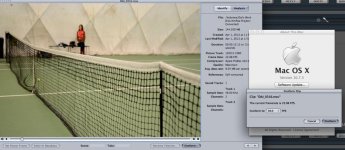
Works just fine for me...
Screen Shot 2012-04-04 at 2.50.27 PM.jpg


Maybe, its installed incorrectly... or somehow something installed and overwrote a few files. If you really need this ALL the time, you may want to look into doing a clean install again.
I have FCP 7 and FCP X, as well as CS 5.5 all installed.
 
Interesting Im on 10.7.2 and FCP 6

Im not too hot on getting this stuff working and thought an external app might be an easy solution

I hope not to do too much conforming in the future - Im working with some older shoots with the 5d from before 25p was available

Best

SMM
 
You can do this in Compressor, in the frames tab. Look in the online manual for more information.
 
To confim - thank you Arnie - Compressor did the job fine

To other browsers it goes a bit like this..
Export using compressor
Video Settings - new frame rate
Frame controls tab - make the frames play back at 25p

Thanks

SamMM
 
Back
Top