Computer Monitors

Calomile

Well-known member
Hi!

I've just bought a brand new Mac Pro, and now I'm looking into getting some brand new monitors to go with it. I'm looking for some suggestions on what I should be looking for, based on my requirements/budget, so here goes!

I would like to use two monitors for editing in Final Cut Pro & running other programs simultaneously (After Effects or a large preview window) ideally they would be 24"+ with a decent resolution. Some form of colour accuracy would be nice, as for smaller projects I will be using them to grade footage until such a time as I can afford a Decklink card and decent monitor for this task. My budget would be somewhere around £300-400 per monitor, so a maximum of £800 for the pair, however if there are particular bargain monitors that are going to save me a couple hundred quid then I would not be averse to this!

I really want to crack on with getting my system set up properly so my little rig can start earning its keep!

Thanks in advance for any replies I get!
 
grab two dell u2410's. The most accurate lcd you're going to get under a grand or two, they come precalibrated from the factory with an average delta E of around <4, with some quick tweaking its down below 3. Also, on their displayport input, it is capable of and will receive, process, and display a 10 bit signal, giving you real bit for bit display and accuracy of 10 bit footage or a 10 bit grading pipeline, if you have any. They are 24" inches with a nice resolution of 1920x1200. I can't begin to describe how good they look whilst being accurate, and how much data I see on them compared to my old lcd and even the crt's I used to use, the contrast ratio is huge and the viewing angle is basically infinity. They can be had for 500 bucks (american) each! I don't see myself needing to upgrade for a very very long time, graded a project in Assimilate Scratch on them, when it was displayed on a sony 2k projector, it looks gorgeous, and exactly like it did in the post room. From factory they cover 110% of the NTSC color gamut, which is absurd.

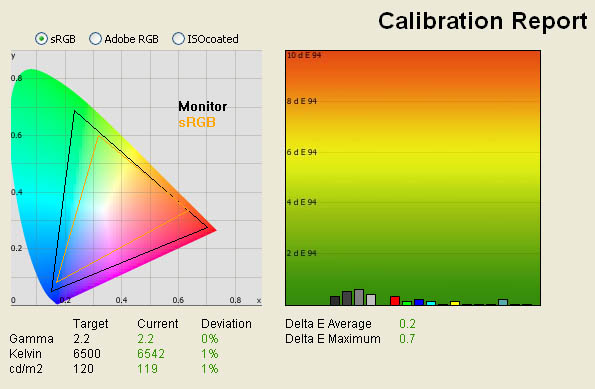
Edit: excuse me, down to an average delta E of 0.2! this is it's accuracy and tracking when using it's supplied LUT. This means the monitor is tracking the srgb gamut to within 0.2 of what your eyes are actually physically capable of distinguishing, with no spike over 1 delta E, which is what your eye can distinguish.

standard_calibrated.jpg
 

Attachments

  • standard_calibrated.jpg
    standard_calibrated.jpg
    53.5 KB · Views: 0
Last edited:
Hi guys, I was curious about something and found this post. Fohdeesha, thanks for the info on those monitors!

I'm an animator, currently working on a pretty large 3DCG project. The budget for the project is....the money that I make at my day job :crybaby: I'm currently running two Samsung 226bw, which I think are 6bpp monitors. At any rate, they're around 3 years old I think. I was considering getting a Samsung LED LCD TV to use as a monitor, probably a 32" or 40", but I can't find any info anywhere about bit depth on the panels they use for their current LED LCD series. Anyone have any clue? If I had to guess, I would guess 8bbp. I would love to be doing my texturing and my color grading of the final output on something that was as accurate as I could get. I'm wondering if the TV would be enough, although I can imagine swinging $500 for an extra monitor just for that purpose pretty easily. My ultimate goal is to output to DVD and a highdef stream for the internet, although I can see taking it to festivals and such. Any suggestions for me? Thanks guys. Sorry if I derailed the thread a tad :O
 
grab two dell u2410's.

Having read your post, some quick perusing online and review sites, and with no clear contenders to this monitor I plumped for this! I managed to find a pair on ebay factory refurbished (guaranteed no defects + 1 year extended warranty) for under my budget. Thanks so much for your reply!

Roll on the new year...
 
Also, would it be worth me trying to procure a colour calibrator for use on the monitors? I should be able to borrow one overnight, however it is my understanding that ideally you calibrate the monitor just before beginning work on a grade to ensure the colour is exactly right for that exact environment (light, time of day, colour of light in the room etc. etc.) - hence I should look into getting one?
 
Awesome! you'll love them

You can if you want, but just leaving the monitor in standard preset mode, putting the brightness at 30 and the contrast at 50, you are calibrated to around >0.2 average delta e, which is absolutely fantastic.

http://www.tftcentral.co.uk/reviews/dell_u2410.htm

scroll down to the last of the calibration results when he figures out standard mode is already spot accurate
 
No problem man, I was in the same spot myself a while back and I know how hard it can be to find the best for your money. Glad I can share what I found with someone else!
 
Also, once you get them setup, go into their menu and change the gamma from windows (2.2) to mac (1.8)

unless that is your video card is already correcting the output to 2.2, but I'm not quite sure how all that works on a mac
 
Back
Top