Compression Tutorial

Buy Quicktime Pro and use the settings listed here. Export as an uncompressed AVI file from Vegas.

I'm actually having trouble with the uncompressed AVI file. My exports have errors at 4gb.
So ... the 4GB file size limit might be due to your settings on the hard-drive you are trying to send it to. I've had that problem a lot until I reformatted the hard drive (to a different format). Sounds like your using PC so, I don't know a good format to switch it to (I'm on Mac), but once I changed my format, I was able to export >4GB.
 
Dammit, quicktime. MPC, VLC, and Nero Showtime all play the file fine, but Quicktime for some reason decides it's going to play the video a quarter-second behind the audio. Wonderful. Awesome. Great.
 
So ... the 4GB file size limit might be due to your settings on the hard-drive you are trying to send it to. I've had that problem a lot until I reformatted the hard drive (to a different format). Sounds like your using PC so, I don't know a good format to switch it to (I'm on Mac), but once I changed my format, I was able to export >4GB.


Thanks. My external was using FAT32 which limits to 4gb. I just rendered out to my internal and it worked.
 
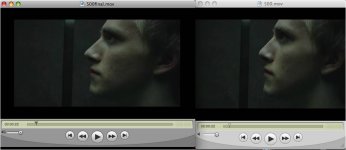
I did a higher quality compression but there's this annoying black box around the film like letterbox but it's on the sides too :(

Should I upload the one with higher quality but an obnoxious black box or the one with lower quality but no black box?
 

Attachments

  • quality.jpg
    quality.jpg
    35.6 KB · Views: 0
I did a higher quality compression but there's this annoying black box around the film like letterbox but it's on the sides too :(

Should I upload the one with higher quality but an obnoxious black box or the one with lower quality but no black box?


Definitely upload the higher quality. I look forward to sseing this!:thumbsup:
 
Cool... just curious. I checked it off and used your settings. We'll see what file size it comes out at.


*fingers crossed*

I exported 800 by 400...this might not work for every film. If you are 16:9 render at 800 by 450 or whatever 16 by nine ratio you want. I*t might be best to go 720 by 405 to be safe on size... :-) Good luck!
 
Back
Top